AWS Pentesting - Flaws Level 1 - When S3 Is Open to Everyone

A Quick Introduction to Flaws
If you are looking for a beginner-friendly way to learn AWS security, Flaws is a great place to start. Instead of focusing on common vulnerabilities like SQL injection, XSS, or buffer overflows, Flaws teaches you about real mistakes and misconfigurations that occur in AWS environments.
Each level comes with helpful hints that’ll guide you step by step. You can try solving the challenges on your own or simply follow along and learn. Every new level explains how to prevent the issue you just discovered, helping you build both practical and defensive cloud skills.
All challenges run inside a single AWS account under flaws.cloud subdomains, making the experience simple, safe, and easy to explore.
For the learning flow, I recommend you to install the AWS CLI.
NOTE: If you prefer not install the AWS CLI on your machine (to avoid cluttering your environment), you can use the official AWS CLI Docker image instead. I’ve included instructions on how to use it here
Without further ado, let’s dive in!
Flaws Level 1 - Anonymous S3 Bucket Enumeration
The challenge scenario goes like this:
Scenario: This level is buckets of fun. See if you can find the first sub-domain.
Your mission is simple: find a subdomain that belongs to flaws.cloud, something like:
1
http://[first sub-domain].flaws.cloud
At this point, you’re not supposed to know anything about the technology or infrastructure behind the site. All you got is the domain flaws.cloud.
This makes it a great opportunity to begin with some recon and try to fingerprint whether AWS is involved. If you can confirm the target is running on AWS, you can then test for common cloud exposure issues later.
Just as the usual, a good first step is to inspect the page’s source code and see what information you can gather:
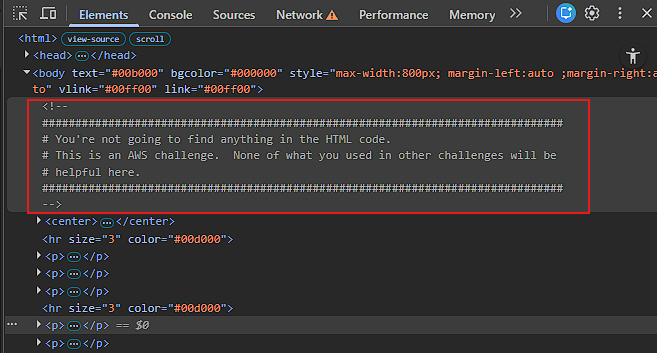
The author of the challenge is very straightforward with that message, so you won’t get far trying to obtain hints from the page source code. So, let’s try another approach.
Let’s see what DNS has to say about the flaws.cloud domain:
1
> host flaws.cloud
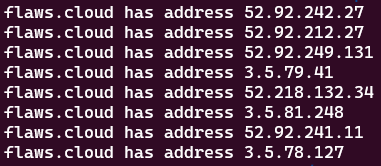
It looks like the domain flaws.cloud resolves to multiple servers, maybe this means that the traffic is spread across them. If you run the previous command multiple times, you’ll notice repeated or completely different IP addresses in a different order, a sign of a highly available infrastructure backed by a large pool of IPs.
Anyway, moving on, pick any IP address from the list and perform a reverse lookup. In my case:
1
> host 52.92.242.27
This is what I get:
1
27.242.92.52.in-addr.arpa domain name pointer s3-website-us-west-2.amazonaws.com.
As you can see, the IP address 52.92.242.27 resolves to the following endpoint:
1
s3-website-us-west-2.amazonaws.com
And if you try the other IP addresses from the results, you’ll notice they all map to the same S3 service endpoint.
That endpoint is an AWS S3 static website endpoint and is a base domain AWS uses for static website hosting. You see, when you want to host your own website on an S3 bucket and make it publicly accessible, you need to enable static website hosting on the bucket. Once enabled, AWS provides you a website endpoint that looks something like this:
1
http://<bucket-name>.s3-website-us-west-2.amazonaws.com
Alright, so far you recon phase has gathered you some high-value intel. Based on it you can infer the following:
- The cloud service provider behind the site is AWS.
- The service being used is S3, specifically, the site is hosted as a static website on an S3 bucket located in the region
us-west-2(US West, Oregon).
That being said, you can start applying common real-world developer patterns.
One of the most common setups is mapping a domain name to a bucket with the same name, something like this:
1
domain: flaws.cloud -> S3 bucket: flaws.cloud
So when someone visits:
1
http://flaws.cloud
They’re actually seeing files being served from the S3 bucket:
1
S3 bucket: flaws.cloud
This pattern is very common for static sites and is even recommended by AWS as a standard approach:
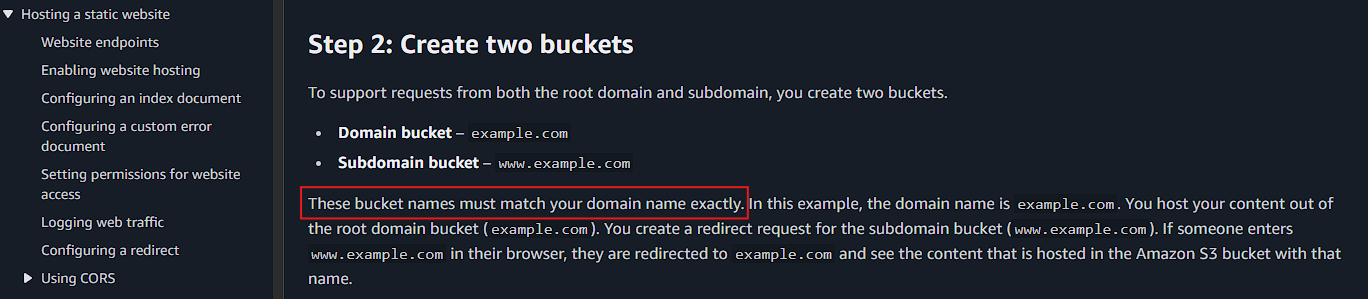
At this point, it’s reasonable to assume that the current website is being served by an S3 bucket named flaws.cloud. Let’s test that hypothesis by running this:
1
> curl -I http://flaws.cloud.s3-website-us-west-2.amazonaws.com
You get the following response:
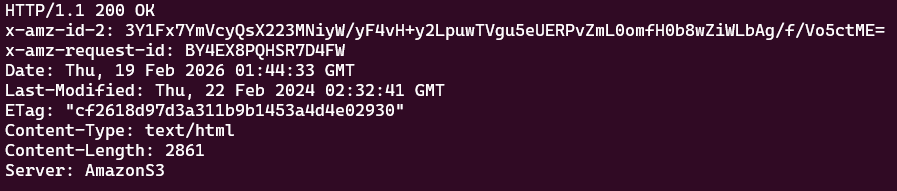
This confirms that an S3 bucket named flaws.cloud exists, nice find!👌
Now, the next step is to determine if you can enumerate the contents of the flaws.cloud S3 bucket. To do this, use the AWS CLI to list the objects inside the bucket:
1
> aws s3 ls s3://flaws.cloud
If that doesn’t work or if you receive an InvalidAccessKeyId error message, try making the request without signing it. The bucket might be fully public, meaning authentication isn’t required at all:
1
> aws s3 ls s3://flaws.cloud --no-sign-request
The --no-sign-request flag tells the AWS CLI not to use any configured AWS credentials. In other words, the request is made as an anonymous user:
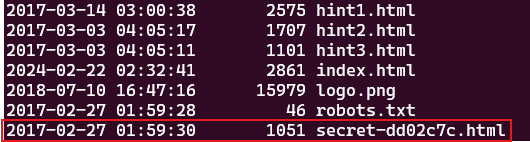
It looks like the bucket is publicly listable 👾, you can enumerate and potentially download all of its contents, but for now focused on the secret-dd02c7c.html file . Copy it to your current directory:
1
> aws s3 cp s3://flaws.cloud/secret-dd02c7c.html ./ --no-sign-request
And inspect the contents of it:
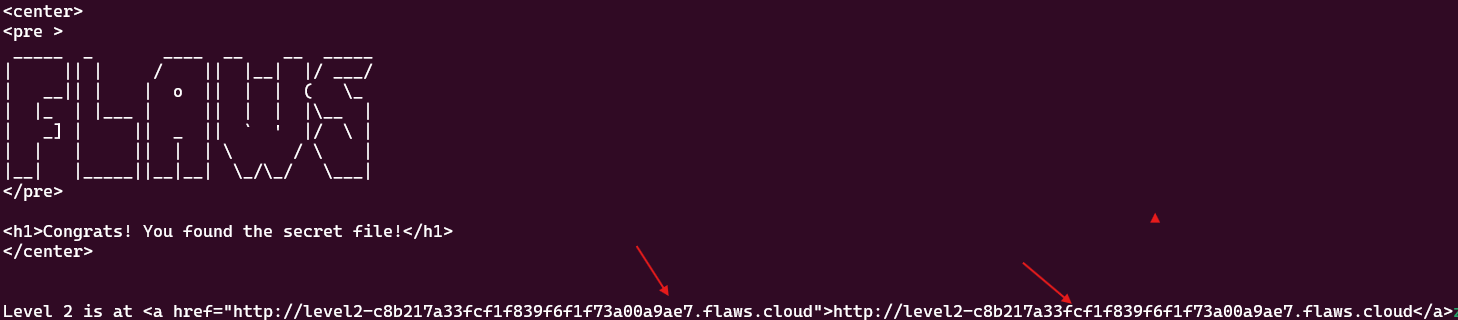
You can also access it directly by appending the file name to the URL, like this:
1
http://flaws.cloud/secret-dd02c7c.html
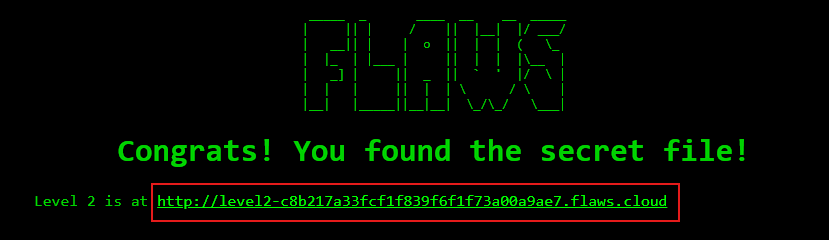
Either way, a subdomain is revealed, the answer you were initially looking for :
1
http://level2-c8b217a33fcf1f839f6f1f73a00a9ae7.flaws.cloud
Go ahead and paste that URL into your browser.
You’ve officially unlocked the Level 2 challenge, nice work!👌
Lesson Learned
Just like directory listing on a traditional web sever, public bucket listing on an S3 bucket allows attacker reconnaissance. As you know, this action has the potential to reveal internal structure, file naming patterns, and clues that only helps in further exploitation. It may uncover hidden resources such as sensitive files, exposed backups, configuration files, and in the worst cases, security credentials.
Security Recommendations
To reduce the risk of data exposure, S3 buckets should follow the principle of least privilege at both the bucket and object level.
If your intention is to host a public website, enabling static hosting and allowing s3:GetObject is totally fine. However, granting public s3:ListBucket permissions or broad access to the Everyone is overkill:
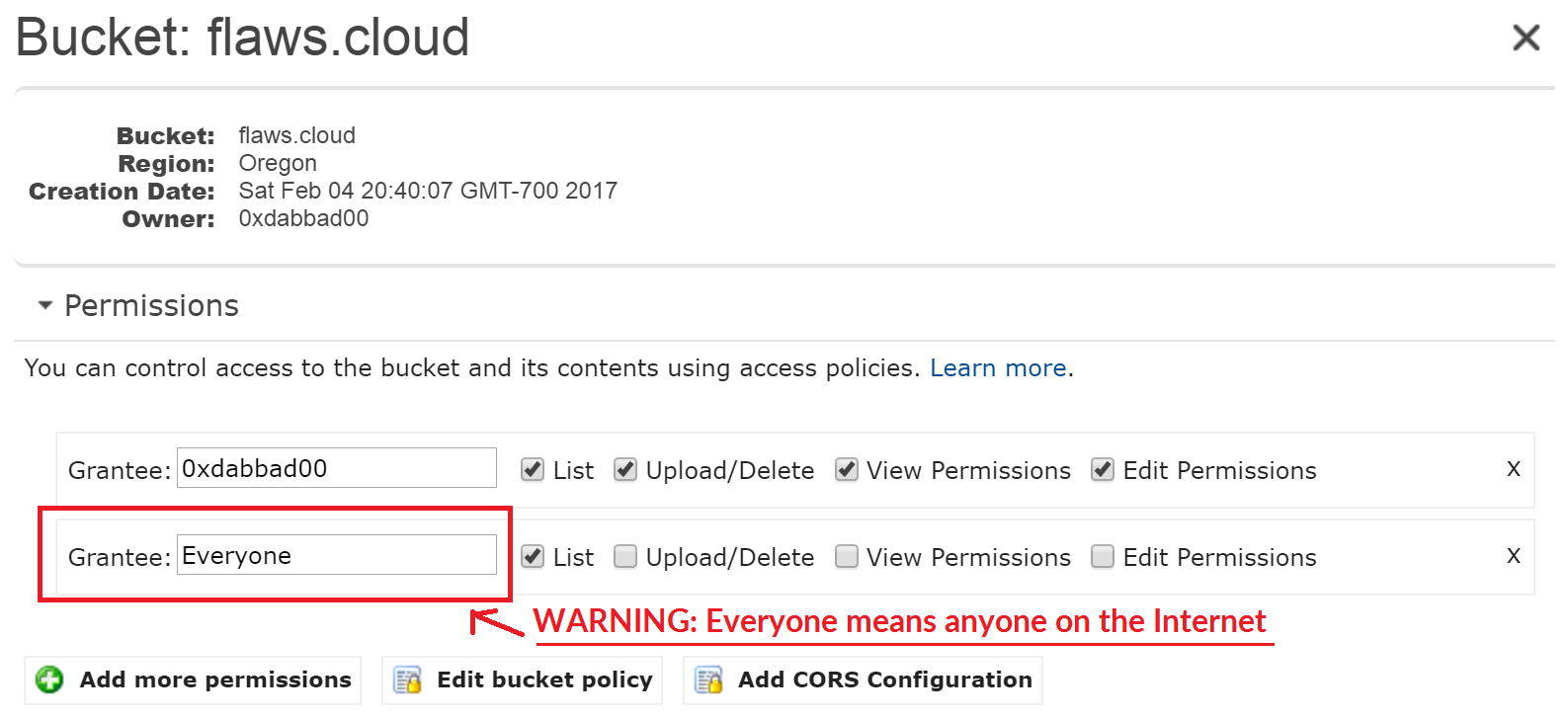
If something is public, it should be intentional and carefully controlled.
On top of that, regular audits using automated tools like AWS Config, S3 Block Public Access, or external scanners can help to detect overly permissive policies early. Enabling S3 Block Public Access at the account level and using CloudFront with Origin Access Control (OAC) can also reduce direct bucket exposure.