AWS Pentesting - Flaws Level 2 - When S3 Is Not Public but Still Exposed

For this challenge you’ll eventually need to create an AWS IAM user, you can use the AWS Free Tier for this purpose, but don’t worry about that just yet, for now, let’s focus on the presented scenario:
Scenario: The next level is fairly similar, with a slight twist. You’re going to need your own AWS account for this. You just need the free tier.
Alright, not a lot of guidance on what to do next, but at least you have a starting point, this URL:
1
http://level2-c8b217a33fcf1f839f6f1f73a00a9ae7.flaws.cloud
As usual, your first move should be some reconnaissance. The goal is to see if you can discover anything interesting from that endpoint, for example new S3 buckets that might be publicly accessible.
Alright, let’s start by checking what that domain resolves:
1
> host level2-c8b217a33fcf1f839f6f1f73a00a9ae7.flaws.cloud
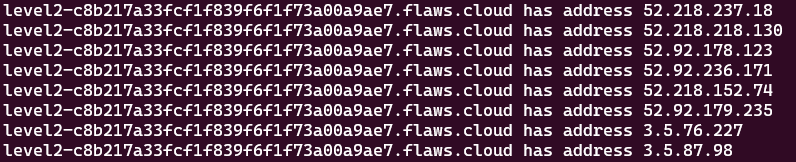
Just like before, it resolves to multiple IP addresses, and if you run a reverse lookup on any of them, you’ll find out that they all point to the same AWS S3 static website endpoint:
1
18.237.218.52.in-addr.arpa domain name pointer s3-website-us-west-2.amazonaws.com.
Basically this:
1
s3-website-us-west-2.amazonaws.com
This suggests that the site is being served through S3 static website hosting. Same old story 😒.
As the professional pentester you’re, before jumping into the AWS CLI, you first want to confirm that the target S3 bucket name matches the domain name you are analyzing, so you test your assumption like this:
1
> curl -I http://level2-c8b217a33fcf1f839f6f1f73a00a9ae7.flaws.cloud.s3-website-us-west-2.amazonaws.com
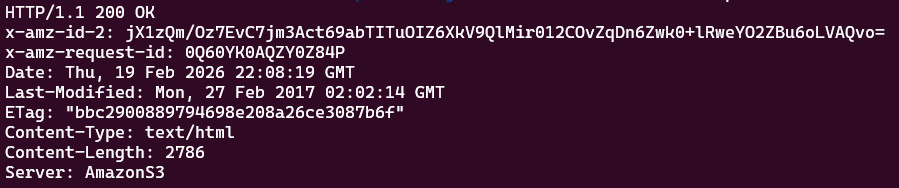
The successful response implies that an S3 bucket named level2-c8...e7.flaws.cloud exists in the us-west-2 AWS region, but not only that, it also confirms that the static website hosting option is enabled, meaning the bucket is acting like a public website.
Another way to validate this assumption is by using the S3 API endpoint s3.amazonaws.com instead. Check this out:
1
> curl -I http://level2-c8b217a33fcf1f839f6f1f73a00a9ae7.flaws.cloud.s3.amazonaws.com

This time you get a 403 Forbidden response. The good news is that the bucket does exist, the bad news is that it is restricted, you can’t access its contents 😔.
Now, if you try enumerating the bucket using the AWS CLI:
1
2
> aws s3 ls s3://level2-c8b217a33fcf1f839f6f1f73a00a9ae7.flaws.cloud \
	--no-sign-request
You’d get the following:
1
An error occurred (AccessDenied) when calling the ListObjecsV2 operation: Access Denied
As shown, directory listing is disabled on that S3 bucket, you could say someone did their homework, or at least, that’s what they think 🫠.
You see, S3 bucket listing is clearly blocked, but only for public (anonymous) access. What about other external entities, like for example authenticated AWS users? Could they still access the bucket? Let’s find out.
To speed things up, I created an AWS IAM user named flaws and attached the AmazonS3ReadOnlyAccess policy to it (I suggest you do the same, the AWS Free Tier is more than enough):
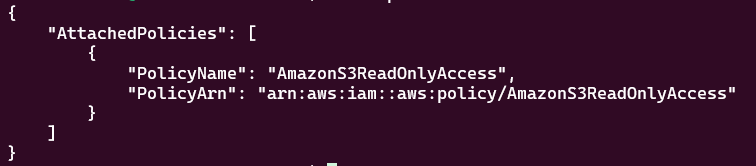
That IAM policy is necessary because even though the request will be authenticated, the identity still needs explicit permissions to interact with the S3 APIs.
Now, try enumerating the bucket again, but this time using the flaws user:
1
> aws --profile flaws s3 ls s3://level2-c8b217a33fcf1f839f6f1f73a00a9ae7.flaws.cloud
You get the following result:
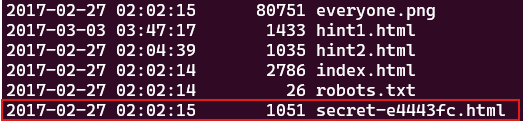
Success! 🎉 You were able to enumerate an S3 bucket that initially looked protected. The answer you’re looking for lies in front of you, go ahead and inspect its contents :
1
http://level2-c8b217a33fcf1f839f6f1f73a00a9ae7.flaws.cloud/secret-e4443fc.html
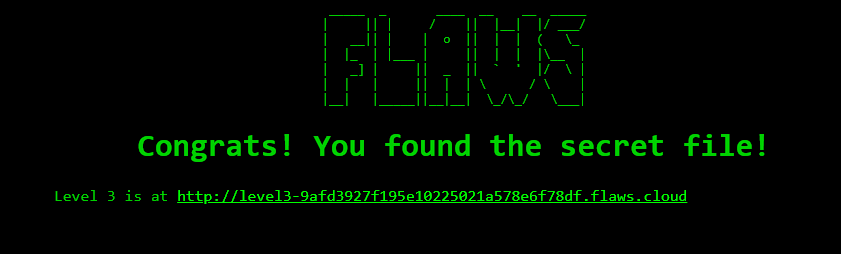
Nice work!, you did it 😎. You’ve officially unlocked the Level 3 challenge.
Lesson Learned
From a defensive perspective, this challenge exposes a common misconception in cloud security: just because you block anonymous access to your S3 bucket, that doesn’t mean it’s actually safe.
In this scenario, even though the bucket wasn’t publicly listable, yet it remained reachable and accessible to anyone that had an AWS account and permissions to perform S3 actions.
Security Recommendations
To prevent this type of exposure, you should enforce strict bucket policies that explicitly restrict access to trusted AWS accounts or IAM roles.
Blocking public access to your S3 bucket is great first step, but it’s not the finish line. You still need least-privilege IAM design and continuous auditing of bucket policies and ACLs to avoid accidental exposure.
At the end of the day just because something isn’t public, doesn’t mean it isn’t exposed.