Python Essentials - Functions
A function is a block of code designed to perform a specific task. The way you define a function in Python is as easy as follows:
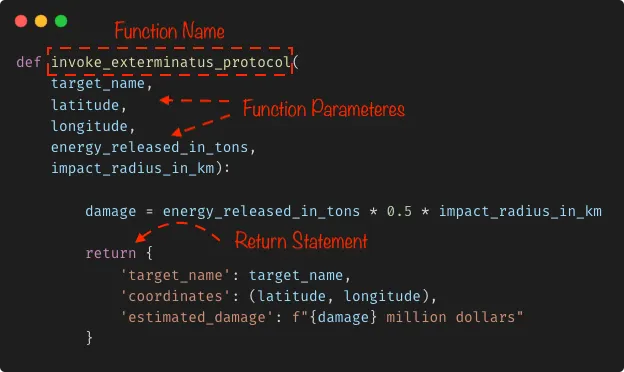
For now ignore the implementation details and keep your attention on the outlined parts.
What you’re observing at this moment is the function at design time. You can see all of its inner working parts. At this stage, your job is to define and develop the function’s behavior to ensure it fulfills its intended purpose.
On the other hand, when you invoke the function you get to see it in action:
1
2
3
4
# Call invoke_exterminatus_protocol function
result = invoke_exterminatus_protocol("New York City",40.7128,-74.0060,2000,70)
# Print result
print(result)
What you’re seeing now is the function at runtime. At this stage, your job is to verify the function behaves as expected.
Function Parameters vs Function Arguments
The distinction between Parameters and Arguments lies upon whether you’re seeing the function at design time or at runtime.
What you see at design time is the function parameters:
1
2
3
4
5
6
7
def invoke_exterminatus_protocol(
	target_name,
	latitude,
	longitude,
	energy_released_in_tons,
	impact_radius_in_km):
	...
Whereas, at runtime you’re looking at the function arguments:
1
invoke_exterminatus_protocol("New York City", 40.7128, -74.0060, 2000, 70)
As simple as that!.
Default Parameters
You can define a default value for a function parameter. For instance:
1
2
3
4
5
6
7
def invoke_exterminatus_protocol(
	target_name,
	latitude,
	longitude,
	energy_released_in_tons=1000,
	impact_radius_in_km=50):
	...
Both energy_released_in_tons and impact_radius_in_km parameters are now optional. You can call the function without using neither of those arguments:
1
invoke_exterminatus_protocol("New York City", 40.7128, -74.0060)
Now, when calling the function, the values for both arguments are assumed based on what you assigned as default.
Positional Arguments
Also known as required arguments. It’s the most straightforward way to pass arguments to a calling function:
1
invoke_exterminatus_protocol("New York City", 40.7128, -74.0060, 2000, 70)
Yet the least flexible one: The order and number of arguments passed in must match the order and the number of parameters in the function definition, otherwise, Python will complain:
1
2
3
4
5
invoke_exterminatus_protocol("New York City")

# TypeError: invoke_exterminatus_protocol() missing 4 required positional
# arguments: 'latitude', 'longitude', 'energy_released_in_tons',
# and 'impact_radius_in_km'
It’s the programmer’s job to document the function’s signature, and the consumer’s responsibility to be aware of and comply with this information.
Keyword Arguments
This is a more relaxed way to pass in arguments to a calling function:
1
2
3
4
5
6
invoke_exterminatus_protocol(
	target_name="New York City",
	latitude=40.7128,
	longitude=-74.0060,
	energy_released_in_tons=2000,
	impact_radius_in_km=70)
Essentially, you use the names of the parameters to assign values to arguments when calling your function. This removes the argument order restriction, that is, you can now specify them in the order you want and Python will know which argument goes with which parameter:
1
2
3
4
5
6
invoke_exterminatus_protocol(
	energy_released_in_tons=2000,
	impact_radius_in_km=70,
	latitude=40.7128,
	longitude=-74.0060,
	target_name="New York City")
However, the number of arguments passed in must still match the number of parameters in the function definition.
In my personal opinion, if I were to choose between positional arguments vs keyword arguments when calling a function, I’d stick to keyword arguments since even though positional arguments offers me a more succinct approach, keyword arguments tells me a better story.
Compare this:
1
invoke_exterminatus_protocol("New York City", 40.7128, -74.0060, 2000, 70)
To this:
1
2
3
4
5
6
invoke_exterminatus_protocol(
	target_name="New York City",
	latitude=40.7128,
	longitude=-74.0060,
	energy_released_in_tons=2000,
	impact_radius_in_km=70)
Which approach would you choose?.
The return Statement
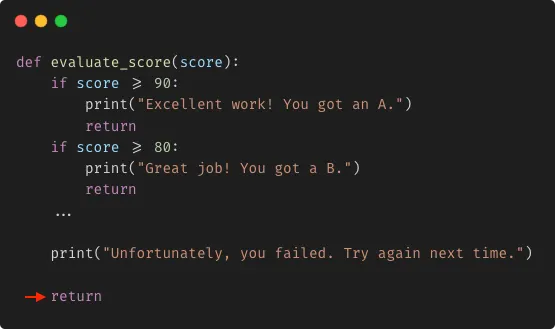
A return statement terminates the function execution at once, and passes the control back to its caller:
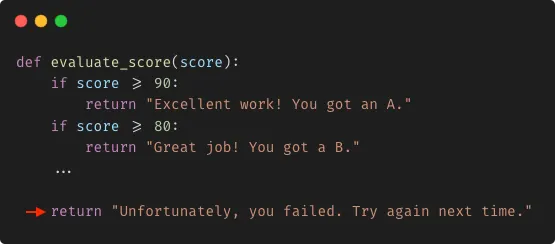
Additionally, you can use the return statement to pass data back to the caller:
By default, a function without a return statement or with an empty return statement always return None.
This:
1
2
3
4
5
6
def foo():
	a = 1
	# Explicit return
	return

foo() # None
And this:
1
2
3
4
5
def bar():
	a = 1
	# Implict return

bar() # None
Both always return None when called.
Function Side Effects
Beyond returning a value, when a function interacts or modifies something outside its local scope, it is considered to produce a side effect.
Side effects may include:
- Modifying a Global variable.
- Performing I/O operations such as writing to file, printing something to the console, making a network request, etc.
- Interacting with external resources like databases.
In this example, recruit_space_marines is a function with side effects since it modifies a global variable when called:
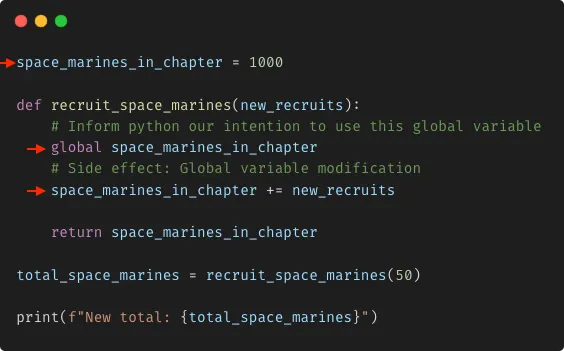
Side effects are really common in programming, and without proper management it can make your code harder to understand and debug.
Always pick good names for your functions
Choosing a good name is one of the hardest parts in programming yet the one that yields the best ROI during refactoring.
When it comes to naming things, keep this tips in mind:
- The name of your function should be pronounceable, it can be long enough to capture the concept comprehensively, yet concise enough to avoid unnecessary length.
- The name of your function should be actionable, it should invite to action. When something is actionable it produces a result, when something is actionable it starts with a verb, for example:
filter_even_numbers,calculate_average,validate_email,connect_to_database, etc. - The name of your function should reveal its intention, by reading the name of your function I have to know what it does immediately so there’s no need to dive further into the inner working parts of your function.
Alright, I know that coming up with good names initially is taxing and time-consuming. Sometimes a suitable name shows up after reviewing the code many times or it happens that you already have the coding solution in your head and want to try it ASAP without spending time on naming.
In these cases you can use a temporary name like foo, bar or baz. Once your function is tested, you can revisit it and reflect on a suitable name.
Alternatively, you can ask ChatGPT for a list of potential names to get some ideas.