Python Essentials - Lists

A list is a mutable, ordered data structure that allows you to store multiple pieces of information:
1
2
3
4
5
6
7
8
9
10
# inline list style
weapon_ranges = [ 24.0, 36.0, 12.0, 48.0, 18.0, 60.0, 6.0, 72.0, 30.0, 96.0 ]

# multiline list style
factions = [
	'Adeputs Astartes',
	'Adeptus Mechanicus',
	'Astra Militarum',
	'Chaos Space Marines'
]
Including a mix of different types:
1
weapons = [ 'Boltgun', 24.0, True, 'Lascannon',  48.0, False ]
As you can see, all you have to do is to place all the elements of you interest between the brackets [] and separate them by comas.
Accessing an element in a List
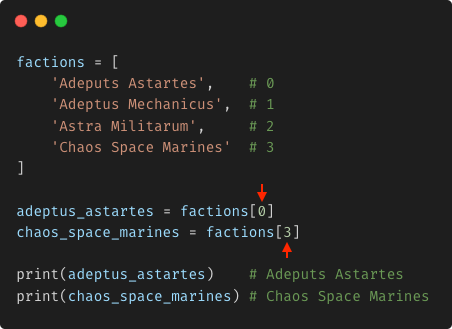
When I say that a list is an ordered data structure, I mean that each item in the list has an associated index that starts counting from 0 and incrementing sequentially: 1, 2, 3, 4 and so on.
With this in mind, you can easily access the element of your interest by just specifying its index:
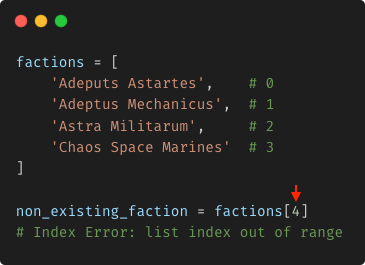
If you specify an index that is equal or greater than the total number of elements in the list, Python will complain:
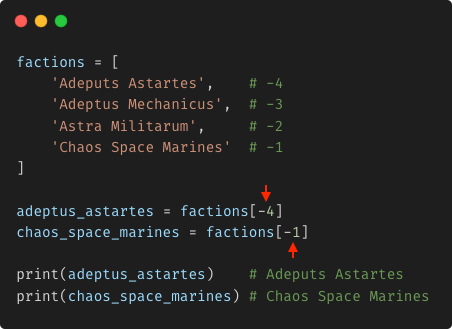
Negative Indexing
You can use negative numbers to access elements in a list. The number -1 represents the last item in the list, the number -2 references the second last item, and so on:
List Common Operations
When I say that a list is a mutable data structure, I mean that once created you can alter its content by adding or removing elements to and from it.
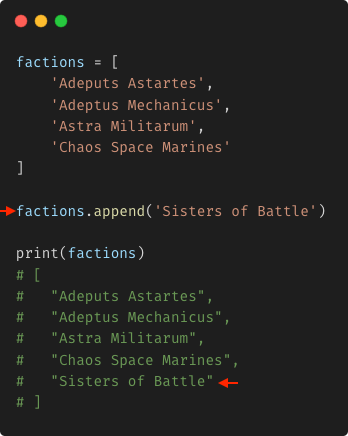
Appending an element
This entails adding an element to the end of a list:
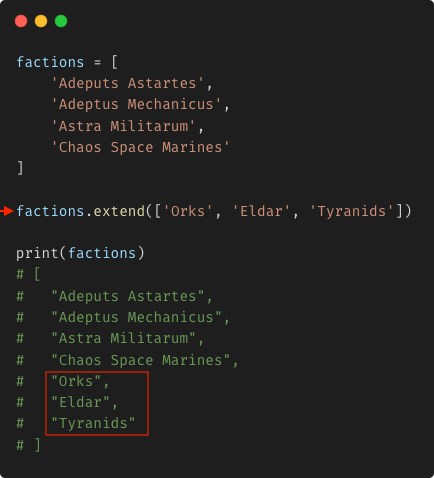
Extending a list
It simply involves adding multiple elements to the end of a list in one go:
Inserting elements
Unlike the previous two methods, this one allows you to insert one element at a specific position in the list:
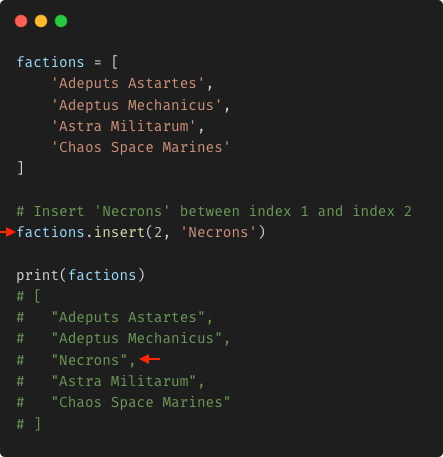
The new element is inserted between: [index -1, index]
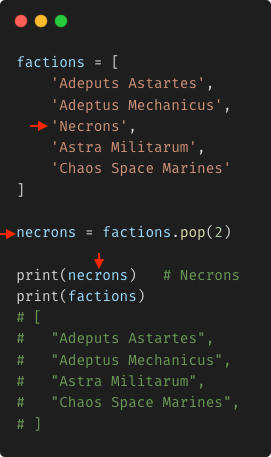
Popping an element
It removes and returns the element at a given index:
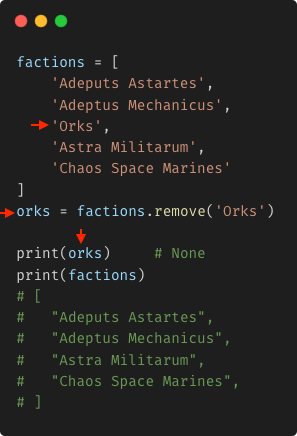
Removing an element
It removes the first matching element from the list and returns None:
List Slicing
Just like a host at a birthday party decides the thickness of each cake slice for their guests, you determine the portion of data you want to take from your list by choosing where to start cutting and where to end. For example:
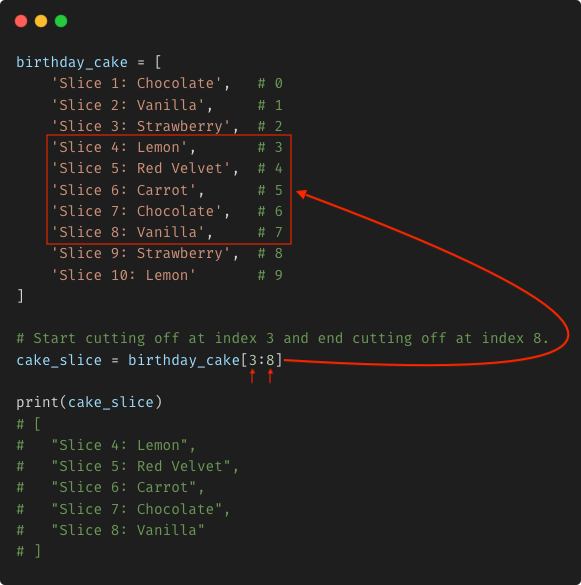
You start cutting off your list at index 3 and ending at index 8. Keep in mind that, the last element of your slicing is excluded. Essentially, the thickness of your cake slice is determined by [start_index, end_index - 1].
If you don’t have any idea where to start cutting off or where to end, you can omit certain parameters from your slicing process:
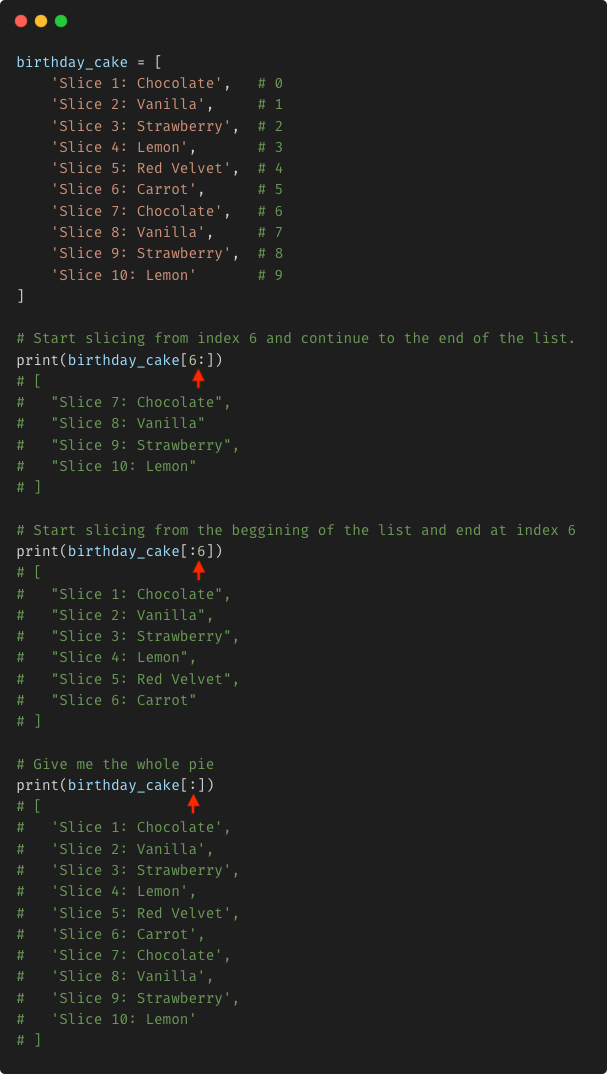
Excluding elements from your slice
Fortunately, you can skip the flavors you don’t like from your cake slice by adding a third argument to your slicing operation. For example:
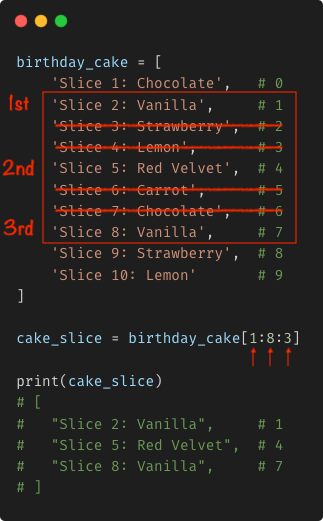
You get you portion starting at index 1 and ending at index 7 (8-1, remember?) including only every third element within that subset.
Removing elements from a list with Slicing
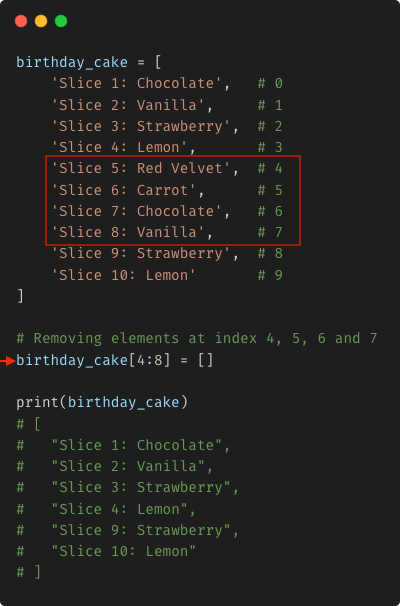
Slicing and Removing are not the same. Slicing operations do not affect the original list, whereas removing elements does. If your intention is to remove elements from the source using slicing operations, it’s certainly possible.
How about removing a single element?, let’s say for example the element at index 4:
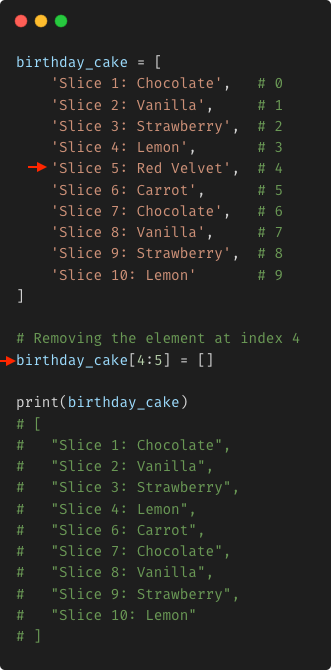
How about removing multiple elements at once?, you want to get rid of elements at index 4, 5, 6 and 7.
List Comprehension
It’s a technique to create a brand new list from other Iterable entities such as string, arrays, lists, tuples and so on. For example:
1
2
3
numbers = [ 1, 2, 3, 4, 5, 6, 7, 8, 9, 10 ]
# Using list comprehension to generate square numbers from numbers list
square_numbers = [ n ** 2 for n in numbers ]
As you can see, it’s basically a shorthand way to build a new list based on the contents of an existing list. However, a more complete description of the comprehension technique includes the use of conditionals:
1
2
3
numbers = [ 1, 2, 3, 4, 5, 6, 7, 8, 9, 10 ]
# Using list comprehension to include only even numbers from numbers list
even_numbers = [ n for n in numbers if n % 2 == 0 ]
You can even use an else clause along with your if statement inside a list comprehension operation:
1
2
3
4
5
6
7
filenames = ['program.c','stdio.hpp','sample.hpp','a.out','math.hpp','hpp.out']
new_filenames = [
  filename.replace('hpp', 'h')
  if filename.endswith('hpp') else filename
  for filename in filenames]

print(new_filenames)
List comprehension operations can be used for filtering and transforming information. For example:
1
2
3
4
5
6
7
8
9
10
11
12
13
14
15
16
17
18
19
20
21
22
23
24
25
26
27
28
29
30
31
32
33
34
35
36
37
38
39
40
41
42
43
44
45
46
47
legions = [
	{
		'name': 'Ultramarines',
		'description': 'Noble and disciplined defenders of the Imperium.',
		'is_traitor_legion': False
	},
	{
		'name': 'Blood Angels',
		'description': 'Elegant warriors cursed with a bloodlust.',
		'is_traitor_legion': False
	},
	{
		'name': 'Space Wolves',
		'description': 'Fierce, wolf-themed warriors from Fenris.',
		'is_traitor_legion': False
	},
	{
		'name': 'Dark Angels',
		'description': 'Secretive and relentless hunters of the Fallen.',
		'is_traitor_legion': False
	},
	{
		'name': 'Black Legion',
		'description': 'Once the Sons of Horus, now dedicated to Chaos.',
		'is_traitor_legion': True
	},
	{
		'name': 'Iron Hands',
		'description': 'Obsessed with mechanical augmentation and strength.',
		'is_traitor_legion': False
	},
	{
		'name': 'Alpha Legion',
		'description': 'Masterful manipulators, working in secrecy.',
		'is_traitor_legion': True
	}
]

# Filtering.
# I want to know who the traitors are.
traitor_legions = [ legion for legion in legions if legion['is_traitor_legion'] ]

# Mapping.
# I only care about their legion's names.
traitor_names = [ traitor['name'] for traitor in traitor_legions]

print(traitor_names) # [ 'Black Legion', 'Alpha Legion' ]
While list comprehension can make your code more elegant, things can get messy and make your code less clean if abused:
1
2
3
4
5
6
7
8
9
10
11
latitudes = [ 51.5074, 40.7128, 35.6895, 34.0522, -33.8688 ]
longitudes = [ -0.1278, -74.0060, 139.6917, -118.2437, 151.2093 ]

lat_threshold = 40.0
lon_threshold = 0.0

coordinates = [
	(round(lat, 2), round(lon, 2))
	for lat, lon in zip(latitudes, longitudes)
	if lat > lat_threshold and lon > lon_threshold
]
Membership Testing
It’s just a simple operator that allows you to check if a certain element exists in the list:
1
2
3
4
5
6
latitudes = [ 51.5074, 40.7128, 35.6895, 34.0522, -33.8688 ]

print(51.5074 in latitudes)  # True
print(39.5074 in latitudes)  # False
print(35.6895 in latitudes)  # True
print(-33.8688 in latitudes) # True
The same way, you can invert the assertion by using the not operator:
1
2
3
latitudes = [ 51.5074, 40.7128, 35.6895, 34.0522, -33.8688 ]

print(83.5274 not in latitudes)  # True
Here is an example of using List Comprehension and Membership Testing in the same expression:
1
2
3
4
5
6
7
8
9
10
11
12
13
14
15
16
17
18
19
20
21
22
23
24
25
26
27
28
29
30
31
legions = [
	'Ultramarines',
	'Blood Angels',
	'Space Wolves',
	'Dark Angels',
	'Black Legion',
	'Iron Hands',
	'Alpha Legion',
	'Word Bearers',
	'Imperial Fists',
	'Night Lords'
]

identified_traitors = [
	'Black Legion',
	'Alpha Legion',
	'Word Bearers'
]

# List Comprehension and Memership Testing both in action.
traitor_legions = [
	{'name': legion, 'is_traitor': True}
	for legion in legions if legion in identified_traitors
]

print(traitor_legions)
# [
#    {'name': 'Black Legion', 'is_traitor': True},
#    {'name': 'Alpha Legion', 'is_traitor': True},
#    {'name': 'Word Bearers', 'is_traitor': True}
# ]