Python Essentials - Variables
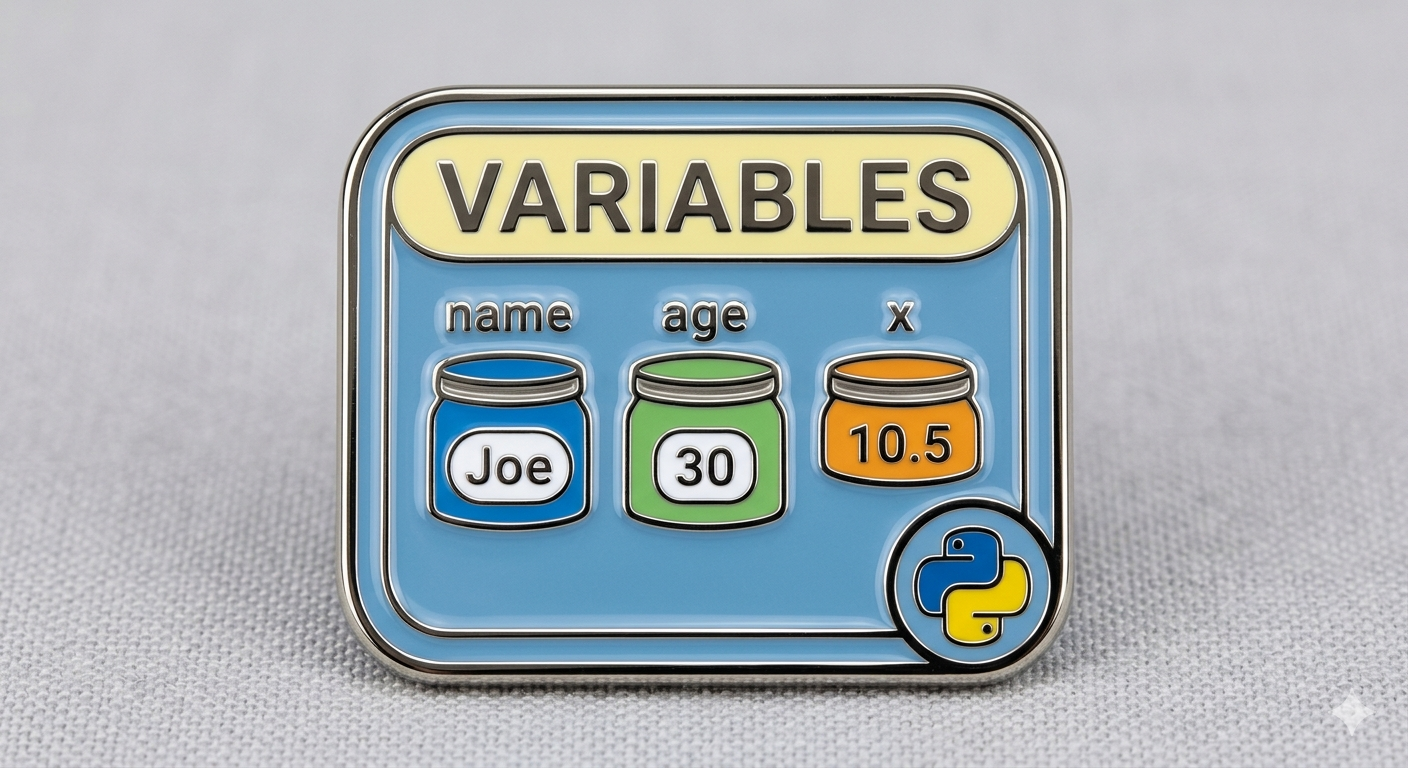
Just like any other programming language, the variable is the workhorse unit for storing pieces of information that you can use later on. For example:
1
2
3
4
5
6
name = "Roboute Guilliman"
chapter = "Ultramarines"
age = 10000
height_feet = 11
weight_tons = 3.0
is_immortal = True
Basically on the left, you can appreciate the variable itself, represented by a clear and descriptive name, this is the spot where you assign a value. On the right, you got the value itself, which is what you intend to store.
Python is cool enough to allow you to assign variables in the same line in one go, like so:
1
name, height_feet, weight_tons, is_immortal  = "Roboute Guilliman", 11, 3.0, True
How dope is that?.
Variable Types
Python is smart enough to automatically figure out by itself the type of a variable:
1
2
3
4
5
6
7
8
9
10
11
12
# integer
age = 12

# decimal
PI = 3.14

# string
name = "Jaine"

print(age)
print(PI)
print(name)
If you aren’t sure what type a variable is, you can always find it out by using the type() function:
1
2
3
4
5
6
7
age = 12
PI = 3.14
name = "Jaine"

print(type(age))   # <class 'int'>
print(type(PI))    # <class 'float'>
print(type(name))  # <class 'str'>
Variable mutation
Such a fancy term for recycling an existing variable name. It happens that as your program grows, at some point you might be tempted to reuse an existing variable name by just replacing its current value with another of a different type:
1
2
3
4
5
6
7
name = "Roboute Guilliman"
age = 10000
height_feet = 11
weight_tons = 3.0

# At some point later in your code.
weight_tons = "3.0"
At first glance, this might look harmless since it doesn’t cause an error or anything similar but it is error prone, believe me!. Let’s say for example that your beloved character has gained some weight after eating some big ass burritos and you want to reflect this change as follows:
1
2
3
4
5
6
7
weight_tons = 3.0

# At some point later in your code.
weight_tons = "3.0"

# Calculate character's new weight
weight_tons += 0.1
You’ll get the error message TypeError: cannot concatenate 'str' and 'float' objects. Apparently, in Python you cannot mix values of different types in the same expression, and that’s the reason your code fails.
Variables inherently change their values over time, which is why they’re called variables. However, it’s important to distinguish between changing their value and altering their type or behavior.
Variable Scoping
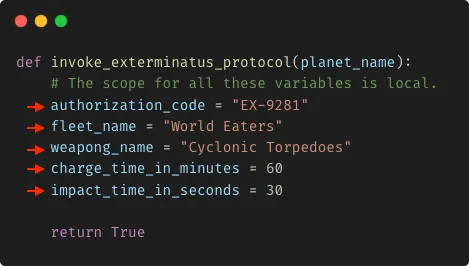
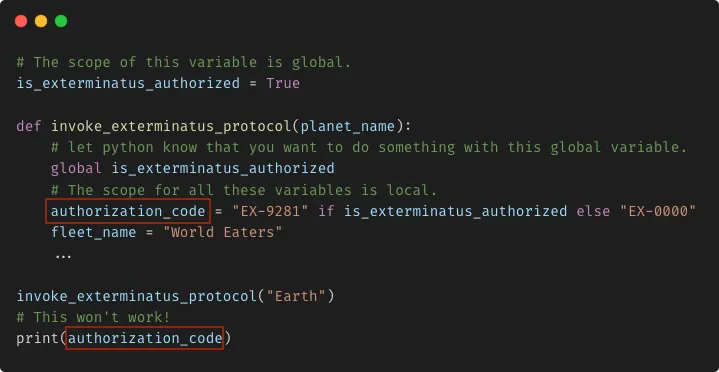
A local variable is a variable defined inside the body of a function:
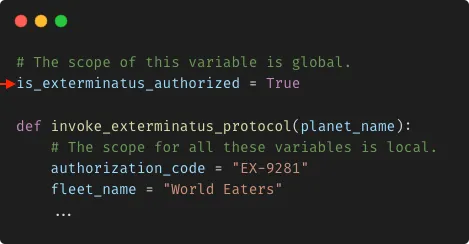
On the other hand, a global variable is a variable defined/declared outside the body of function, for instance:
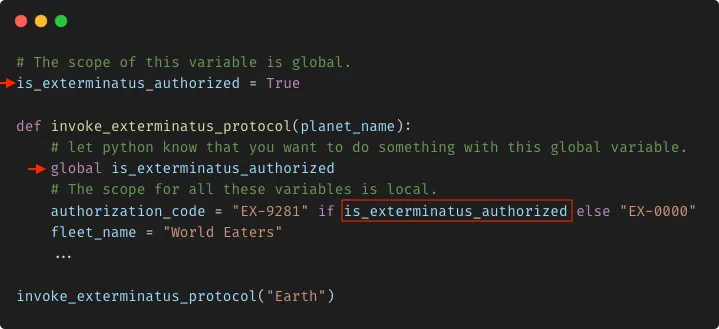
A global variable then can be read/accessed from anywhere:
Whereas a local variable cannot be accessed the other way around:
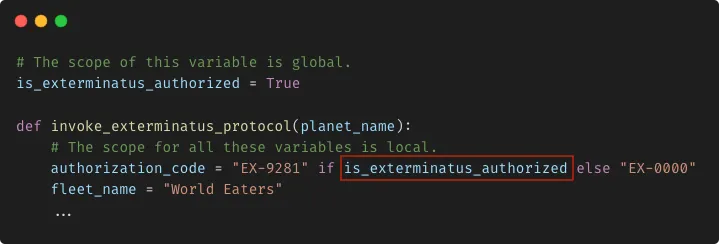
By the way, when reading/accessing a global variable from within a local scope, the use of the global keyword is actually not really required. Python can figure this out on its own:
However, when your intention is to write/modify the value of a global variable from within a local scope, the situation is different. In this case, you need to be explicit and indicate to your function, that you want to change the value of a global variable, that is:
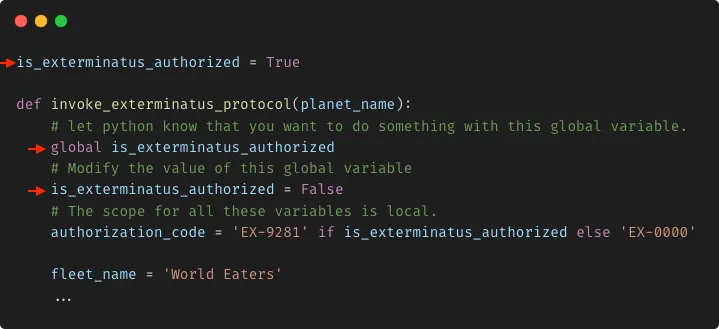
Just remember, it’s ok to read a global variable without the global keyword, but you can’t write to a global variable in the same way.
Wrapping up, variables defined within functions are considered locals, whereas variables defined outside are globals.
User-defined Constants
A constant, as the name suggests, represents a value that doesn’t change overtime. Real-life examples of constants include: the number of hours in day, the speed of light, the freezing point of water, PI number, etc.
In Python, constants are conventionally declared using only capital letters. For example:
1
2
3
4
5
 PI = 3.14159                # Pi (π)
 BOILING_POINT_WATER = 100   # Boiling point of water at sea level in °C
 HOURS_IN_A_DAY = 24         # Number of hours in a day
 FREEZING_POINT_WATER = 0    # Freezing point of water
 MINUTES_IN_AN_HOUR = 60     # Number of minutes in an hour`
While a variable can change during its lifetime, a constant cannot. Once you assign a value to a constant, you can read from it but you cannot change its value, well, at least in Python, that’s expected of you since Python don’t enforce read-only access. The convention is just there to convey the idea that you, the developer, be aware that this variable is a constant, and it shouldn’t be modified.
There are many use cases where constants come into action. One of them is replacing magic numbers to enhance readability.
You see, a magic number is just a literal numeric value that is used in your code without any further explanation. For example:
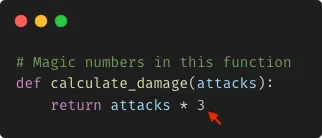
Can you tell what is the meaning of the numeric value 3?, maybe you can, maybe you probably cannot. A better approach to get rid of this ambiguity is using a constant:
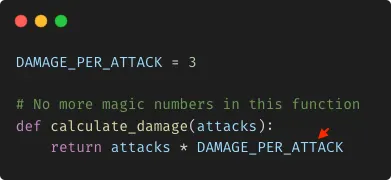
With this minor update, you function is clearer and more maintainable. Other developers can surely tell what this function does.
Just keep in mind that, if you ever find a variable whose value never changes, a good practice is to label this variable as a constant.
Some Good Practices
They say one of the hardest things in programming is to come up with good names, I agree.
I consider that the name of a variable should:
- Be pronounceable.
- Reveal its intention.
- Not contain abbreviations.
- Be long enough to capture the concept comprehensively, yet concise enough to avoid unnecessary length.
- Consider the context in which is defined/declared.
- Differentiate between nouns and verbs.
Understanding the purpose of a variable is way more important than just figuring out its type.
Lastly, while there are various conventions and guidelines out there for writing Python code, I find PEP-8 particularly appealing for crafting elegant and readable Python code.
Bonus Lesson: Python Comments
If you take a closer look at the examples I’ve provided throughout the article you’ll find lines of code starting with the hash symbol (#), well that’s basically an in-line comment:
1
# I'm a single-line comment
You can also comment out your code with multiple lines by just stacking one comment on top of another like this:
1
2
3
# I'm a single-line comment.
# I'm another single-line comment.
# Dude dont't forget about me, I'm also a single-line comment.
Another way of writing multi-line comments is by using documentation strings, also called docstrings, are strings that are written over multiple lines and are used to document code. To create a documentation string, use triple quotation marks (""" """).
1
2
3
4
5
6
7
8
9
'''
	I'm a
	Multi-line comment
'''

"""
	I'm also a
	Multi-line comment
"""
Comments are a valuable tool for debugging code since instead of removing code segments we can just simply comment them out to prevent execution. However, their real value lies in making the code more readable, they provide clarity and context explaining why a certain piece of code behaves the way it does.