AIG - Responding to a Zero-day Vulnerability

You’re an Information Security Analyst on AIG’s Cyber & Information Security Team.
A common task and responsibility of information security analyst is to stay on top of emerging vulnerabilities to make sure that the company can remediate them before an attacker can exploit them.
During this job simulation, you’ll handle two security challenges: responding to a zero-day vulnerability and dealing with a ransomware attack. Don’t worry, you’ll have the guidance from the Cybersecurity & Infrastructure Security Agency (CISA) , which is the agency dedicated to helping reduce the nation’s exposure to cyber security threats and risks. So let’s get started!.
The Scenario
The Cybersecurity & Infrastructure Security Agency (CISA) as recently published the following two advisories:
- The first advisory (Log4j), outlines a serious vulnerability in one of the world’s most popular logging software.
- The second advisory explores how ransomware has been increasing and becoming professionalized, a concern for a large company like AIG.
Log4Shell - Responding to a Zero-day Vulnerability
A new advisory about a new zero-day vulnerability affecting the Apache Log4j library has been released to the public by the Cybersecurity & Infrastructure Security Agency (CISA).
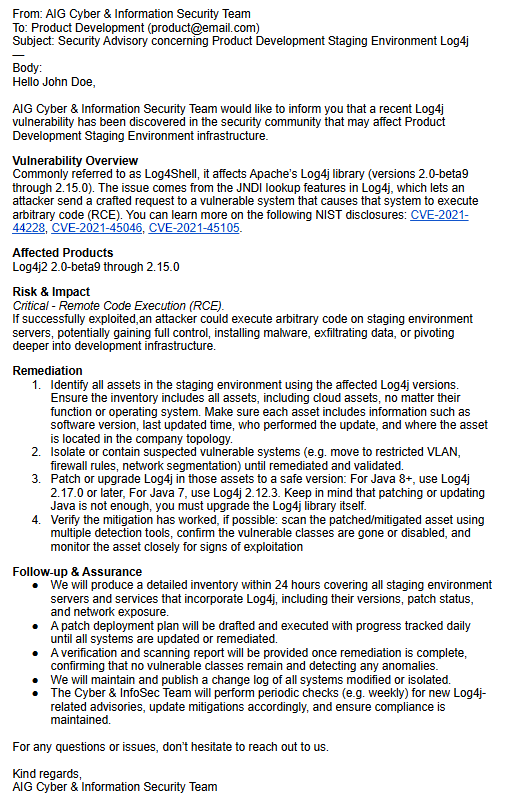
Your job is to respond to this zero-day vulnerability and figure out which infrastructure might be exposed to this issue. Once you’ve identified the areas at risk, draft an email notifying the affected teams about what’s going on and what steps need to be taken.
According to CISA’s Log4j advisory, Log4j is an open-source Java library used for application logging. Because it’s so widely used in all sorts of applications, from small apps to big enterprise systems and cloud services, vulnerabilities in Log4j can have a huge impact across many different systems.
CISA also highlights something called Log4Shell, a Remote Code Execution (RCE) vulnerability affecting Apache’s Log4j library (versions 2.0-beta9 to 2.14.1). This flaw comes from the way the Java Naming and Directory Interface (JNDI) resolves variables, allowing an adversary to execute arbitrary code on a compromised system if successfully exploited. Once inside, attackers can then steal information, install ransomware, or conduct other malicious actions.
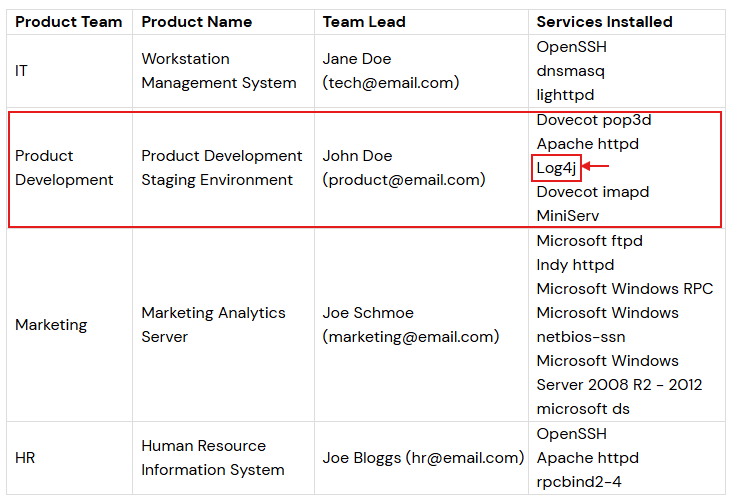
In accordance with the AIG’s infrastructure list, the following services may be exposed to this zero-day vulnerability:
An email has been prepared to alert the infrastructure owner about the critical nature of this vulnerability.
Bypassing a Ransomware Attack with Python
Your advisory email in the last task was great. It provided context to the affected teams on what the vulnerability was, and how to remediate it.
Unfortunately, an attacker was able to exploit the vulnerability on the affected server and began installing a ransomware virus. Luckily, the Incident Detection & Response team was able to prevent the ransomware virus from completely installing, however it only managed to encrypt one zip file.
Internally, the Chief Information Security Officer does not want to pay the ransom, because there isn’t any guarantee that the decryption key will be provided or that the attackers won’t strike again in the future.
Instead, the company would like you to bruteforce the decryption key. Based on the attacker’s sloppiness, it is not expect this to be a complicated encryption key, because attackers used copy-pasted payloads and immediately tried to use ransomware instead of moving around laterally on the network.
To accomplish this task, you’ll write a Python script to bruteforce the decryption key of the encrypted file. You’re provided with the following resources:
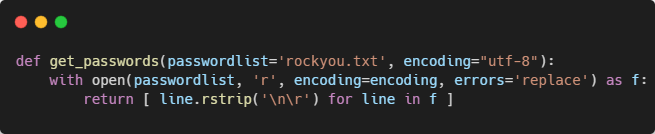
- A password wordlist (RockYou): a well-known list of thousands of commonly used passwords that attackers often try.
- A password-protected ZIP file: your job is to run a brute-force attempt against this ZIP using the wordlist to find the correct plain-text password.
- A foundational Python 3+ template that you’ll use to write your script.
With everything in place, you come up with the following solution.
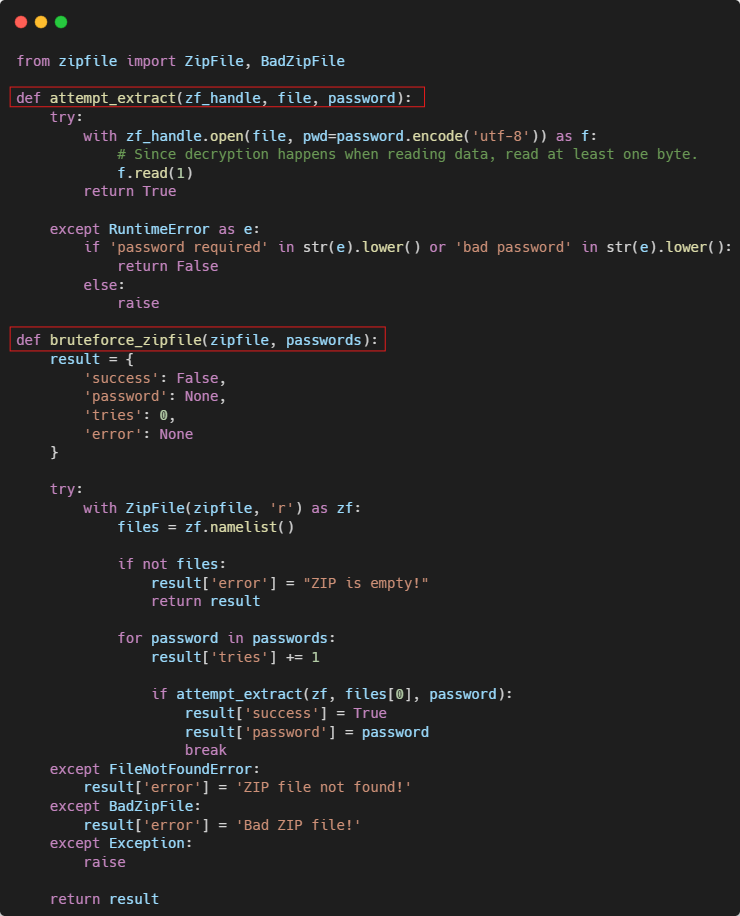
The zip_cracker.py module implements two functions that brute-force the password-protected ZIP file:
On the flip side, the wordlist_utils.py module contains the logic responsible for reading the rockyou.txt file, where the candidates passwords reside, and will be used against the protected ZIP file:
Lastly, you’ll find the main logic responsible for running your solution:
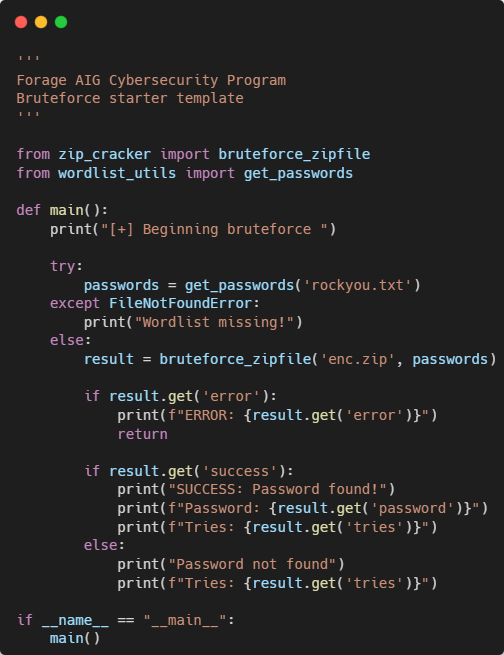
The source code for this solution is available on my GitHub repo
Now, when you run the code, you’ll obtain the desired answer:

Go ahead, use that password and extract the file.
And that’s it! 🎯 You’ve built a complete solution your CISO would be proud of. Keep exploring, practicing, and building, every step sharpens your skills!. See you next time.