HackTheBox - Detecting Attacker Behavior With Splunk Based On TTPs

Cybersecurity is always changing, which makes Threat detection more important than ever. You need to have a solid understanding on the TTPs (Tactics, Techniques, and Procedures) attackers leverage and have a solid foundation on how networks normally behave.
Threat detection usually comes down to spotting either what looks malicious or what looks unusual. When building detection-focused SPL queries in Splunk, you’ll usually take one of these two approaches:
- SPL Searches Based on known TTPs: This is all about spotting what you already recognize. Think of it like “spot the known.” If an attacker’s behavior matches something you know is malicious, like a specific command, process, or traffic pattern, you flag it. It’s direct, effective, and rooted in past knowledge of how attacks work.
- SPL Searches Based on Anomalies: This approach still benefits from TTP knowledge but focuses more on statistical analysis and unusual patterns. Here, you rely on math and statistics to spot behavior that deviates from the norm. The idea is that attackers often leave traces that stand out once you know what “normal” looks like.
By combining these two strategies, you get the best of both worlds: the ability to catch known threats while also surfacing 🏄♂️ new, unknown risks. Each method has its strengths, and together they create a much stronger defense. Of course, both approaches depend on really knowing your environment and its normal activity.
Enough chit-chat, just show me the answer, please!
Navigate to http://[Target IP]:8000, open the “Search & Reporting” application, and find through SPL searches against all data the password utilized during the PsExec activity. Enter it as your answer
As you may already know, PsExec is part of the Windows Sysinternals suite that was originally built to help system administrators manage remote Windows systems. However, the same features that make PsExec useful for admins also make it attractive for attackers.
During this challenge your job is to detect PsExec activity.
The first thing you need to understand is that psexec.exe (or psexec64.exe) is the main executable of PsExec that allows you to run commands on a remote Windows machine. The second thing, is that, in order to make that possible, you must provide a username and a password so that PsExec can authenticate on the remote system.
For example, the following command uses PsExec to run ipconfig on the remote system 10.0.0.47 using the username 10.0.0.47/waldo and the password Password@123:
1
> psexec64.exe \\10.0.0.47 -u 10.0.0.47\waldo -p Password@123 ipconfig
If the credentials are wrong or missing, PsExec won’t be able to execute any command remotely. Therefore, credentials are mandatory for remote execution.
With that in mind, a good first step would be to look at Sysmon Event ID 1 - Process Creation events by using the following query:
1
2
index="main" sourcetype="WinEventLog:Sysmon" EventCode=1 Image="*psexec*"
| stats count by ParentImage, ParentCommandLine, Image, CommandLine
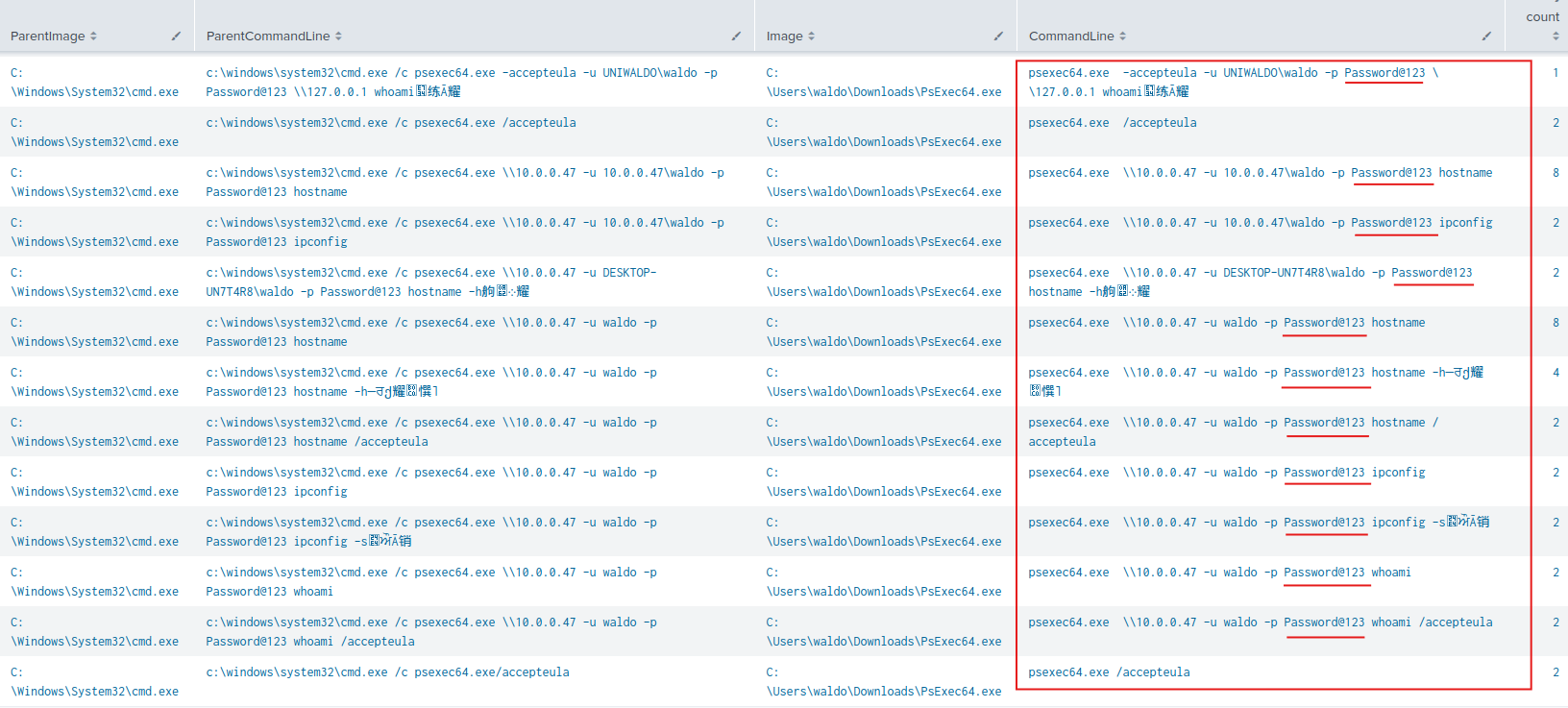
You’re looking at all the PsExec activity here. Basically, the password will be visible in the CommandLine field. This is why Sysmon Event ID 1 - Process Creation is useful for detecting credential exposure during PsExec usage. Notice that the ParentImage and the ParentCommandLine fields also help you trace the origin of the execution.
So yeah, you got it right. The answer for this question is: Password@123