HackTheBox - Intrusion Detection With Splunk (Real-world Scenario)

In this walkthrough, you’ll dive into a real-world intrusion detection scenario using Splunk. You’ll chase down suspicious processes, DLL abuse, Credential dumps, temporary code executions, and sneaky C2 callbacks. Ready to follow the trail?, here we go 🔦👣.
Navigate to http://[Target IP]:8000, open the “Search & Reporting” application, and find through an SPL search against all data the other process that dumped lsass. Enter its name as your answer. Answer format: _.exe
This question is asking you to detect credential-dumpling activity. Basically, which process is attempting to open a handle to lsass.exe. The most reliable way to spot an LSASS dumping attack is via Sysmon’s Event ID 10 — ProcessAccess. However, to reduce unnecessary noise, you’ll focus on suspicious binaries that are requesting full process access and appear to be abused to perform LSASS dumping.
This is how you’d do it in Splunk:
1
2
3
index="main" sourcetype="WinEventLog:Sysmon" EventCode=10 TargetImage="*lsass.exe" GrantedAccess="0x1FFFFF" CallTrace="*UNKNOWN*"
| stats count by SourceImage, TargetImage, CallTrace
| sort -count

As shown, both binaries rundll32.exe and notepad.exe tried to open a handle to lsass.exe, and the CallTrace points to injected code running inside them to perform the malicious activity. Using these binaries this way is a common LOLBin technique and a strong indicator that someone is trying to dump passwords from memory. My guess for this question is rundll32.exe, because it’s the one doing it multiple times.
So, the answer for this question is rundll32.exe
Navigate to http://[Target IP]:8000, open the “Search & Reporting” application, and find through SPL searches against all data the method through which the other process dumped lsass. Enter the misused DLL’s name as your answer. Answer format: _.dll
This question is linked to the previous one. Now that you have identified that rundll32.exe is performing the LSASS dumpling activity, you must determine how that binary was used to dump the memory from lsass.exe.
As you already know, attackers commonly try to dump LSASS to steal credentials. They can do it in different ways, one of them is by abusing Windows DLLs (like comsvcs.dll or dbghelp.dll). This question is asking you for that misused DLL that rundll32.exe loaded to perform the LSASS memory dump.
You can start off your investigation by taking a look at Sysmon Event ID 7 – Image Loaded events. Pay particular attention to the values of the ImageLoaded field in the results that follow:
1
2
index="main" sourcetype="WinEventLog:Sysmon" EventCode=7 Image="*\\rundll32.exe" ImageLoaded="*.dll"
| stats values(ImageLoaded) by Image
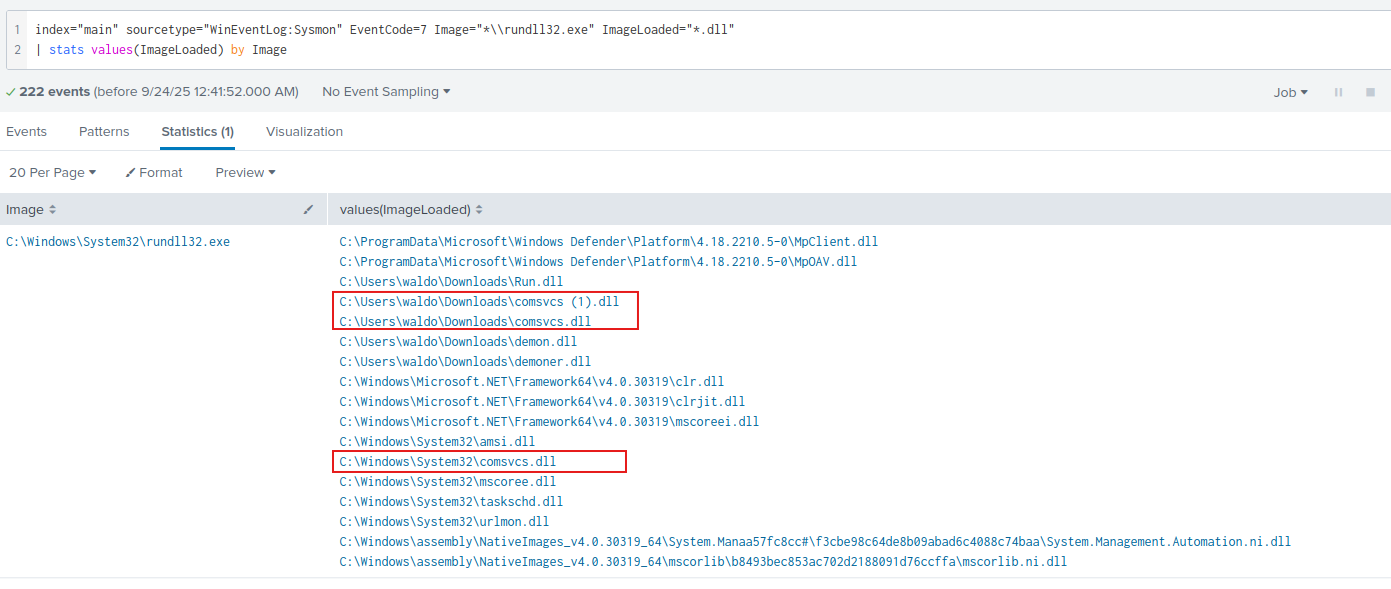
You can see every DLL rundll32.exe loads.
As previously mentioned, comsvcs.dll is a common library abused for memory dumps. But how can rundll32.exe leverage comsvcs.dll to dump lsass.exe?. Well, this is how basically works:
rundll32.exeis a legitimate Windows binary that can call exported functions inside a DLL.- Inside
comsvcs.dllthere exists an exported function namedMiniDump, originally intended for debugging and support, which can capture a process dump. - An attacker can invoke the
MiniDumpfunction to dump the memory of a target process, likelsass.exeinto a file.
Essentially, the attacker is doing the following:
1
> rundll32.exe C:\Windows\System32\comsvcs.dll, MiniDump <lsass_pid> C:\temp\lsass.dmp full
This way, you can make a memory dump of any process, including lsass.exe.
Alright, you already have the answer, but let’s confirm whether comsvcs.dll and MiniDump are actually being abused as reported. For this, check out Sysmon Event ID 1 – Process Creation events and pay attention to the values in the CommandLine field:
1
2
3
4
index=main sourcetype="WinEventLog:Sysmon" EventCode=1 Image="*\\rundll32.exe"
| search CommandLine="*MiniDump*"
| table _time Image CommandLine ParentImage
| sort -_time
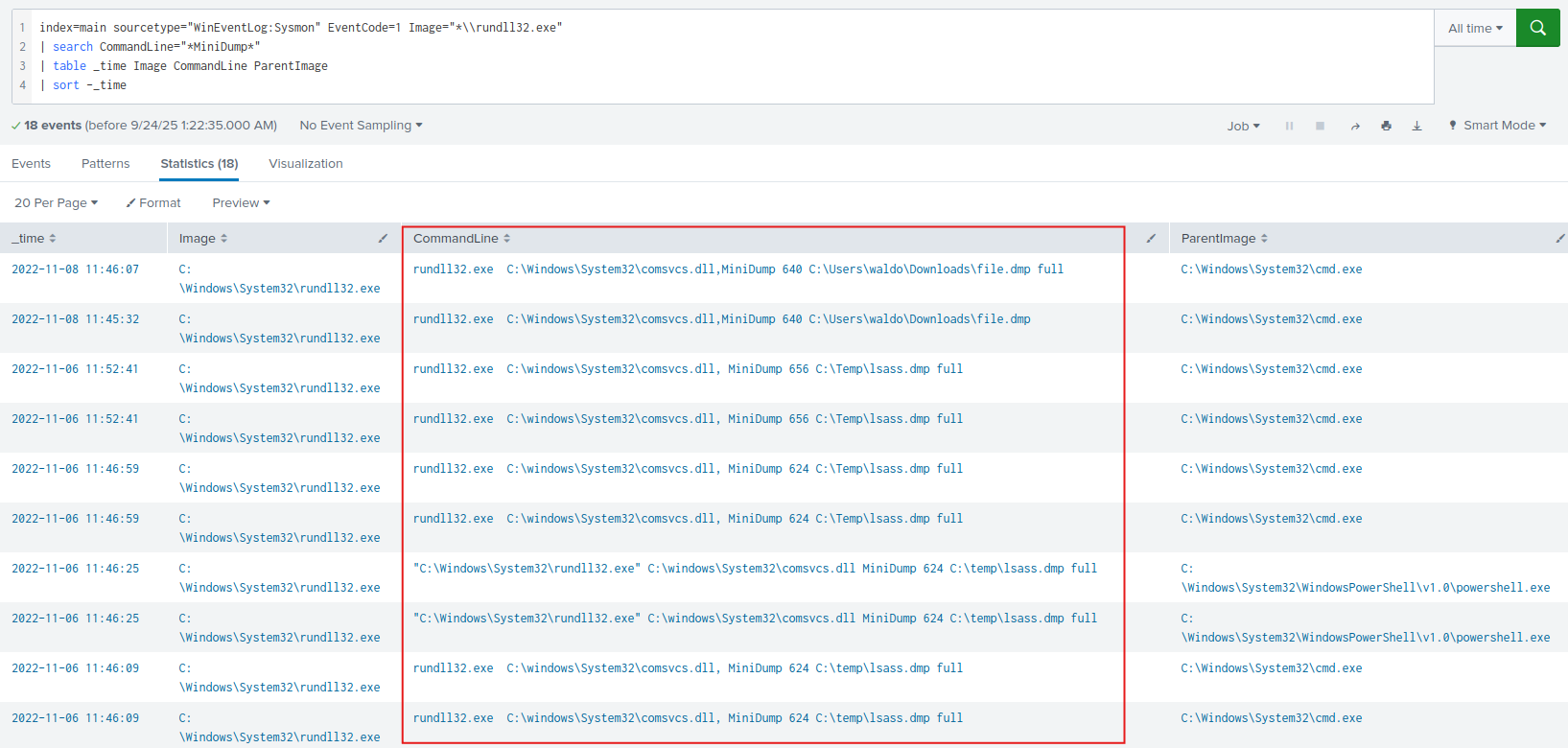
Yeah, you guessed it.
So, the answer for this question is obvious: comsvcs.dll
Navigate to http://[Target IP]:8000, open the “Search & Reporting” application, and find through an SPL search against all data any suspicious loads of clr.dll that could indicate a C# injection/execute-assembly attack. Then, again through SPL searches, find if any of the suspicious processes that were returned in the first place were used to temporarily execute code. Enter its name as your answer. Answer format: _.exe
First, let’s confirm any suspicious activity that might point a C# execute-assembly attack. To achieve this, let’s take a look at Sysmon Event ID 7 – Image Loaded events.
If you spot a clr.dll, clrjit.dll, or mscoree.dll library being loaded by a native Win32 process (like rundll32.exe, notepad.exe, cmd.exe, regsvr32.exe, etc.), that’s a big red flag, as these processes don’t normally need the .NET library to run, so seeing them should immediately catch your attention.
1
2
3
index="main" sourcetype="WinEventLog:Sysmon" EventCode=7
| regex ImageLoaded="(?i)(clr|clrjit|mscoree)\\.dll$"
| top limit=0 Image
From the results, you can identify some suspicious executables, a few may catch your eye right away:
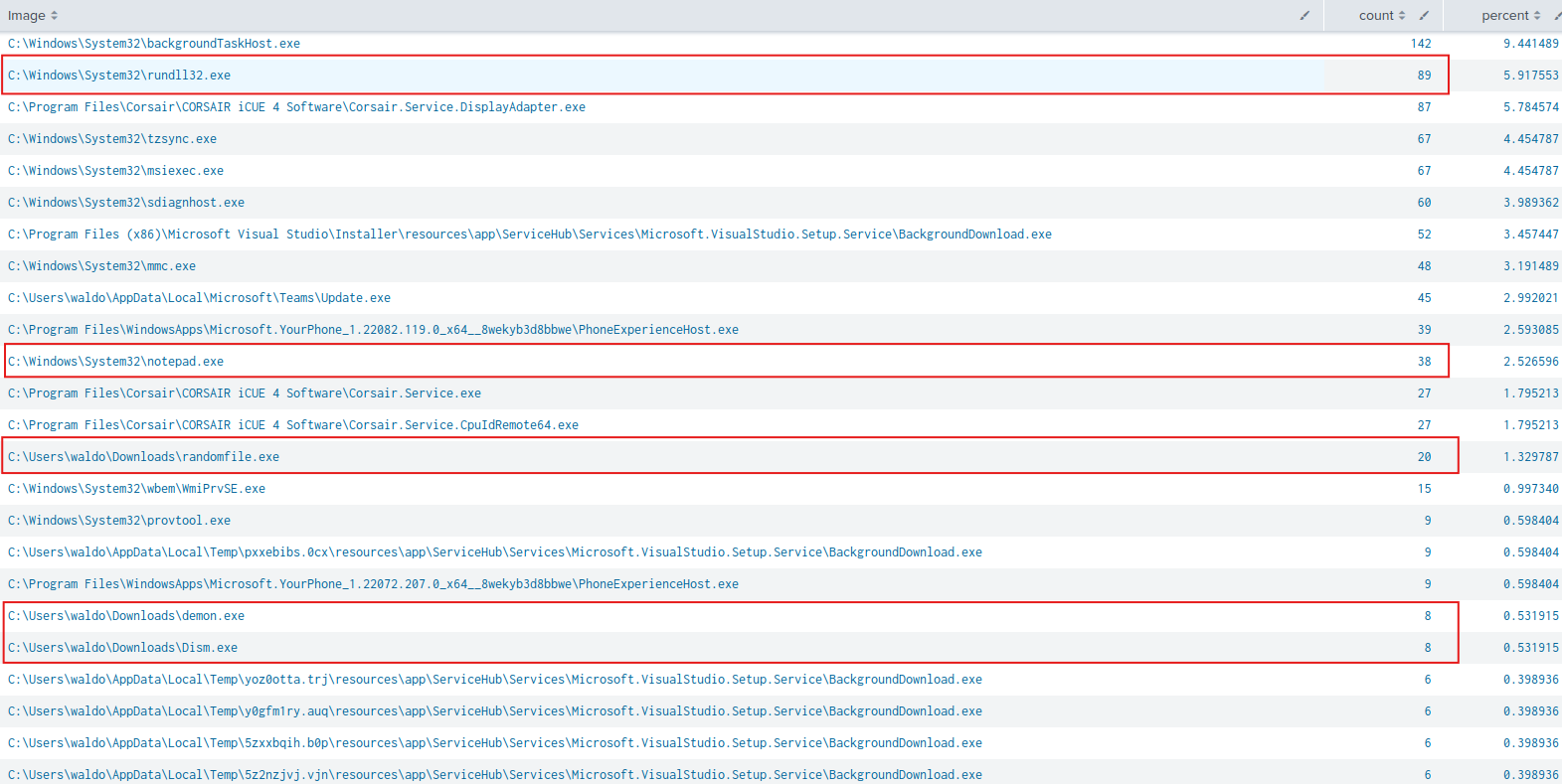
Let’s see what those processes have to say:
1
2
3
4
5
index="main" sourcetype="WinEventLog:Sysmon" EventCode=7
| regex ImageLoaded="(?i)(clr|clrjit|mscoree)\\.dll$"
| regex Image="(?i)(rundll32|notepad|randomfile|demon|dism)\\.exe$"
| stats count by Image
| sort -count
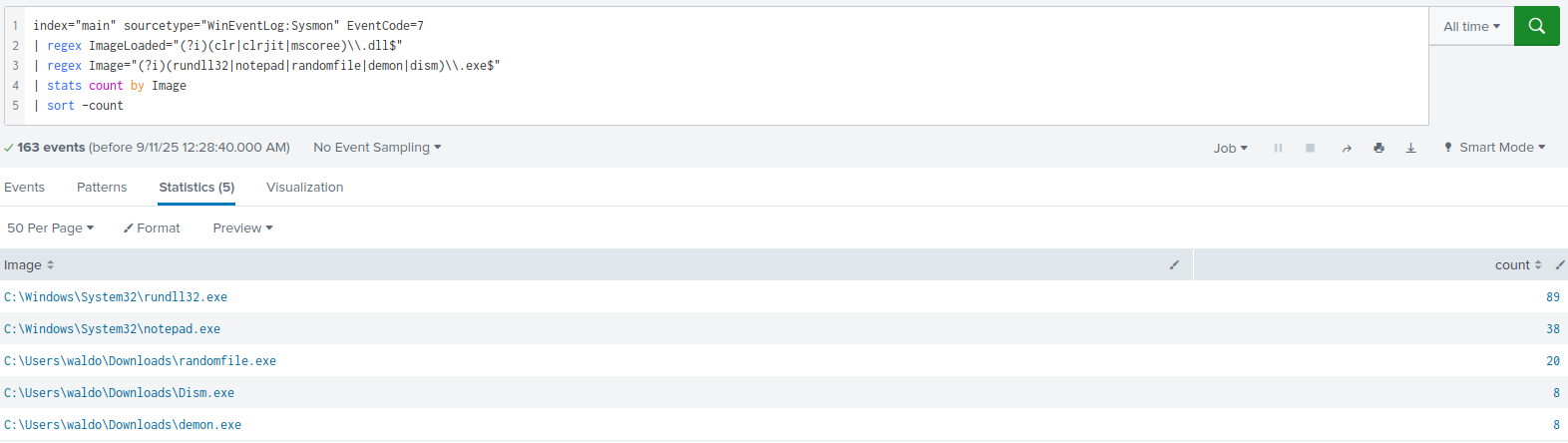
You immediately notice that rundll32.exe is loading any of the previously mentioned .NET runtime libraries many times, so their presence does indicate .NET assembly execution or injection.
Alright, something nasty seems to be brewing. Let’s see how rundll32.exe is being used though. Let’s check out Sysmon Event ID 1 – Process Creation events to see if something unusual pops up with rundll32.exe:
index="main" sourcetype="WinEventLog:Sysmon" EventCode=1 Image="C:\\Windows\\System32\\rundll32.exe"
| stats count by ParentImage, Image, CommandLine
| sort -count
While reviewing the results, you’ll see entries like the following. Pay attention to the highlighted ones:
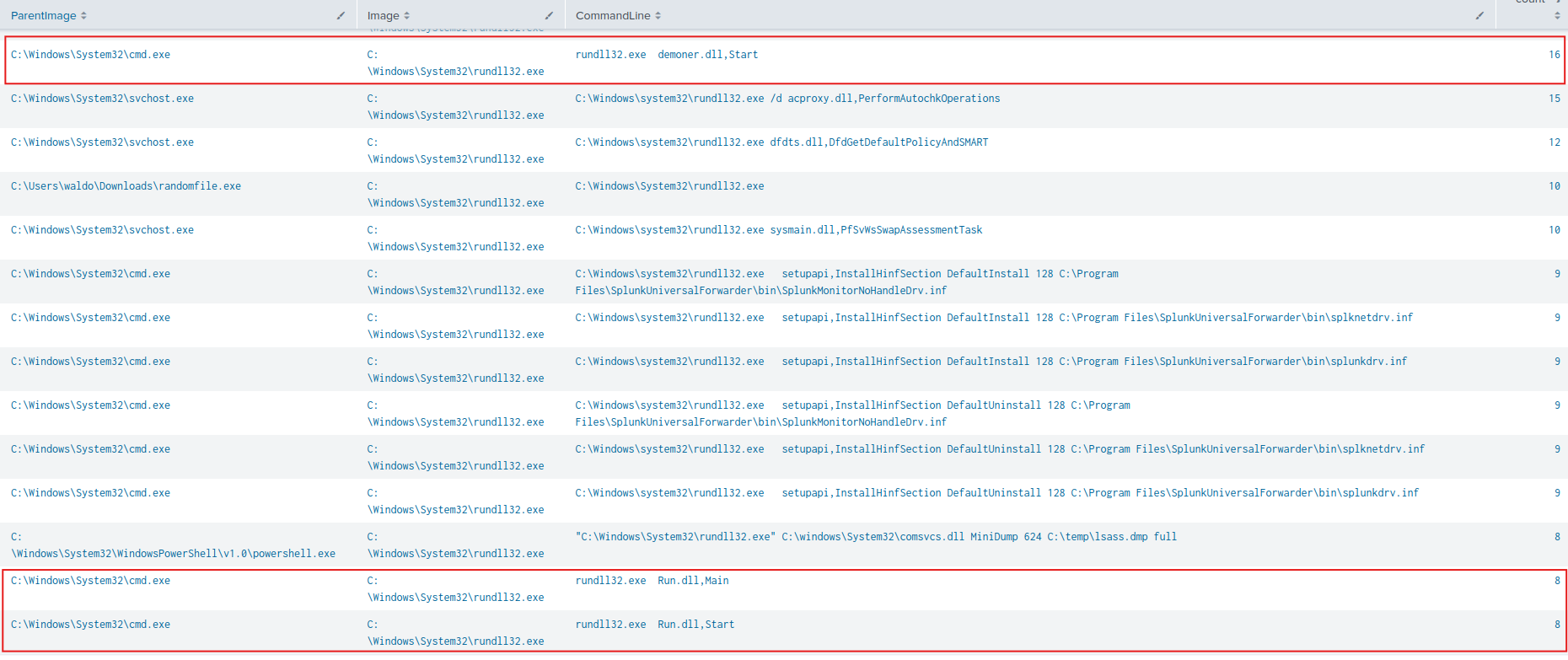
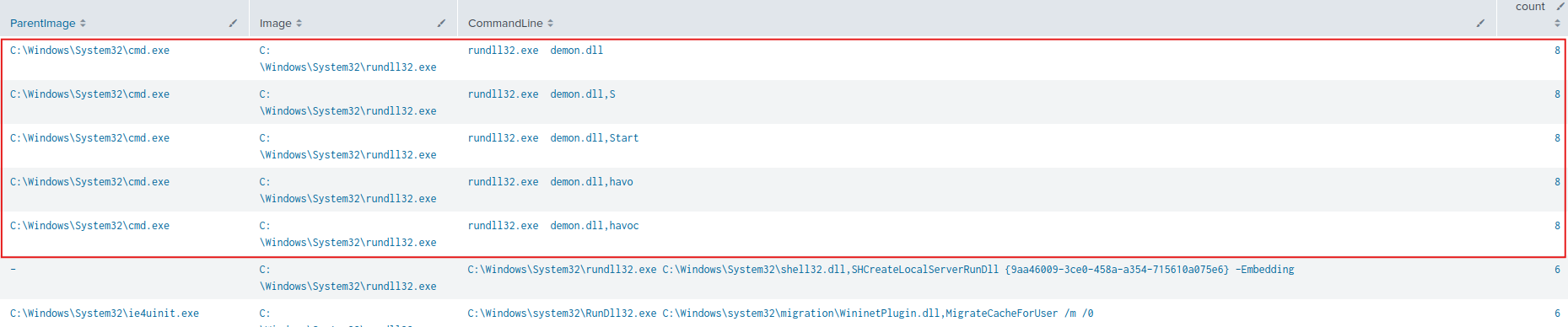
As shown, you have powershell.exe and cmd.exe spawning rundll32.exe so it can execute transient/temporary code. How can you tell?. Take a close look at the following command executions in the CommandLine field:
1
2
3
4
5
6
7
8
rundll32.exe demoner.dll,Start
rundll32.exe Run.dll,Main
rundll32.exe Run.dll,Start
rundll32.exe demon.dll
rundll32.exe demon.dll,S
rundll32.exe demon.dll,Start
rundll32.exe demon.dll,havo
rundll32.exe demon.dll,havoc
Essentially, all of these are custom DLL functions being executed via rundll32.exe, following this pattern:
1
> rundll32.exe <DLLpath>,<ExportedFunctionName> [optional args]
Why is this suspicious?. Well, rundll32.exe is a signed Microsoft binary attackers commonly abuse to run malicious/custom DLLs so activity can look legit. Just out of curiosity, let’s check what those libraries have to say about this:
index="main" sourcetype="WinEventLog:Sysmon" EventCode=7 Image="C:\\Windows\\System32\\rundll32.exe"
| regex ImageLoaded="(?i)(demoner|demon|run)\\.dll$"
| stats count by Image, ImageLoaded, Signed, SignatureStatus
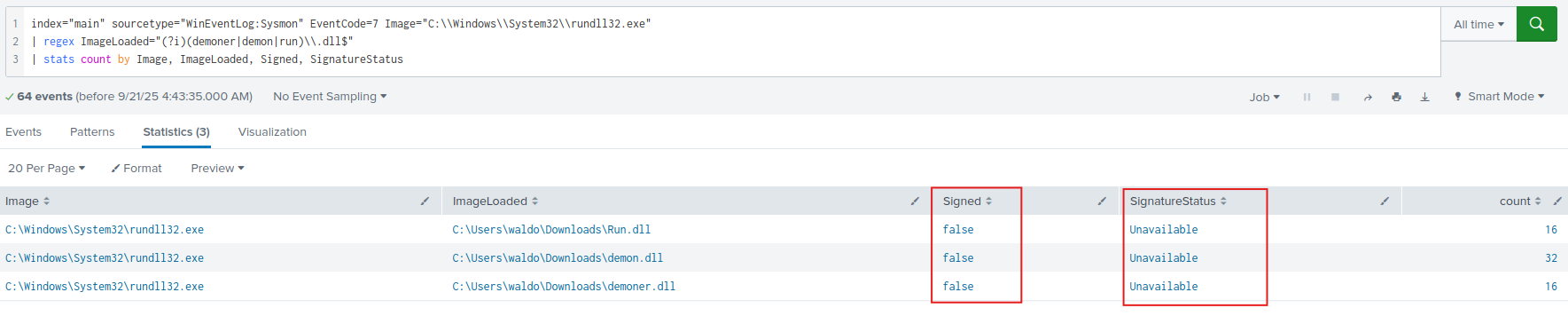
Highly suspicious, eh!.
Alright, long story short: having rundll32.exe invoking DLL exported functions is a direct evidence of temporary/transient code execution since none of these actions shows persistence. You see, once a process completes, it leaves no foothold.
So the answer to this question is: rundll32.exe
Navigate to http://[Target IP]:8000, open the “Search & Reporting” application, and find through SPL searches against all data the two IP addresses of the C2 callback server. Answer format: 10.0.0.1XX and 10.0.0.XX
In this challenge, your goal is to spot possible Command and Control (C2) activity. Some malware is reaching out two suspicious IP addresses: 10.0.0.1xx and 10.0.0.xx. Your task is to figure out which ones.
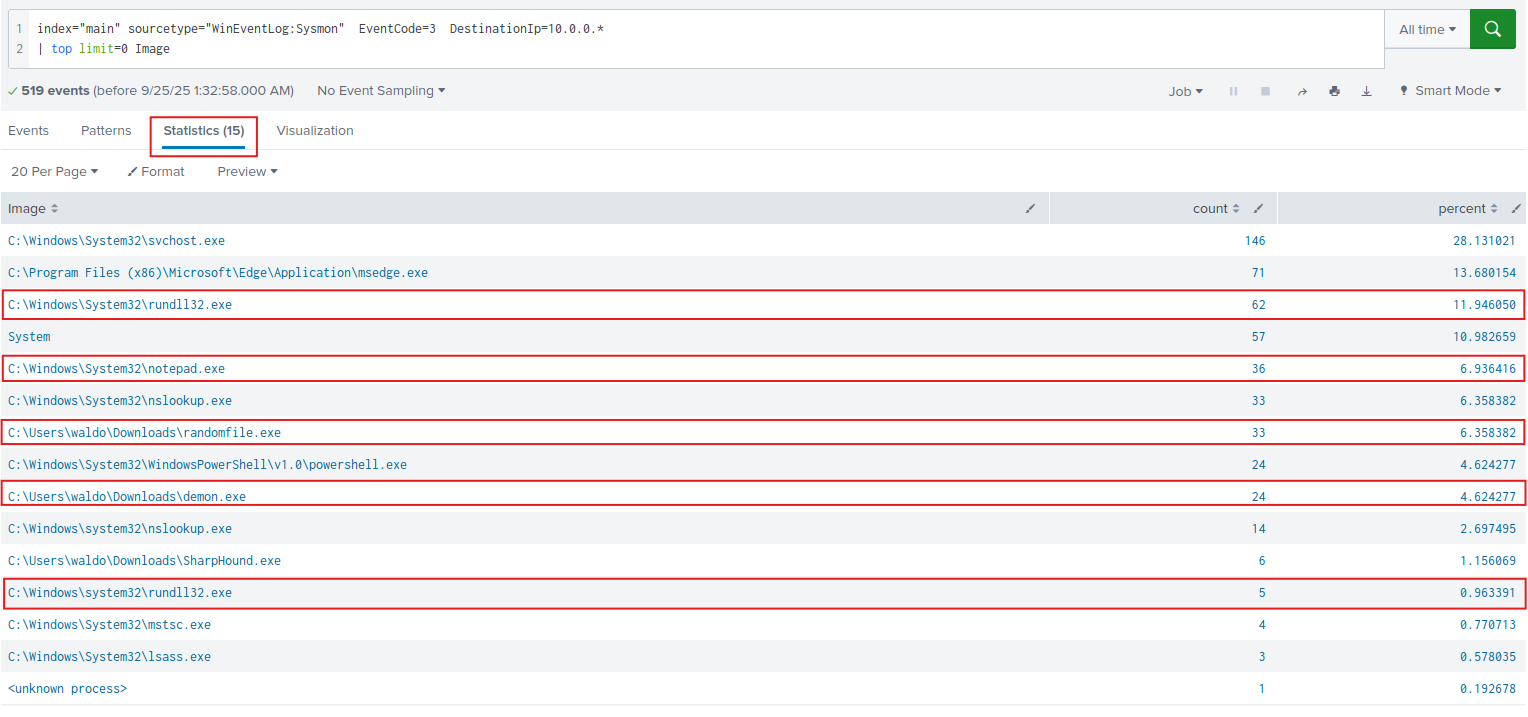
You can begin your investigation by taking a look at Sysmon Event ID 3 – Network Connection Detected events, to analyze inbound or outbound connections made by processes. Start off by listing all processes that are initiating network connections to the 10.0.0.x network range with the following query:
index="main" sourcetype="WinEventLog:Sysmon" EventCode=3 DestinationIp=10.0.0.*
| top limit=0 Image
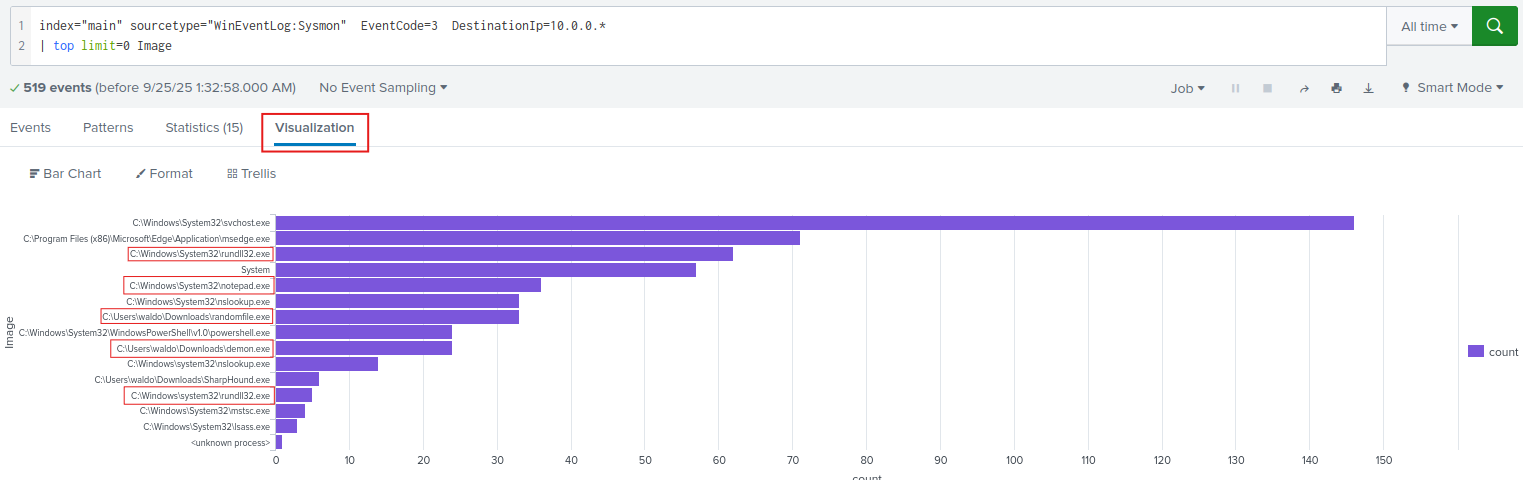
Since you’re a professional threat hunter, you quickly recognize some processes as suspicious:
Let’s see what those suspicious binaries are up to, that is, which destination IP addresses they are connecting to:
index="main" sourcetype="WinEventLog:Sysmon" EventCode=3 DestinationIp=10.0.0.*
| regex Image="(?i)(rundll32|notepad|randomfile|demon)\\.exe$"
| stats count as TotalConnections by Image, SourceIp, DestinationIp, DestinationPort
| sort -TotalConnections
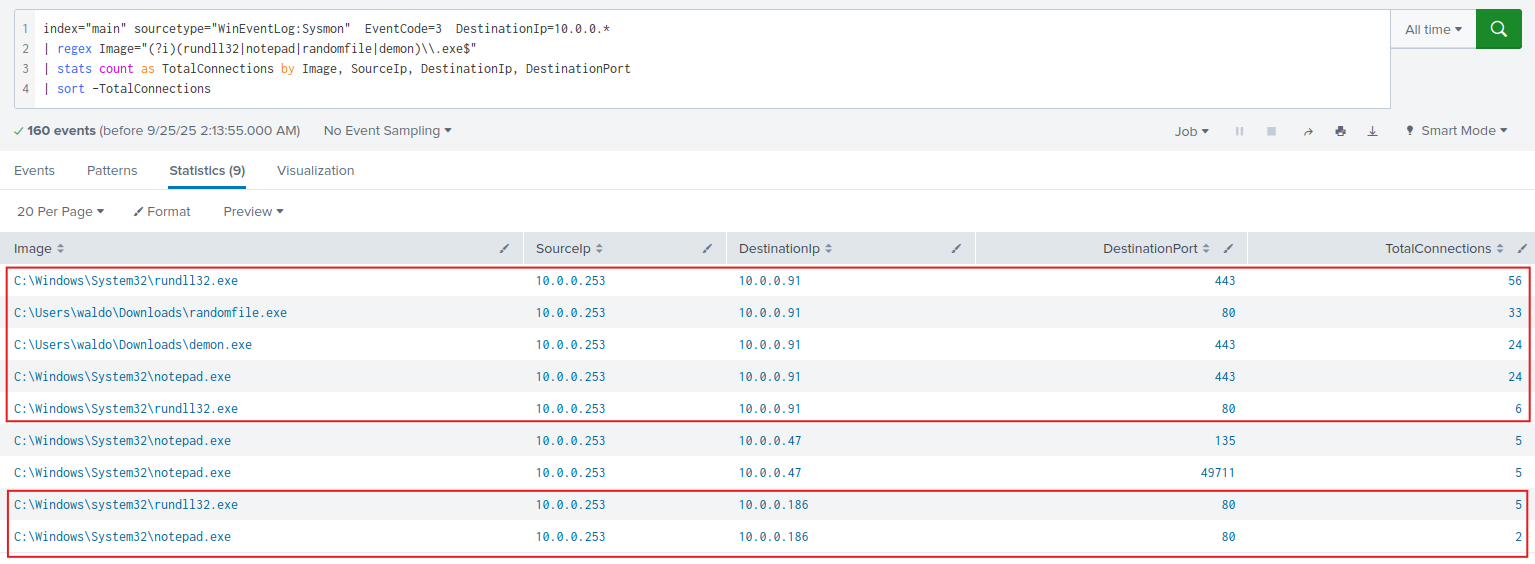
As shown, most of the network activity is directed toward the destination IP address 10.0.0.91, coming form the suspicious processes you identified earlier, this strongly suggests you’ve uncovered your first C2 server.
On the other hand, the IP address 10.0.0.186 matches the suspicious format 10.0.0.1xx, and considering the shady binaries involved in the network communication, you can say you’ve spotted your second C2 server.
Therefore, the answer for this question is: 10.0.0.186 and 10.0.0.91
Navigate to http://[Target IP]:8000, open the “Search & Reporting” application, and find through SPL searches against all data the port that one of the two C2 callback server IPs used to connect to one of the compromised machines. Enter it as your answer
You’ve already identified the two C2 server IP addresses controlled by the attacker. Your job now is to determine which port any of those C2 servers used to communicate back with a compromised machine.
To answer this question, you can simply search the events where the source IP address is one of the suspected C2 server IPs:
1
2
index="main" sourcetype="WinEventLog:Sysmon" EventCode=3 (SourceIp="10.0.0.186" OR SourceIp="10.0.0.91")
| stats count by Image, SourceIp, SourcePort, DestinationIp, DestinationPort

That will give you the IP address of the machine talking to a C2 Server, you can also see the port through which the conversation is happening.
Therefore, the answer for this question is: 3389
🎯 And that’s a wrap!. Not too bad, right? 😎 Whether you’re sharpening your threat-hunting skills or just curious about how attackers operate, these techniques will definitely level up your detection game. Keep practicing, stay curious, and most importantly, stay safe out there in the cyber jungle.