C Pointers Without Confusion - Understanding Memory in C
Think of RAM as a giant linear array of slots, where each slot is 1-byte (8 bits) in size so information can be stored in it. Conceptually, it looks like this:

Ignore the details for now, we’ll get to that shortly.
Your Data has to Fit Somewhere
Since everything is raw bytes in memory, every value in C (int, float, char, double, etc.) must be broken into individual bytes before being stored. To illustrate this, let’s say you want to store the value 6666:
1
int x = 6666;
On most systems today, an int would require 4 bytes (32 bits) to be stored in memory. So how does 6666 actually get squeezed into those 4 bytes?
First, the compiler converts the value 6666 into its binary form:
1
6666 decimal = 1101000001010 binary
That’s basic binary representation, only 13 bits, but since an int must occupy exactly 32 bits (4 bytes), that binary number must be adjusted into a 32-bit format divided into groups of 8 bits. To do this, zeros are added to the left to fill the required bit length:

You now have four clean 8-bit chunks ready to be stored in memory.
Byte Order Chaos? Endianness Saves the Day!
Endianness is the thing that tells the CPU in what order those 8-bit chunks (bytes) will be arranged in memory.
But before getting into that, notice that the bytes about to be stored inherently have what’s called a Least Significant Byte (LSB) and a Most Significant Byte (MSB):

- MSB (Most Significant Byte): It’s the byte that matters the most. It contributes the most to the value
6666. - LSB (Least Significant Byte): It’s the byte that matters the least. It contributes the least to the value
6666.
That is exactly how the CPU sees the significance of bytes before storing them in memory.
Alright, with that in mind, imagine the following memory layout:

On a little-endian machine (most modern computers), the Least Significant Byte (LSB) will be stored at the lowest memory address (0x1000), with the other bytes following in order:

On a big-endian machine (embedded systems, some network hardware, older computers), the Most Significant Byte (MSB) will be stored at the lowest memory address (0x1000), with the other bytes following in order:

And that’s basically how your 6666 integer (0x1A0A in hex) ends up living in memory.
The key thing to remember is that endianness is only about the order in which bytes are stored in memory. When the CPU reads all the bytes together to reconstruct your number, it will follow its own endianness rules. The result will always be the same logical value (6666), just stored differently.
Knock, knock - Who Lives at this Address?
As you know, in C you can obtain the memory address of any variable with the good old address-of (&) operator:
1
2
int x = 40;
printf("x address is: %p\n", (void*) &x); // 0x6bd287fc
But, what does that memory address actually mean?. Well, what you’re seeing is the address of the first byte out of the 4 bytes used to store that integer in memory.
So, when you read back the value of x:
1
printf("x value is: %d\n", x); // 40
What the CPU does is read the 4 bytes stored in memory at once, starting at address 0x6bd287fc, reorder them according to its endianness, and produce the logical value 40. If you’ve been following along, you already know what I’m talking about 😏.
Pointers - Following Memory’s Breadcrumbs
Just printing a memory address isn’t that exciting, right? 😅. The real power comes when you store that address and use it later in your code. That’s what pointers are all about:
1
2
3
int x = 40;
// This pointer now contains the memory address of x
int *p = &x;
In simple terms, a pointer is just a special kind of variable that contains a memory address, that’s all. You can actually check what that pointer is storing as value:
1
printf("p stores: %p\n", (void*) p); // 0x6bd287fc
You can even obtain the memory address of the pointer variable itself:
1
printf("p stores: %p\n", (void*) &p); // 0x7ffcb37b0100
And here’s the fun part: you can modify the value of x through the pointer p:
1
2
*p = 200;
printf("%d", x); // now x is 200
So yep, that’s the magic of pointers, they let you follow the address straight to the original data and even change it on the fly.
Dereferencing a Pointer
Dereferencing a pointer simply means accessing the value stored at that memory address:
1
2
3
4
5
int x = 40;
int *p = &x;

// Dereferencing this pointer
printf("%d", *p); // 40
As simple as that!.
The NULL Pointer
The following is a pointer that points to nowhere:
1
int *p = NULL;
You can see this as a “safe default” when a pointer doesn’t have a valid address.
A common mistake is using an uninitialized pointer. If you declare a pointer but do not initialize it to a valid memory location, dereferencing it can lead to a segmentation fault or other unpredictable behavior.
Always make sure to initialize your pointers either to NULL or to a proper memory address. Doing this upfront will save you a whole bunch of headaches later.
Pointer to Pointer
A pointer can store the address of another pointer:
1
2
3
int x = 5;
int *p = &x;
int **q = &p;
Here, q is a pointer to a pointer. It holds the address of p, and p holds the address of x. In other words, following q will eventually lead you back to x. So if you change the value of x through q:
1
2
3
4
5
**q = 200;

printf("%d\n", x);    // 200
printf("%d\n", *p);   // 200
printf("%d\n", **q);  // 200
Everything behaves as expected.
Dancing Through Memory with Pointers & Arrays
Let’s say you have the following array of integers:
1
int numbers[5] = {10, 20, 30, 40, 50};
Conceptually, you can imagine the memory layout for those 4-byte ints as follows:

Alright. Here’s something people often miss: the expression numbers on its own acts like a pointer to the first element’s memory address. In other words, these two lines mean exactly the same thing:
1
2
numbers        // points to 0x1000
&numbers[0]    // points to 0x1000
Both give you the memory address of the first element.
Still skeptical? Go ahead and test it. Try to dereference numbers as if it was a pointer:
1
printf("%d\n", *numbers); // 10
Sweet!. You can actually reach the next element by simply incrementing numbers as such:
1
2
3
4
printf("%d\n", *(numbers + 1)); // prints 20
printf("%d\n", *(numbers + 2)); // prints 30
printf("%d\n", *(numbers + 3)); // prints 40
printf("%d\n", *(numbers + 4)); // prints 50
This expression *(numbers + i) is exactly how you access the i-th element of the array. Behind the scenes, the compiler does a little math for you: it multiples i by sizeof(int) to calculate the byte offset. For example, if each int is 4 bytes, then:
*(numbers + 0)→ the CPU reads 4 bytes starting at 0x1000 → reconstructs10.*(numbers + 1)→ the CPU reads 4 bytes starting at 0x1004 → reconstructs20.*(numbers + 2)→ the CPU reads 4 bytes starting at 0x1008 → reconstructs30.*(numbers + 3)→ the CPU reads 4 bytes starting at 0x100c → reconstructs40.*(numbers + 4)→ the CPU reads 4 bytes starting at 0x1010 → reconstructs50.
That’s the essence of pointer arithmetic, moving through memory in chunks based on the size of the type you’re working with.
So, whenever you see something like:
1
numbers[i]
That’s really just syntactic sugar for:
1
*(numbers + i)
Now, what happens when you assign an array to a pointer?, let’s say:
1
int *p = numbers;
You’re right, that actually is equivalent to this:
1
int *p = &numbers[0]; // 0x1000
You’re referencing the memory address of the first element in the array. From there, pointer arithmetic lets you move through the array easily:
1
2
3
4
5
printf("%d\n", *(p + 0);  // prints 10
printf("%d\n", *(p + 1)); // prints 20
printf("%d\n", *(p + 2)); // prints 30
printf("%d\n", *(p + 3)); // prints 40
printf("%d\n", *(p + 4)); // prints 50
Simply put, pointers hold memory addresses, so you can actually do arithmetic operations on them to make them “dance” across different memory locations.
Same Bytes, Different Angles with Pointer Casting
As you already know, different data types occupy different amounts of memory: an int usually takes 4 bytes, a char takes 1 byte, a float takes 4 bytes, and so on.
But sometimes, you may want to treat those same bytes stored at the same location in a different way, that’s exactly what Pointer Casting is all about. Let’s break this down step by step.
You declare the following variable:
1
int x = 6666;
On a little-endian machine, the value 6666 (0x1A0A in hex) would be stored in memory like this:

Next, you create and initialize an int pointer to x:
1
int *p = &x; // 0x1000
When dereferencing *p, 4 bytes are read at once. Basically, pointer arithmetic moves in 4-byte steps:
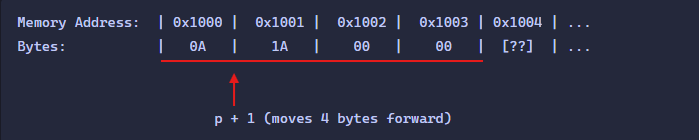
If you now cast that int pointer to a char pointer:
1
char *c = (char*) p; // 0x1000
Dereferencing *c reads 1 byte at the time. In this case, pointer arithmetic moves by 1 byte per step:

In the end, both pointers p and c refer to the same memory location and the same bytes, only pointer arithmetic and dereferencing behave differently because the type changed. This is essence of Pointer Casting.
Pointers are the backbone of dynamic memory, data structures, and many of the more advanced techniques you’ll learn later. For now, understanding how values live in memory and how pointers interact with them gives you the solid foundation every C programmer needs before moving on. Master this layer, and the rest of C starts making a lot more sense.
I hope this beginner-friendly explanation gave you a solid foothold on how memory and pointers truly work in C. Catch you in the next compile! ⚙️