HackThisSite - Basic Level 5 - Insecure Password Recovery via Hidden Fields
Since Sam has gotten wise to all the people who wrote their own forms to get the password, he decided to make his email program a little more secure, or at least that’s what he thinks 😏.
In this challenge, you won’t need Burp Suite, request interception, or anything fancy. The vulnerability is right there in plain sight.
Start by opening your browser’s DevTools and inspecting the HTML form responsible for emailing Sam:

At this point, you’re probably thinking the same thing I am: why not just change the email address directly in the HTML and have the password sent to me instead?, and… yep, that’s exactly what you’ll do. Simply edit the email field in the HTML to your own address, like this:

As simple as that, no interception, no proxy, no extra tools.
Just submit the form and Sam’s password will show up straight in your email inbox 📬:
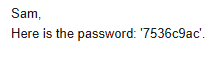
And just like that, Sam’s password is revealed: 7536c9ac
Security Recommendations
Always assume the client is malicious. Anything in HTML can be modified by the user: email addresses, hidden fields, form actions, etc., that’s why all of it must be validated and authorized server-side, specially when handling sensitive actions such as password recovery.
Passwords should never be sent via email as this exposes credentials to interception and misuse, instead, secure, time-limited password reset tokens should be implemented. Sensitive business logic must reside on the server, not in client-side code, and proper authentication and recovery workflows should be leveraged to ensure that credentials remain protected even if the frontend is manipulated.