HackThisSite - Basic Level 9 - Cross-Directory SSI Injection

Network Security Sam is going down with the ship 🚢, he’s determined to keep hiding the password file, no matter how many times people manage to recover it. This time, he moved it to:
1
/var/www/hackthissite.org/html/missions/basic/9/
However, for this challenge things got a lot trickier as you’re only presented with this screen:
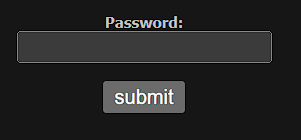
There’s no obvious input field, so no easy way to test whether this feature is vulnerable to some kind of an injection attack. Still, it turns out that this level is closely related to the previous one, so go back and from there you must figure out a way to list the contents of this directory:
1
/var/www/hackthissite.org/html/missions/basic/9/
But how do you do that?.
Well, in level 8 you escaped the tmp/ folder by moving one directory up using this SSI directive:
1
<!--#exec cmd="ls .." -->
That allowed you to list everything inside:
1
/var/www/hackthissite.org/html/missions/basic/8/
Now, what if instead of escaping just tmp/, you also escape the 8/ folder by moving two directories up?:
1
<!--#exec cmd="ls ../../" -->
That will lead you to:
1
/var/www/hackthissite.org/html/missions/basic/
And maybe, from there, the directory structure might follow this pattern:
1
2
3
4
5
6
7
8
/var/www/hackthissite.org/html/missions/basic/1
...
...
...
/var/www/hackthissite.org/html/missions/basic/7
/var/www/hackthissite.org/html/missions/basic/8
/var/www/hackthissite.org/html/missions/basic/9
...
If that assumption is correct, you can easily inject the following SSI directive in level 8’s input field to list the contents of 9/, something like this:
1
<!--#exec cmd="ls ../../9/" -->
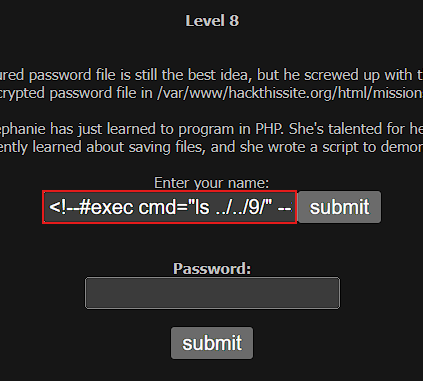
And this would be the result:

Now, to obtain Sam’s password, simply append the highlighted file to the path where Sam stored the password file:
1
https://www.hackthissite.org/missions/basic/9/p91e283zc3.php
And there it is:
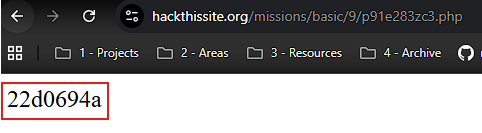
Once again, Sam’s password has been recovered. This time, it is: 22d0694a
Security Recommendations
Web applications should be treated as isolated units, with strict permissions preventing one application or directory from accessing another, even if they share the same server.
Web servers should enforce the principle of least privilege at the filesystem level, ensuring that each application is restricted to its own directory structure and cannot traverse or access unrelated paths. Proper isolation mechanisms such as separate system users, virtual hosts, containers, or chroot environments, should be implemented to ensure access is restricted to a single application context, limiting this way the potential impact of a compromise and reducing the overall attack surface.