LetsDefend - Investigate Web Attack

After meticulously reading the many different web attacks a web application may face according to letsDefend.io, I was completely overwhelmed when I was faced with a log file containing more than 12,000 log entries. Where do I even begin?, What am I supposed to do with all this information?.
I must admit, I had no idea what to do even though I had studied all the lessons on web attacks. My initial reaction was to blame letsDefend.io for not providing enough information on how to deal with this challenge. But, let’s be honest, we’re taking this course to become Security Analysts, and our job is to analyze the information presented the best we can with the tools and knowledge at our disposal.
Long story short. Let’s dive into the questions and tackle them head-on.
Which automated scan tool did the attack use for web reconnaissance?
To answer this question you need to focus on two things:
- Client’s IP address: Are you receiving a high number of requests from the same source IP address?.
- Time Interval between Requests: Are the requests coming from that IP address separated by only milliseconds?, If so, well that’s too fast for a human to generate.
Looking at the log file provided, you’ll see there are multiple requests coming from the same IP address 192.168.199.2, and not even a single second has passed between them:
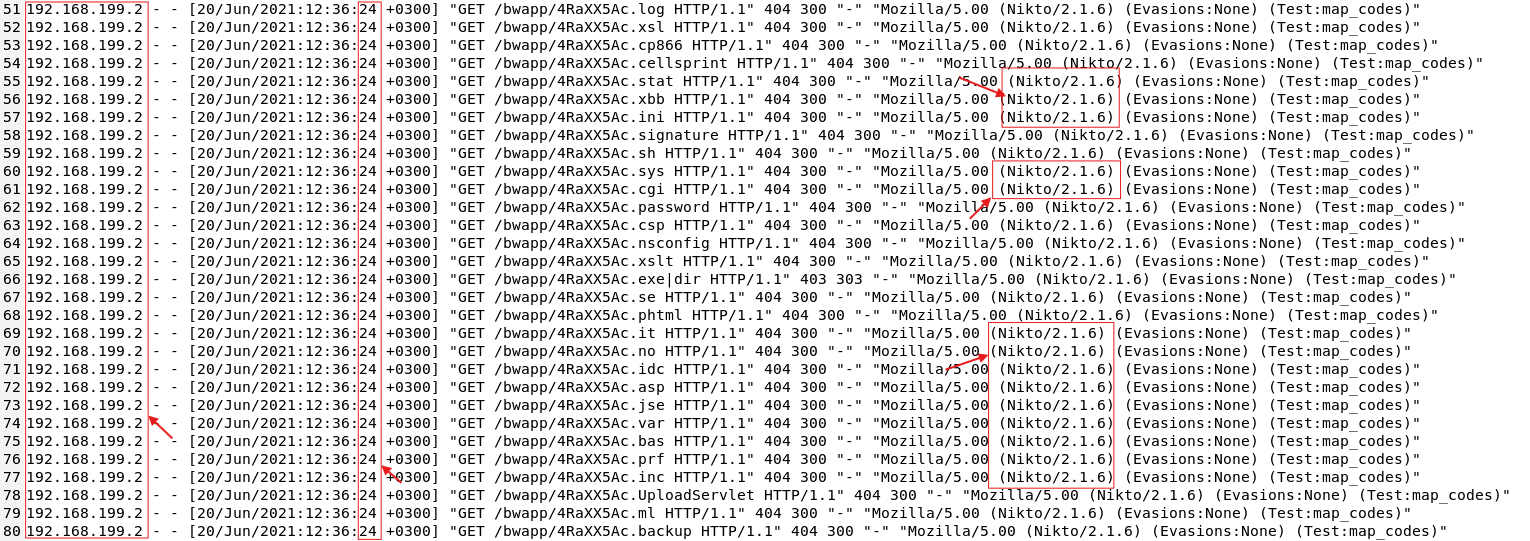
The list goes on and on, and the timeframe between requests barely changes. At this point, it’s clear that you are being scanned by an automated tool, but which one?. That information is also included in every log entry. As you noticed, the attacker is using something called Nikto, which turns out to be a vulnerability scanner. So yeah, the attack is being carried out using Nikto.
So, the answer to this question is: Nikto
After web reconnaissance activity, which technique did attacker use for directory listing discovery?
To answer this question, pay attention to the keywords: directory listing discovery.
If you have read the “Detecting Brute Force Attacks” lesson, by now you’d be familiarized with a technique called Directory Brute Forcing on web applications. I know, I know that topic was touched briefly, but it’ll help you to answer this question.
As you navigate through the log entries, you’ll notice some URLs that appear suspicious. Even more concerning, all responses to these requests return a 404 HTTP status code and have the same response size of 300 bytes:

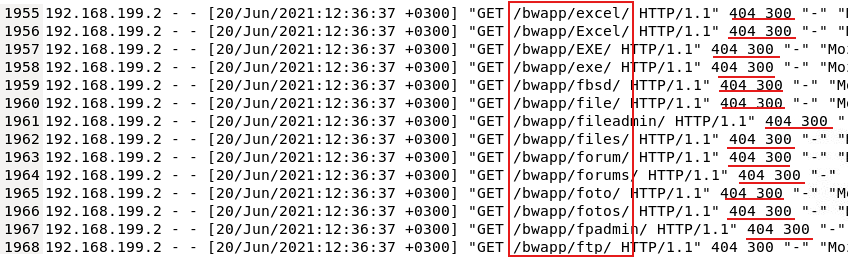

All of this indicates that the attacker with the help of its automated scanning tool is trying to guess the name of files and directories of your webserver, with the intention to find hidden or restricted resources that should not be publicly available.
So the answer for this question is: Directory brute force
What is the third attack type after directory listing discovery?
This question expects you to know the next logical sequence in the attack chain. What could come after listing discovery?, maybe you’ll try to directly access sensitive sections or files you found listed, perhaps you’ll download files or access a login section in the website. Let’s stick to this one.
It’s very likely that the attacker got access to a valid login page section to your webserver. Try to find a log entry that confirms this activity:

There it is, a precious valid login page. If you scroll down a bit, you’ll also notice that the attacker carried out several login attempts against this login page:
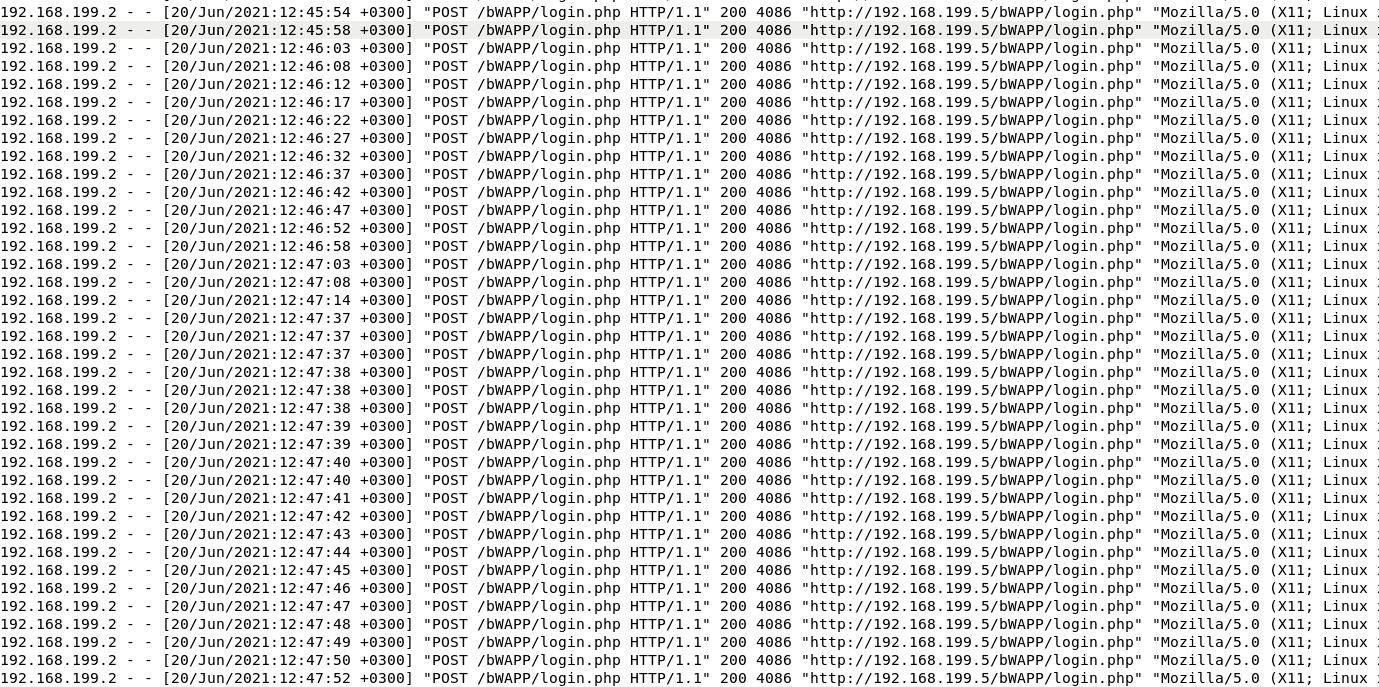
So, the answer to this question becomes obvious: Brute force
NOTE: I mean, it’s not that obvious. My first try was Brute force login, but letsDefend.io didn’t like this answer.
Is the third attack successful?
The question implies if the attacker had success authenticating against your web application. Let’s see what the logs have to say about it. Pay attention to the following extract:

- The first
POSTrequest got a200 OKresponse, meaning the server processed it and returned some content, likely the login page. - The second
POSTrequest got a302 Foundresponse, meaning a redirected happened. This might indicate a successful login where the server redirects the user to another page, maybe a portal or a dashboard. - The third
POSTrequest got again a302 Foundresponse, possibly reusing the session or confirming the login. - The attacker accessed
/bWAPP/portal.php, maybe the main portal after login. TheGETrequest got a200 OKresponse with a large payload of23369bytes, which is expected for a portal page. - The
POSTrequest to/bWAPP/portal.phpindicates some action in the portal page by the attacker.
With all this in mind, the answer for this question is: Yes
What is the name of fourth attack?
If you navigate the log file further, a few lines later you’ll find log entries where the URLs contain unusual or suspicious character sequences:

This indicates that after a successful brute force attack, the attacker moved to another phase, in this case, it tried to perform several command injection attacks. How can you tell this?.
Do you see all those gibberish character strings trying being injected into the query string parameter message? All of them are trying to execute commands on the server.
So, the answer for this question is: code injection
NOTE: Just like you, I didn’t even know that name existed. My answer to this question was command injection, but again, letsDefend.io didn’t like it for some reason.
What is the first payload for 4th attack?
Clearly, the first command injection payload is this:

So the answer for this question is: whoami
Is there any persistency clue for the victim machine in the log file? If yes, what is the related payload?
Persistence refers to technique attackers use to maintain their access on a machine. In this case, by using a command injection attack, the attacker is trying to achieve persistence on the webserver through the following malicious payload:

If successful, the following command will be executed on the webserver:
1
$ net user hacker Asd123!! /add
This will create a new user account in your server. This way, the attacker will be able to later login again. This is a classic persistence technique.
In a nutshell, the answer for this question is: %27net%20user%20hacker%20Asd123!!%20/add%27
I hope all of this helps you explain the reasoning and arguments behind each answer, and last but not least, I’m not sure if it’s just me, but sometimes the questions on LetsDefend.io seem poorly worded or a bit ambiguous. Has anyone else noticed this? Let me know your thoughts.