Cooking the Proxy - What the heck is a Proxy Server?
A proxy server is a dedicated server that sits between a client and a destination. The destination can be either a public-facing endpoint (such as a web server or cloud service) or a private network endpoint (like an internal database or private intranet) that the client is trying to reach.
A proxy server can provide you several benefits like security, privacy, caching, or bypassing geo-restrictions. It’s very common, almost expected, that organizations use some form of proxy server. Chances are that if you’re inside a company network, web traffic is being routed through a proxy server.
How a Proxy Server Works
A proxy server is placed between two communication parties:
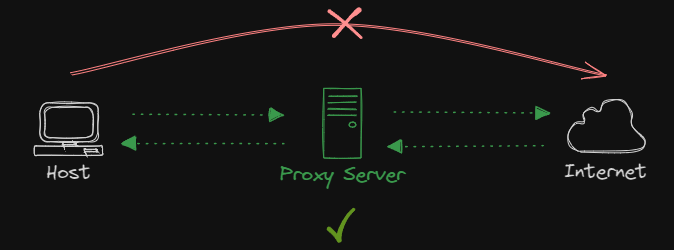
A client’s request must pass through the proxy server before continuing to its destination. This way, for example, when you request a website, the proxy server will intercept your request, forward it to the destination web server on your behalf, then capture the response and deliver the content back to you. Understanding this process is important, as it explains how a proxy server can hide your IP address or allow you access restricted content.
However, proxy servers can do more than just providing anonymity and the ability to bypass geo-restrictions. They can also be used to enhance security by filtering incoming and outgoing content, improve performance when used as a caching mechanism, they can even be used as a load balancer to efficiently y distribute network traffic.
Types of Proxy Servers
Forward Proxy Server
It’s the most widely used proxy server type. The goal is to hide a user’s IP address and provide features like content filtering, caching, and access control.
For example, in a corporate network, a company can use a forward proxy server to control which websites employees can access. When an employee tries to visit a website, the request goes through the proxy server, which checks it against defined security policies to either allows it or blocks it. The destination website will see the proxy’s IP address, not the employee’s.
Transparent Proxy Server
It intercepts and forward requests without modifying them. It is often used for monitoring, content filtering, or caching. The client may not be aware that their requests are being routed through a proxy server.
For example, in a school or public Wi-Fi network, a transparent proxy server could be used to monitor and filter web traffic for inappropriate content. Users don’t need to configure anything on their devices, the proxy automatically intercepts their requests and applies filtering rules before the content reaches them. The client is never aware of the proxy’s presence.
Anonymous Proxy Server
It is used to help maintaining privacy and anonymity for the client by hiding the client’s real IP address when making requests to the Internet.
For example, a user in a country with restricted internet access might use an anonymous proxy server to browse websites without revealing its real IP address. The websites this user visits will only see the proxy’s IP, not the user’s. This way, the user bypasses censorship or maintains anonymity while browsing.
High-Anonymity Proxy Server
Also known as elite proxy. It provides higher level of anonymity than a standard anonymous proxy server. It not only hides the client’s real IP address but also ensures that the proxy server doesn’t disclosure that it is acting as a proxy. Basically, it won’t send any identifying header, which makes it difficult for websites to detect that a proxy is being used.
For example, a person trying to stay completely anonymous online might use a high-anonymity proxy server during browsing or accessing sensitive information. This proxy ensures that websites have no indication that a proxy is involved, making it harder for them to track or identify the user’s activity.
Distorting Proxy Server
This type of proxy hides the client’s IP address by sending a false IP address to the destination server. Basically, it provides false information to the target destination. It’s commonly used to bypass geo-restrictions.
For example, a user might use a distorting proxy to access region-restricted content. For instance, if they are in the UK but want to appear as if they are in the US to access US-based services, the proxy server will provide a fake IP from the US, allowing access to the desired content.
Data Center Proxy Server
This type of proxy server uses IP addresses from data centers rather than residential IPs. They’re typically used for activities like web scraping or automated browsing, basically, any activity requiring high-speed connections. These proxies are fast and reliable but easy to detect and block due to the non-residential nature of their IP addresses.
This type of proxy is not ideal for anonymity since its IP address can be traced back to the data center.
For example, a company performing large-scale web scraping to gather data from e-commerce sites might use a data center proxy. These proxies will allow the organization to send numerous requests quickly and efficiently, though the e-commerce sites may recognize that the requests are coming from a data center and block or throttle them out.
Residential Proxy Server
This proxy uses IP addresses provided by ISPs to real homes, making the proxy requests appear as if they come from regular residential users rather than data centers. These proxies are harder to detect and block because they mimic normal internet traffic.
For example, a digital marketer might use residential proxies to conduct web scraping on a competitor’s site, bypassing detection and rate limits. Since the requests appear to come from real residential addresses, the site is less likely to block them, allowing for a more seamless and anonymous operation.
Public Proxy Server
This proxy is openly available to anyone, usually free. These proxies are often used for basic tasks like hiding an IP address or bypassing content restrictions. However, public proxies are slower and insecure due to the heavy usage by multiple users.
For example, a small business might use a shared proxy for browsing or accessing geo-restricted content. While it’s an affordable solution, the business is sharing the same IP with other users, which can lead to slower performance and potential issues with anonymity if others on the proxy engage in suspicious activities.
SSL Proxy Server
This proxy encrypts the connection between a client and the target endpoint using SSL/TLS.
When a client makes an encrypted request to a target endpoint, the proxy server will intercept this traffic, decrypt it, inspect or modify it, and then, re-encrypt it before forwarding it to the target endpoint.
For example, In a corporate environment, an SSL Proxy might be used to monitor employees’ internet traffic for security threats. When an employee visits a website using HTTPS, the proxy decrypts the SSL traffic to inspect it, looking for malware before re-encrypting it and forwarding it to the destination.
Rotating Proxy Server
This proxy automatically changes its IP address at regular intervals or after each request. This helps avoid detection, IP bans, geo-blocking, or rate limiting by websites, making it ideal for tasks requiring a large number of requests from different IPs, such as web scraping.
For example, when scraping data from a website, a rotating proxy server can use different IP addresses for each request, making it harder for the target website to detect and block the scraper. Each request will appear to come from a different user, which prevents throttling or blocking based on IP.
Reverse Proxy Server
It sits between users and web servers, forwarding requests coming from clients to the appropriate backend server. Unlike a forwarding proxy, which hides the client’s identity, a reverse proxy hides the identity of the server, offering benefits like load balancing, security, and caching.
For example, in a web application, a reverse proxy might be used to distribute client requests across multiple web servers for load balancing. If a client requests a page, the reverse proxy decides which server to send the request to.
Split Proxy Server
This proxy server divides traffic into multiple streams, sending each to different servers based on specific rules or conditions. A business might use a split proxy server to route web scraping requests for different categories through separate proxy servers.
For example, in a corporate network, a split proxy server might direct HTTP traffic to a basic proxy server for web browsing, while routing FTP traffic to a specialized proxy server that handles file transfers more efficiently.
Non-Transparent Proxy Server
This proxy modifies the user’s requests and responses without disclosing its presence, allowing the user’s identity and activities to remain hidden. The client is unaware that their requests are being intercepted and routed through a proxy.
For example, in a company network, a non-transparent proxy server might be used to monitor or filter Internet usage without the employee knowing, blocking access to certain websites.
Hostile Proxy Server
This type of proxy server is set up with malicious intent, often used to intercept, monitor, or alter internet traffic. It can be employed to steal sensitive information, such as login credentials, or inject malicious content into the data being transferred between the user and the destination endpoint.
For example, an attacker might set up a hostile proxy to intercept communication between a user and a banking site. They proxy could steal the user’s login details or alter the responses, such as redirecting funds to the attacker’s account, without the user’s knowledge.
Intercepting Proxy Server
Also known as man-in-the-middle proxy. It intercepts and modifies the communication between a client an a target server. This type of proxy can inspect, log, or alter requests and responses without the client or target server being fully aware.
For example, a security researcher might use an intercepting proxy to test the security of a web application. When a user submits a login form, the proxy captures the request, allowing the researcher to inspect sensitive data, test for vulnerabilities, or modify the request (e.g., to test for weak password validation).
Forced Proxy Server
This proxy requires all client traffic to pass through it, often enforced by network configuration or system policies. It shouldn’t be bypassed, ensuring all requests are routed through this proxy.
For example, in a corporate environment, a forced proxy might be set up to ensure all employee internet traffic goes through a secure gateway, where web browsing is logged, malicious sites are blocked, and data leaks are prevented. Employees cannot access the internet without the proxy being involved.
Caching Proxy Server
This proxy stores copies of frequently requested content, such as web pages or files in order to improve performance and reduce bandwidth usage. When a client requests content that has been cached, the proxy serves it directly, speeding up access and reducing load on the original server.
For example, when users in a network frequently visit the same website, a caching proxy server would store a copy of that website’s content. The next time anyone requests the site, the proxy serves the cached content instead of fetching it from the original server, resulting in faster load times.
Web Proxy Server
This type of proxy handles HTTP/HTTPS requests between clients and web servers. It acts as an intermediary, forwarding web traffic to the destination server.
For example, when you access a website, your request first goes to the proxy server. The proxy fetches the website for you, then sends it back to you. This hides your IP address to the website, and can be used to bypass restrictions or improve performance by caching the page.
SOCKS Proxy Server
This type of proxy works at a lower level, handling all types of internet traffic, not just HTTP or HTTPS. It can relay requests for any protocol, such as FTP, SMTP, torrent, etc., between the client and the destination endpoint.
For example, a user who wants to access a blocked website while using a torrent application can use a SOCKS proxy server to route both their web browsing and torrent traffic through the proxy. Since SOCKS proxies operate at the session layer and are not limited to HTTP traffic, they can handle various types of protocols, including those used by P2P applications.
This setup will mask the user’s real IP address, allowing them to remain anonymous and bypass geographic or ISP-imposed restrictions.
HTTP Proxy Server
Unlike a Web Proxy Server, an HTTP Proxy Server is designed to specifically handle only HTTP traffic.
Email Proxy Server
This proxy intercepts, filters, or relays email messages by verifying whether a sender’s address is forged or not. This reduces the risk of phishing attacks that impersonate people know to the organization.
For example, when you send an email, your client will first connects to the email proxy server. The proxy checks the email for spam or security issues before forwarding it to the recipient’s mail server. Similarly, incoming emails are filtered by the proxy before reaching your inbox.
Benefits of a Proxy Server
- Private Browsing.
- Increase user security.
- Anonymity.
- Network Traffic Management.
- Caching.
- Access to places with geo-restrictions.
Here are some popular proxy server solutions widely used for several purposes such as load balancing, anonymity, caching, filter, or content delivery:
- Squid.
- HAProxy
- Ngnix.
- Apache Traffic Server.
- TinyProxy.
- 3Proxy.
- CCProxy.
- Privoxy.
- SOAX.
- Oxylabs.
- Smart Proxy.
And that’s a wrap on our Proxy Recipe!. Hope you’ve found it easy to digest. Stay curious and keep those proxies cooking!. See you next time.