HackThisSite - Basic Level 3 - Publicly Accessible Sensitive Files

Alright. This time Network Security Sam remembered to upload the password file, but there were deeper problems than that.
There isn’t much information provided for this challenge, other than the fact that there’s now a file containing an unencrypted password and this screen:
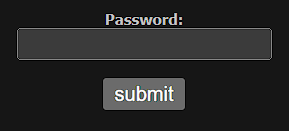
At this point, spending some time poking around the page’s source code to see if anything interesting pops up is a solid move. Trust me, it often pays off 😉
After a bit of digging, you end up looking at the structure of the login form:

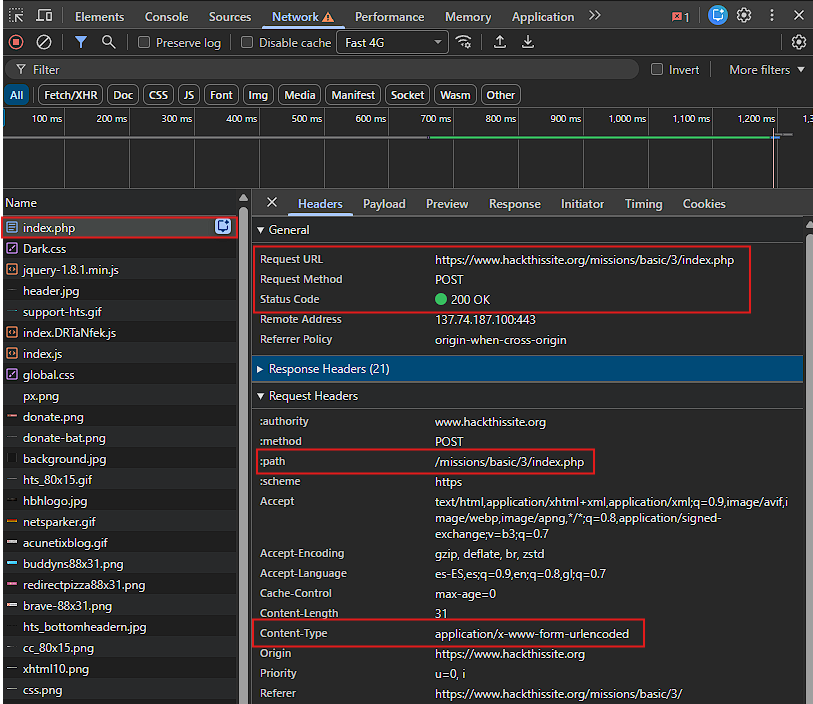
From this, you can infer that when you press the Submit button, a POST request is sent to the following endpoint for processing:
1
https://www.hackthissite.org/missions/basic/3/missions/basic/3/index.php
Here you can see the POST request details:
And the POST request payload:
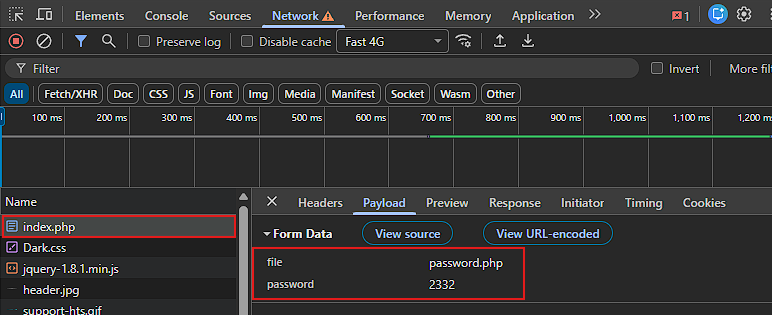
Now here’s the real question: why is a string called password.php being sent as part of the form data? Is this the password file Sam uploaded that contains the real password?, and if so, how can you access to the content of that .php file?.
Well, first, you need to figure out whether that file is publicly accessible. My guess is that the index.php script opens password.php, reads the password from it, and compares it against user’s input. If that’s the case, then password.php is probably located relative to /missions/basic/3/, something like this:
1
https://www.hackthissite.org/missions/basic/3/password.php
Paste that URL into your browser and check the result:
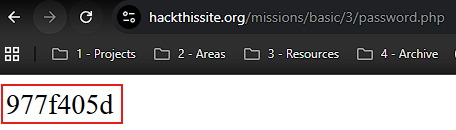
Voilà 🎯, your assumption was correct. There’s Sam’s password: 977f405d
As you can see, the password was stored in an external file that’s publicly accessible. Attackers love these kinds of mistakes. 😬
Security Recommendations
Storing passwords in publicly accessible files is a major security risk and should be avoided. Passwords should never be hardcoded or saved in web-accessible directories. Instead, they should be stored securely in a server-side database with strong hashing (e.g, bcrypt) and proper access controls.
Any script that process sensitive data, (like index.php in this scenario), should sanitize and validate all user input to prevent code injection and unauthorized file access. Additionally, sensitive files should be placed outside the web root or protected with proper server permissions to ensure they cannot be directly accessed via a URL.
Regularly reviewing file permissions and server logs can also help detect misconfigurations or attempted attacks early.